 Skip to content

You've got the photos in place, the categories look tidy, and the opening hours are correct, but the map pack still isn't moving. That's the exact point where most UK service businesses start looking for a bigger lever, and video is usually the one they've ignored.
The mistake is treating video like decoration. On a Google Business Profile, video only helps if it's eligible, uploaded cleanly, and placed where Google and customers can use it. Google's own guidance says video can help a business appear more relevant to local searchers, but the file still has to meet the published limits, including up to 30 seconds, up to 75 MB, and 720p or higher (Google Business Profile video guidance). For a service business in the UK, that means the first job is technical compliance, then profile strategy, then measurement.
Table of Contents
- Why Video Matters on Your Google Business Profile
- Video Specs You Must Hit Before You Upload
- Recording and Uploading Your First Video
- Where to Place Video for the Best Return
- Optimising the Video Itself for Search and Trust
- Measuring Whether Your Videos Are Working
- A Sustainable Video Cadence for a Small Business
Why Video Matters on Your Google Business Profile
A plumber in Leeds can have perfect photos, a verified address, and a strong set of reviews, and still look flat in the map pack. The profile says the right things, but it doesn't feel alive. That's where video earns its keep, because it shows movement, people, premises, and proof in a way static images can't.
Google's local visibility model leans on relevance and prominence, and video fits inside that wider picture rather than replacing it (Semrush GBP optimisation guide). A strong category, clear description, accurate service areas, and good reviews still do the heavy lifting. Video just gives the profile more evidence that the business is real, active, and worth a click.
For UK service-area businesses, that matters more than most owners realise. A short clip of the van, the team, a workshop, or a finished bathroom tells a customer what kind of business they're dealing with before they ring. It also gives Google more on-profile media to work with, which is why I treat video as a multiplier, not a magic trick.
Practical rule: if the profile is weak on the basics, video won't rescue it. If the basics are already solid, video is one of the cleanest ways to make the profile feel credible.
What video changes in practice
A lot of owners think the point is to “look more professional”. That's too vague. The effect is that video can support trust signals a customer normally has to infer from text alone. A decorator can show tidy prep work. A beautician can show a clean treatment room. A solicitor can show a reception and office environment without overproducing anything.
If you're deciding whether to skim or work through this guide, the order matters. The first half covers the upload rules and capture process, the middle deals with placement and on-asset optimisation, and the final part is about measurement and cadence. Skip around if you know your profile is already tidy, but don't skip the specs section. A broken upload is wasted effort.
Video Specs You Must Hit Before You Upload
A file that looks fine on your phone can still fail at upload, or get compressed into something that hides the details customers need to trust. File size is the first trap. I anchor on 75 MB because that is where uploads most often break, whether the file is rejected outright or the platform flattens the image on its way in (Google Business Profile video guidance).

The rules that matter most
Google says the clip should be up to 30 seconds, up to 75 MB, and 720p or higher (Google Business Profile video guidance). Treat that as a production brief, not a theory note. Use a modern phone, keep the shot steady, and do not try to cram a long route through the premises into one clip if a tighter sequence shows the business better.
If the file goes over the cap, re-export it before upload. Do not rely on Google to tidy it up. Bigger files often get compressed in ways that make signage hard to read, faces soft, or vans look dull and muddy. That is poor trade-off if the whole point is to prove who you are and where you work.
There is one practical tension here. Practitioner guidance notes that longer videos may still upload if they stay under the file-size limit, even though Google's published rule still says up to 30 seconds (Whitespark GBP photos and videos guide). My advice is straightforward, keep most clips under 30 seconds for speed and safety, then only go longer when the extra footage adds real trust, such as a walkthrough that shows access, location, and the job being done.
Use the file-size cap as the working rule. If the clip is too big, the rest of the plan does not matter.
A pre-upload check that saves rework
Before you upload, check four things. First, can you clearly read signs, uniforms, or equipment? Second, does the clip show a real business cue, not just polished panning with no proof? Third, is the file small enough to move cleanly through the app? Fourth, does it still make sense on a small phone screen?
For most UK service businesses, a short, well-lit clip beats a fancy edit every time. Shoot in one take, keep the route simple, and if the file looks bloated, cut it down before it ever reaches Google. If you want the wider profile workflow, the Google Business Profile Manager guide is the right companion piece.
Recording and Uploading Your First Video
Start with the phone in your hand, not a camera rig on a desk. Google's verification flow is built around the Business Profile in the mobile app, where you tap Get verified, choose Business video, and record and upload from there (Google support on business video verification). If the first take misses something, Google's own flow allows a re-record, so don't treat the first attempt like a once-only event.
A cleaner setup is better than a more ambitious one. Pick a time when the premises look ready, ask staff to avoid wandering through shot, and film where the business cue is obvious. For a plumber, that might be the van, the branded jacket, and a quick look at the workshop. For a beautician, it might be the treatment room, the reception area, and a close shot of the branded sign.
What to film on a first clip
- Storefront or entrance: show the business name, door, or frontage clearly.
- Team member in place: one person working, greeting, or moving through the premises.
- Vehicle or equipment: a van, tools, treatment kit, or service gear.
- Job proof: a before-and-after angle, or a short clip of service delivery.
- Premises walkthrough: a brief path through the space so the business looks real and usable.
The goal isn't cinematography. It's evidence. Google wants to see that the business exists and that the person filming has a real relationship to it. Customers want the same thing, just in a friendlier form.
Keep the capture routine repeatable
Record the clip once, watch it back immediately, and only then upload. If the lighting is awful, the sign is cut off, or the route feels too messy, do another take. That small pause saves the far bigger pain of a rejected upload and a second round of filming.
A good first workflow is boring on purpose. Open the app, hit the verification path, film a single continuous clip, review it, and submit. Hand that process to a team member and they can repeat it without improvising. That's the point.
Where to Place Video for the Best Return
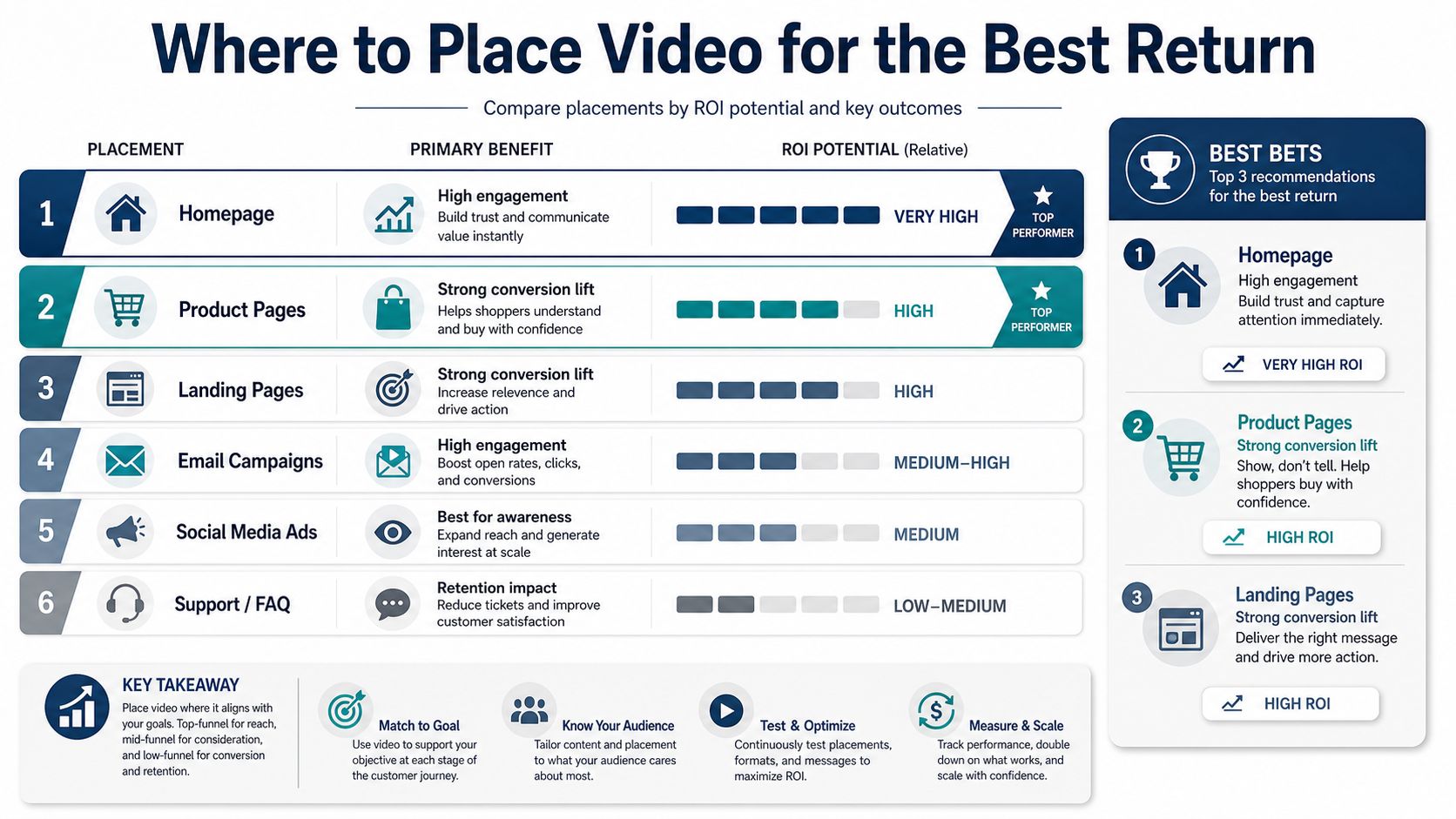
Not every video belongs in the same place. A lot of guides act as if the only question is whether the clip exists, but placement changes how the profile uses it. Posts are temporary, event-led, and built for urgency. The Photos/Videos area is the persistent media library that shapes trust over time.
Evergreen versus timely content
Put evergreen trust-building clips in Photos/Videos. That means a team introduction, a premises walkthrough, a service process clip, or a view of equipment and vehicles. These are the assets that should stay relevant for months, because they help the profile feel established.
Use Posts for timely material. A seasonal offer, a new service launch, a recent job, or a limited availability message fits there better. Those clips are about momentum, not permanence. They can support clicks and engagement, but they don't carry the same long-term trust value as a clean profile media library.
For a one-person or small-team operation, the decision rule is fast. If the clip answers “who are you and can I trust you?”, put it in Photos/Videos. If it answers “what's happening right now?”, put it in a Post. That's the line I use on real accounts because it keeps the content from being scattered.
Why the split matters
Google's local ranking guidance still comes back to overall relevance and prominence, so the media library should reinforce the profile's core identity rather than chase every update cycle. Posts are useful, but they expire in usefulness quickly. The Photos/Videos section keeps doing work after the week you publish it.
That's especially true for service businesses where customers are nervous about access, workmanship, or reliability. A clean, persistent clip of the team or premises can reduce friction for months. A promotional post can't do that.
Optimising the Video Itself for Search and Trust
A video has to earn its place on the profile. Title it clearly, describe it properly, frame it well, and make sure it still makes sense with the sound off. Too many owners upload something raw and expect it to do the job on its own. It won't. Build the clip like proof, not like a diary entry.
Write for the service and the place
Use a title that names the service and the town. “About Us” wastes the slot. “Boiler repair in Croydon” or “Hair colour consultation in Bristol” tells Google and the viewer exactly what the clip is about.
The description should match how a customer searches. Keep it natural, with the service, the area, and the business type included once, not stuffed in repeatedly. A plumber can write, “Emergency leak repair and bathroom plumbing in Manchester, filmed at our local service van and workshop.” A hairdresser can write, “Women's balayage consultation and colour finish in Sheffield, shot inside our salon.” A solicitor can write, “Initial client meeting and office walkthrough in Liverpool, showing our reception and meeting rooms.”
Practical rule: if the title sounds like a brochure heading, rewrite it. If it sounds like the query a customer would type, it is probably much closer to right.
Captions or on-screen text matter because plenty of people watch without audio. Put the service name on screen, keep it short, and make sure it is readable against the background. For example, a beautician can show “Gel nails in Reading” as the opening frame, then move into the treatment room and the finished result.
Thumbnail choice matters too. Pick a frame that shows a person, premises, or the service in action, not a blurry transition. In the photo carousel, that frame competes with the rest of your profile media. If the thumbnail looks flat, people skip it.
The timing still matters. Ultra-short clips are easier to watch and easier to keep within the file rules, but slightly longer clips can build more trust when the content needs room. My recommendation for a busy owner is to keep the default short, then use a longer clip only when the extra seconds show something important, such as a process, a room tour, or a real job result.
A local search framework helps here too. Use the same naming discipline across the profile, the media library, and your wider optimisation work, then check it against a local search optimisation guide instead of treating video as a one-off upload. That keeps the clip tied to the rest of the GBP system, which is what moves the account.
Measuring Whether Your Videos Are Working
Judge the video by what changes on the profile and in the map pack, not by whether you like how it looks. A polished clip that gets views but leaves calls flat and rankings stuck is decoration. Start with GBP signals, then check local visibility against them.
Read the right signals together
Google Business Profile performance data can show views, website clicks, directions, and interactions, depending on the profile and the available reporting surface. Use those numbers as evidence of attention, not proof of impact. If a clip gets watched but does not line up with more calls, more direction requests, or better map positions, it is noise.
Geo-grid rank tracking gives you the local context those profile metrics lack. A 5×5, 7×7, or 9×9 scan shows whether the keyword is gaining ground around the business after you upload a clip. It does not prove the video caused the movement, but it does show whether the profile is trending better across the area you care about.
Profile audits matter for the same reason. If the video is weak, the audit should catch it alongside thin categories, stale descriptions, or a poor photo mix. A proper audit also shows whether the clip is the problem or whether the main drag is something else on the profile. If you want a practical framework for that comparison, use this guide to analysing local competitors and compare your profile against the stronger accounts in the same market.
A simple 30-day review rhythm
Check the profile after a month. Review the media performance, then compare map positions for the keyword you care about. If the clip made the profile look more active but rankings did not move, the asset is probably too generic. If rankings improved in parts of the grid but the clip got little engagement, the trust signal may still be doing useful work.
Use that review to make one decision. Refresh the clip, change the angle, or swap in a different proof point. Do not leave dead weight on the profile for months. A stale video in a local profile is clutter, and clutter weakens the rest of the optimisation work.
A Sustainable Video Cadence for a Small Business
You don't need a videographer on retainer. You need a rhythm you'll consistently keep. For most small UK service businesses, I'd use one strong Photos/Videos clip per quarter, one or two Posts per month for timely updates, and one annual about-us or walkthrough clip for trust-building.
Keep the checklist tight
- Before filming: check the file rules, choose the location cue, and decide whether the clip is evergreen or timely.
- While filming: keep it continuous, steady, and short enough to upload cleanly.
- After filming: choose the right placement, write a service-and-town title, and add a clear description.
- After publishing: review Insights, check geo-grid movement, and archive or replace weak assets.
That cadence keeps the profile active without turning content into a chore. It also stops you from overusing Posts for material that should have lived in the media library from day one.
Pick one clip to film this week, follow the spec rules, and upload it properly. If the profile is already solid, the next clean video will do more for trust than another round of guesswork.
