 Skip to content
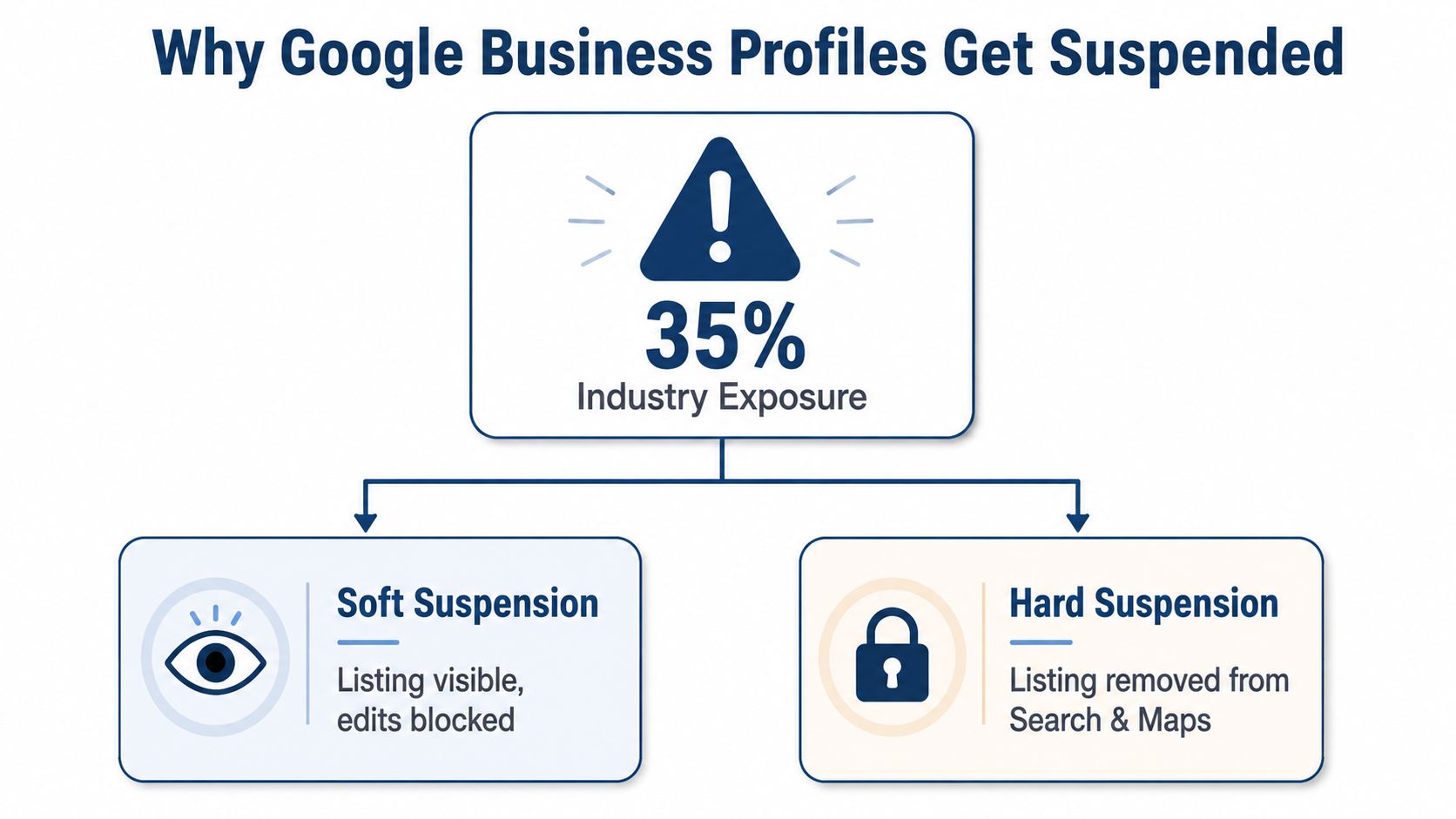
35% of business owners have experienced a Google Business Profile suspension, according to an independent industry figure reported in Google's Business Profile suspension guidance. That figure isn't UK-only, but it changes how local businesses should think about the problem. A suspended profile isn't a minor support inconvenience. It can remove a business from Google Search and Google Maps, interrupting calls, enquiries and local visibility until the listing is restored.
Google now treats suspension management as a structured compliance and identity-verification process. For businesses in Britain and the European Economic Area, Google provides a dedicated appeal route, separate from the process for the rest of the world. The practical response is to stop treating a suspension like a ticket to customer support and start treating it like an evidence-led compliance case.
Table of Contents
- Understanding Why Google Business Profiles Get Suspended
- Common Suspension Triggers in 2026
- Building Your Reinstatement Evidence Pack
- Submitting an Effective Reinstatement Appeal
- Fixing the Profile So Reinstatement Sticks
- Monitoring Progress and Knowing When to Escalate
- Preventing Future Suspensions and Making GBP Compliance Routine
Understanding Why Google Business Profiles Get Suspended
The first decision is classification. Your next action depends on whether Google has applied a soft suspension, a hard suspension or a restriction.
Identify the type of suspension
A soft suspension leaves the profile visible on Google Search and Maps, but blocks the owner from making edits. Customers may still find the listing, yet the business can't reliably update hours, categories, contact details or other profile fields.
A hard suspension is more serious. Google removes the profile from Search and Maps entirely, and the business must complete the reinstatement process before the listing can return. If the listing has disappeared from public search, don't assume that creating another profile will solve the problem. A duplicate can create a second compliance issue and make ownership and identity checks harder.
A restriction may affect content or a specific feature rather than removing the entire profile. Google's appeal guidance says that the business must resolve the restriction before appealing content decisions, and that the appeal must be submitted from the account associated with the profile. Read the exact policy email carefully, because it identifies the issue Google wants addressed rather than leaving you to guess. The relevant process is explained in Google's guidance on restricted profiles and content appeals.
Use the UK and EEA route
Google's official help flow separates “Businesses in the UK or EEA” from the “rest of the world”. That regional split matters. A UK business should use the UK/EEA appeal pathway within Google's Business Profile systems, not a generic support channel or an unrelated form. Submitting through the wrong route can send your case into the wrong workflow and waste the cleanest opportunity to present your evidence.
The account used for the appeal matters too. Sign in with the Google account associated with the affected profile, confirm whether the problem affects one listing or several, and record the profile ID before submitting anything.
Practical rule: Classify the problem first, then prepare the evidence. Don't appeal while you're still guessing what Google has restricted.
Common Suspension Triggers in 2026
Most suspensions aren't caused by one dramatic action. They usually follow a mismatch between the profile and the business Google expects to find in the world. That mismatch might involve the name, address, service area, contact information, ownership or verification documents.

Check the identity signals
Keyword stuffing in the business name is a common risk. A company should use the name it uses in everyday life, not a string of services and locations added to chase rankings. “Northside Plumbing” and “Northside Plumbing Emergency Boiler Repairs Leeds” communicate very different signals. The second version may look like an attempt to manipulate local relevance rather than identify the business.
Address and service-area mismatches also attract scrutiny. A shopfront business needs an address that customers can associate with the business. A service-area business needs a legitimate operating base and a service area that reflects where it works. Addresses that appear unrelated to the business, inconsistent suite details or a service area that is unreasonably broad can all weaken the profile's credibility.
Review the profile against reality
Virtual offices, post boxes and shared premises used as a primary customer-facing address create particular problems when customers can't visit the business there. Multiple profiles for the same business can create another identity signal, especially where the phone number, website, address or ownership account overlaps.
Verification documents must support the precise profile details. A document with an old trading name, a different address or an unexplained variation in the company identity won't answer the reviewer's central question, which is whether the listing represents the business described.
Use a structured audit rather than relying on memory. VisiLocali's guide to listing suspension causes can help you check profile details, duplicates and common policy risks before you prepare an appeal.
Google's troubleshooting material makes the key distinction clear: a soft suspension leaves the profile live but blocks edits, while a hard suspension removes it from Search and Maps and requires reinstatement. That classification tells you whether you're repairing a restricted listing or proving that a removed profile should return.
Accidental inconsistencies can often be corrected with a clear explanation and matching documentation. Deliberate manipulation, repeated violations or an appeal that ignores the stated policy issue creates a much harder compliance case. The reviewer needs to see what changed, why it changed and what now prevents the same issue from recurring.
Building Your Reinstatement Evidence Pack
Treat reinstatement as a compliance file, not a support ticket. The reviewer should be able to connect the profile with the business, its premises or service operation, and the people authorised to manage it.
Prepare evidence in this order:
- Business identity: Provide a relevant licence, registration record or Companies House confirmation that supports the business name and operating details.
- Address confirmation: Add a recent utility bill or comparable business document matching the listed address, including the unit, floor or suite where relevant.
- Visible premises: For a customer-facing location, include clear photographs of road-facing signage and the interior, showing that the business operates there.
- Service-area proof: For a service-area business, use branded vehicle photographs, van wraps, equipment, work vehicles or other material linking the business to its stated activity.
- Change history: Give a brief chronology of changes before suspension. Cover the name, address, categories, phone number, website, ownership or service area, and explain which details were corrected.
The sequence matters. Establish the business first, then explain the profile changes. Label files clearly, keep dates readable and remove documents that create contradictions. A folder of unrelated files leaves the reviewer to assemble the case, and that increases the chance that the relevant evidence is missed.
Include the Google Business Profile ID in the appeal and retain it for follow-up. It identifies the affected listing when an account manages multiple locations. Replace broad statements such as “we're a genuine business” with evidence tied to a precise claim.
Run a Google Business Profile audit with VisiLocali before submitting. Its audit can expose inconsistent details, missing fields and profile changes that are easy to overlook during a manual check. That makes it useful before the evidence pack is finalised, particularly where several people have edited the listing.
The pack should also record who made each correction and when. Keep a copy of the submitted documents, the final profile details and any explanation sent to Google. This creates an internal record if the reviewer requests clarification or the profile requires another compliance check.
Evidence quality matters more than sending repeated appeals. A focused file answers the policy concern, supports the current business details and shows that the underlying issue has been corrected. It should make the reviewer's decision easier, not force them to reconcile conflicting names, addresses or operating models.
Submitting an Effective Reinstatement Appeal
Once the profile is classified and the evidence pack is complete, submit through Google's UK/EEA Business Profile appeal route. Use the account associated with the profile, enter the affected listing details accurately and attach the documents that directly address the policy issue in Google's email.
A clean submission follows this sequence:
- Sign in to the associated account. Don't submit from an agency account or an unrelated owner profile if Google identifies another account as the profile owner.
- Read the policy email again. Google's message should identify the policy concern. Address that concern directly rather than listing every change you've ever made.
- Confirm the profile ID. Check that the ID and business details refer to the suspended listing.
- Explain the correction. State what was wrong, what you changed and why the current profile now reflects the actual business.
- Attach matching evidence. Use documents and photographs that support the exact claim you're making.
- Submit once the file is coherent. A rushed appeal is harder to repair than a delayed submission with complete evidence.
Use a factual template such as this:
Hello Google Business Profile team,
We're requesting reinstatement of [business name], Google Business Profile ID [ID]. The profile was restricted because of [specific issue]. We have corrected [specific field or practice] and attached [specific evidence]. The business operates at [address or service area] and the submitted documents match the current profile details.
Please review the profile and attached evidence.
Kind regards,
[Name and role]
For example, a Leeds plumbing business whose address was flagged might write:
The profile for Leeds Flow Plumbing, Google Business Profile ID [ID], was restricted after the listed address was flagged. We have corrected the address to match the business registration and recent utility documentation. The attached photographs show the branded vehicle and operating equipment, and the business serves customers at their premises rather than receiving customers at the listed address. Please review the corrected profile and supporting documents.
Keep the tone neutral. Avoid accusations, urgency claims or emotional explanations. Google's reviewer needs a verifiable answer, not a plea.
Repeating the same appeal without new evidence is reported to succeed in under 5% of cases, according to the independent reinstatement success-rate analysis. If Google rejects the first submission, identify what remains unsupported, correct the profile and add new documentation. Don't resend the same letter with different punctuation.
Fixing the Profile So Reinstatement Sticks
An appeal and a profile correction should happen together. If you submit evidence while the listing still contains the mismatch that triggered the suspension, your explanation and your profile tell two different stories.
Start with the fields most likely to create an identity conflict:
- Business name: Remove added keywords and use the trading name.
- Address: Correct the premises details, or use the appropriate service-area setup where customers don't visit a public location.
- Primary category: Choose the category that best describes the core business, rather than a temporary marketing service.
- Phone and website: Make sure both identify the same business across the profile and supporting documents.
- Opening hours and attributes: Remove claims that don't reflect the current operation.
- Duplicate profiles: Find overlapping listings and resolve ownership or duplication issues instead of creating another profile.
VisiLocali's Profile Analyser compares a profile with statistically competitive and selected competitor profiles. Used as a remediation check, it can highlight NAP inconsistencies, missing categories, weak attributes and neglected content. Its AI recommendations explain what needs attention and why, while its Google Business Profile management tools support changes to fields such as the business name, categories, opening hours, description, attributes, phone number, address, photos, reviews and videos.

Consider a service-area electrician whose suspended profile still shows an old shared-office address, a keyword-heavy name and an outdated category. Before reinstatement, the compliant version would use the genuine business name, remove the unsuitable address display, select the category that reflects the main electrical service and update the phone and website so they match the business's current records.
That isn't a ranking trick. It's identity repair. If the reviewer opens the listing after reading the appeal, each visible correction should support the explanation in the evidence pack. For duplicate listings, use VisiLocali's duplicate business listing guidance to investigate overlap before making further profile changes.
Reviewer perspective: Every corrected field should answer the same question, whether the business shown online matches the business operating in the real world.
Monitoring Progress and Knowing When to Escalate
A suspension case becomes easier to manage when every action has a recorded reason. Log the submission date, profile ID, policy cited by Google, documents uploaded, changes made and follow-up attempts. This prevents contradictory replies and gives agencies a clear handover record when several people manage the case.
Google says UK Business Profile verification reviews can take up to five working days, according to its UK verification guidance. That is a benchmark for initial verification, not a promise that reinstatement will finish within the same period. Reinstatement cases may take longer, particularly where ownership, access or location evidence needs further review.
A simple case may be resolved within weeks, while an ownership dispute can remain open for much longer. Multi-location portfolios and access conflicts require patience because the reviewer may need to connect the account, business identity and location ownership across several profiles. Treat the process as a compliance workflow, not a support ticket. Each follow-up should add clarity or evidence, rather than only request a faster decision.
Read the response carefully
An acknowledgement email confirms receipt. It does not confirm approval. A later message that refers to the specific business, policy issue or submitted document may show that the case has received more targeted attention. A generic response that repeats the restriction without addressing the evidence usually indicates that the core concern remains unresolved.
For agencies managing several locations, keep each case separate. Label evidence by profile ID, avoid combining unrelated explanations and use Google's official product forums if the normal route does not resolve the issue. Social channels may help in exceptional cases, but public pressure cannot replace a complete evidence file and may create conflicting submissions.
If ownership is disputed, allow for the longer review period rather than treating silence as an automatic rejection. Follow up only when you have material new information, such as corrected registration evidence, clarified access ownership or a document that resolves the exact mismatch. A VisiLocali audit can help identify listing inconsistencies before escalation, so the next submission addresses the profile issue rather than repeating the original appeal.
Preventing Future Suspensions and Making GBP Compliance Routine
A reinstated profile can become vulnerable again if nobody monitors the details that caused the original problem. Google's guidance notes that a suspension can remove all locations owned by the affected account, which makes shared access and multi-location governance an operational risk for UK businesses, as explained in Google's suspension guidance.
Treat compliance as routine hygiene. Review the business name, address, service area, categories, contact details, ownership access and duplicate listings on a scheduled basis. Record significant changes before applying them, and keep supporting documents organised so a future review starts with evidence rather than panic.
A monthly audit is a practical control because it catches profile drift before a policy email does. VisiLocali combines geo-grid rank tracking with Profile, Review and Post Analysers, side-by-side competitor comparisons and AI recommendations that prioritise the next actions. That gives business owners and agencies a way to monitor visibility while checking whether the profile still presents a consistent, defensible identity.
Start a 14-day free trial of VisiLocali to track Google Business Profile rankings, compare competitor profiles side by side and receive AI insights and recommendations. Use the platform to identify listing inconsistencies and act on the changes most likely to improve visibility before a small compliance issue becomes another suspended profile.
