 Skip to content


Your Messages tab is probably sitting there with a few threads in it, maybe one from a homeowner asking for an urgent repair, one from a prospect wanting a price, and one you haven't touched since yesterday morning. That's the problem. Most UK businesses treat Google Business Profile messaging like a novelty feature, then wonder why it doesn't produce booked jobs. In practice, it's a live conversion channel, and Google's own Performance data treats Messages as the number of different conversations through messages, which is far more useful than counting clicks or impressions alone. For local service businesses, that makes messaging one of the cleanest intent signals in the whole profile, especially when you're using it alongside reviews, posts, and geo-grid rankings in a broader local SEO workflow.
Table of Contents
- Why Messages Deserve Real Attention on Your Profile
- Turning On Messaging and Setting Up Your Welcome
- Writing Quick Replies That Convert
- Owning the Inbox With a Response Process
- Measuring What Messaging Does for You
- Pitfalls That Quietly Kill Your Message Conversion
- Putting It Together in a 30-Day Action Plan
Why Messages Deserve Real Attention on Your Profile
A lot of owners look at the Messages tab the same way they look at a spare room. It exists, it's there, and it's not causing a problem, so it gets ignored. That's a mistake. A person who taps Chat has already searched, found your profile, and decided to start a conversation. That's a much stronger signal than a passive profile view, and Google explicitly tracks it as a separate performance measure through Business Profile Insights and Performance, including in the mobile Maps app via the Business tab Google Business Profile Performance guidance.

The real value is intent, not volume
If you run a Leeds plumbing firm and your profile gets 30 views a day but only two message enquiries, those two messages matter more than the views. They're from people close enough to act. If you answer them in under five minutes, you stay in the customer's head while the problem is still urgent. If you leave them until the next morning, you've already trained the customer to contact the next business that replies first.
Practical rule: treat every message as a pre-booking conversation, not a general enquiry.
That mindset is what separates a busy inbox from a profitable one. Messaging sits in the same strategic bucket as reviews, posts, and map visibility, because it shows whether your profile is turning local demand into contact. If you're also analysing competitors, this local competitor analysis guide fits naturally beside messaging work, because the same profile that outranks another business in Maps should usually be converting better too.
Why this belongs in your local SEO stack
Messaging shouldn't live in a separate corner of your operation. It belongs with profile audits, review management, and post planning because the quality of your replies affects trust just as much as the quality of your listing. VisiLocali is built around that same idea, where ranking data and profile actions sit side by side, so you can see whether profile changes are improving real customer contact, not just visibility.
A message thread is also more informative than a website visit. It tells you the customer's service area, urgency, and what they already understand about your offer. That makes it a conversion signal you can act on quickly, instead of a vague vanity metric.
Turning On Messaging and Setting Up Your Welcome
A live message box with no owner is a trap. It tells customers to contact you, then leaves them hanging. Turn messaging on only when you have a clear person, device, or shared inbox ready to handle replies during trading hours. In Google Business Profile Manager, switch messaging on in the profile settings, then route notifications to the account that will answer them. If you run the business yourself, the mobile Maps app is enough to keep on top of new messages, and it keeps the setup simple. This guide to using Google Business Profile Manager is useful if you still need to sort out who controls what inside the profile.
Route the inbox before you write the greeting
Start with ownership. Messages can land on a mobile phone, a shared inbox, or a single team member who handles first response while the business is open. What matters is consistency. Do not let chat notifications disappear into a personal account that gets checked at random.
The welcome message comes second. It should name the business, acknowledge the enquiry, set a realistic reply window, and ask for the minimum detail needed to move the conversation along. Keep it plain. A greeting that sounds honest and useful will convert better than a polished line that promises instant help and then fails to deliver.
Keep the customer comfortable
Google hides the customer's name until you reply, which lowers the barrier for first-time chatters. Use that to your advantage. Sound calm, direct, and human. Skip anything that reads like a hard sell, especially if you run a trades business, clinic, or other local service operation.
Good welcome text does three jobs. It tells the customer they've reached the right place, it sets a response expectation, and it prompts a short first reply. Keep it tight. The point is to get the thread started and move the lead toward a booking, quote, or callback.
Writing Quick Replies That Convert
Most inboxes fail because every answer is written from scratch. That burns time and creates inconsistency. Build quick replies for the questions you get every week, then tighten them until they sound human, not scripted. Google's own post guidance recommends 100 to 300 characters with the value proposition in the first 100 to 150 characters, plus a clear CTA button such as Book, Order, Shop, Learn more, Sign up, or Call Google Business Profile post best practices. Use that as your length check for messages too, because short copy is easier to read on mobile and faster to answer.
Build replies around intent, not jargon
Every local service business gets the same handful of questions. Hours, location, services, pricing, booking, parking, and complaints. Keep the answer direct. Put the useful detail first, then move the customer to the next step. A quick reply should answer the question, invite action, and leave room for a follow-up.
A good quick reply doesn't finish the conversation, it moves it forward.
Here's a starter library you can adapt the same afternoon.
| Customer intent | Typical question | Sample quick reply under 200 chars | Suggested next step |
|---|---|---|---|
| Opening hours and location | Are you open today, and where are you based? | We're open today until 5 pm. We're at the city centre branch on King Street. Message us your postcode and we'll check the best appointment slot. | Ask for postcode or book |
| Services and pricing | How much do you charge for a boiler service? | Thanks for your message. We cover boiler servicing, repairs, and safety checks. If you send the boiler make and model, we'll give you the right quote. | Request details for quote |
| Booking and availability | Can I get booked in this week? | We may have spaces this week. Send your preferred day and time, and we'll confirm the earliest slot we can offer. | Collect preferred time |
| Directions and parking | Is there parking nearby? | Yes, there's parking nearby and we'll send simple directions now. If you're coming from the ring road, message us and we'll guide you in. | Share directions |
| Complaints or issues | My previous job wasn't right, can someone help? | Sorry to hear that. Message us the job date and a short note on what's wrong, and we'll get the right person to review it and call you. | Escalate to human review |
Intent matters more than volume
A reply should do one job well. For a quote, ask for the minimum detail needed. For a booking, ask for the preferred time. For a complaint, move the discussion into a proper review route and do not argue inside chat. The point is to keep the conversation alive long enough to convert.
If you need a simple promotional opener, write it with the same discipline. Lead with the value, then tell people what to do next. That matches the logic Google uses in posts, and it works for messages too because customers scan on mobile and act fast.
Owning the Inbox With a Response Process
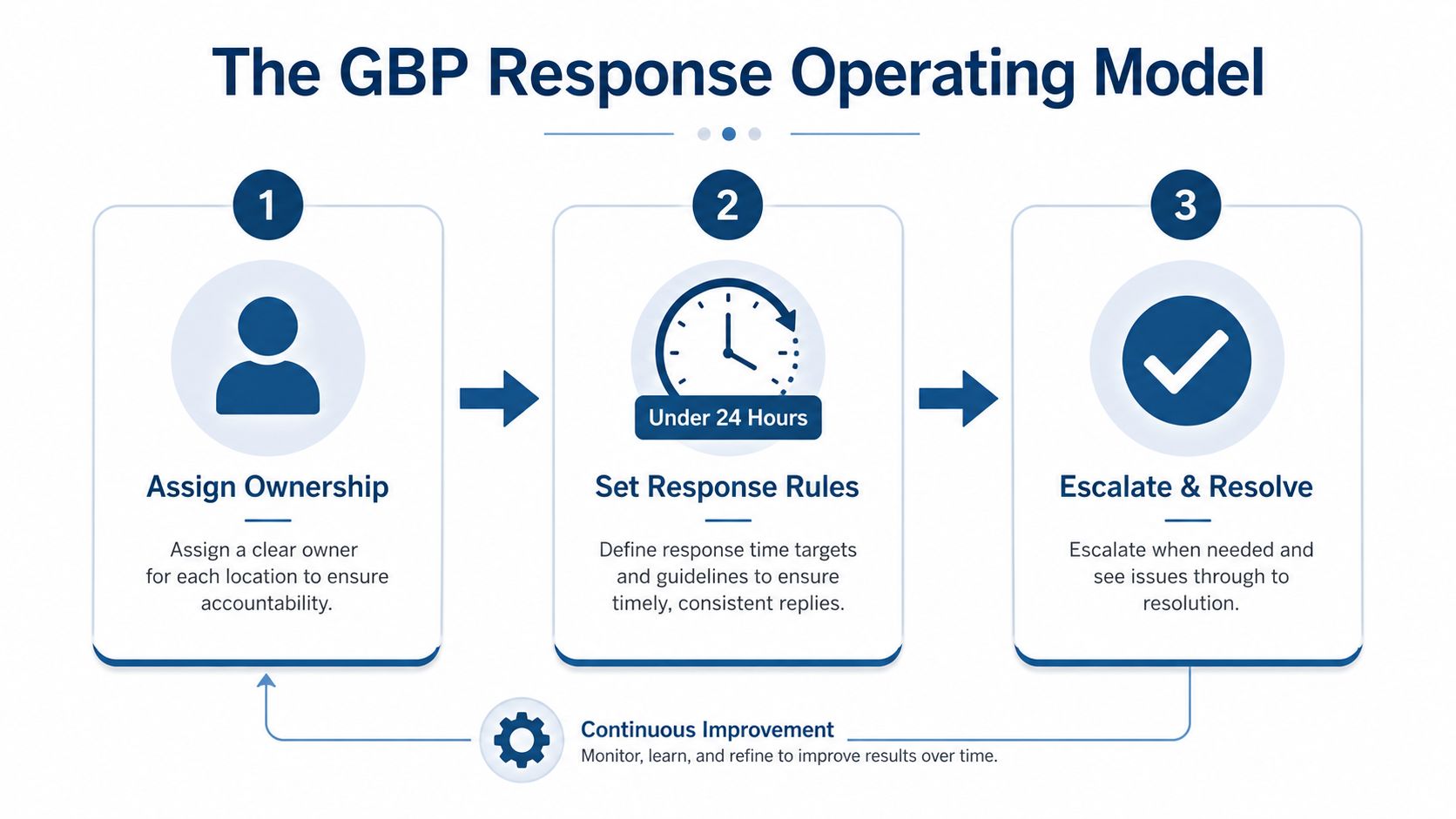
Messaging without ownership is a trust problem. Customers can see when a thread sits unanswered, and so can Google. Businesses that leave chat enabled but unmanaged often do more harm than good. Google's own guidance says replies should happen within 24 hours, and it warns that slow or missing replies can lead to the messaging capability being suspended Rio SEO messaging guidance.
Set a service-level objective and stick to it
I'd tighten the standard for UK trading hours. Aim for under 15 minutes during business hours and under 2 hours outside business hours. That benchmark comes from practical message handling, not hope. It's enough to stop leads going cold and simple enough for a small team to maintain consistently PagePros GBP optimisation guide.
Rotate ownership if more than one person can reply. If not, assign one named owner and a backup. Then build a rhythm that's boring in the best possible way.
- Morning sweep: clear overnight messages, answer anything urgent, and flag threads needing a quote or callback.
- Lunchtime sweep: catch the midday spike before the customer moves on.
- End-of-day sweep: close open loops, set tomorrow's follow-ups, and check nothing is stranded.
Escalate sensitive or complex issues properly
Some conversations don't belong in chat. If a customer starts giving payment details, national insurance numbers, medical information, passport data, or credit card details, stop them and move the conversation to a phone call or secure form. Google explicitly advises against using messaging for sensitive information Rio SEO messaging guidance.
That's not bureaucracy, it's basic customer protection. The same rule applies when the issue is too complex to type out properly. Use chat to qualify, then move to the safest channel that gets the job done. If you run multiple profiles or a small agency workflow, VisiLocali's profile and review management can keep messaging, posts, and review handling in one place rather than spread across disconnected tabs.
Measuring What Messaging Does for You
If you are not measuring message conversations, response time, and outcomes, you are guessing. Google's Messages metric counts the number of different conversations through messages, so track conversations, not raw pings Google Business Profile Performance guidance. A conversation matters more than a single message because it shows the customer stayed engaged long enough to reply again.
Use the right KPIs
Do not build a fake dashboard with too many numbers. You need a short set of metrics that shows whether the inbox is producing business.
- Total message conversations: the main volume signal in Performance.
- Response speed: how fast the first human reply lands.
- Conversion outcome: whether the thread led to a call, quote, booking, or visit.
- Source context: which post, service, or search triggered the contact when you can identify it.
Google's Performance area also shows messaging alongside other profile actions in the same place you monitor calls and website clicks. That matters because messaging should be judged with the rest of your profile activity, not as a standalone vanity metric. A profile that starts more conversations but loses them before booking still needs work.
Review it like an operator, not a marketer
A weekly review should take minutes, not hours. Look at the threads, not just the totals. Which questions keep appearing? Which replies lead to bookings? Which ones stall? That is the work. The goal is to spot friction and remove it quickly.
Read message performance next to your local SEO activity and your Google review management. If you changed your profile copy, posted new updates, or improved review handling, check whether conversation volume moved with it. The point is not to chase bigger numbers for their own sake. It is to see whether the profile is earning more real customer contact.
Pitfalls That Quietly Kill Your Message Conversion
The biggest messaging mistakes are usually unglamorous. They're operational failures, not strategic ones. Slow replies, generic automation, unsafe handling of sensitive information, and half-closed threads are the usual suspects. Google's guidance on messaging makes it clear that consistency and care matter, and it warns that missing replies can lead to suspension of the messaging capability Rio SEO messaging guidance.
The mistakes that cost you enquiries
A notification that lands on a personal phone set to silent is a slow reply waiting to happen. So is an auto-response that says nothing useful. Customers don't want a bot to confirm that a business is alive, they want an answer. If your template feels like a dead end, rewrite it.
- Slow replies: fix notification routing and assign a named owner.
- Generic templates: replace filler with useful detail and a next step.
- No follow-up: close every quote thread or callback request the same day.
- Unsafe data handling: move payment or medical details out of chat immediately.
Don't confuse “enabled” with “managed”
A profile with messaging enabled but consistently slow is worse than a profile with messaging off. It creates false hope, and that breaks trust faster than a clean absence would. If your team can't watch the inbox properly, fix the process before you scale the feature.
The same applies to orphan threads. A message that turns into a quote and then disappears is wasted effort. Someone on your team should close the loop, even if that closure is just a status update and a follow-up date. That habit alone makes the inbox look alive and professional.
Putting It Together in a 30-Day Action Plan
Start with setup, not perfection. Days 1 to 3, enable messaging, route notifications to a real owner, and write a welcome that sets a clear reply expectation. Days 4 to 7, build the quick-reply library and train whoever is answering. Days 8 to 14, tighten response times, move sensitive conversations off-platform, and stop anything important from sitting overnight.
Days 15 to 21, measure the first round of message conversations, response speed, and outcomes against your baseline. Then days 22 to 30, test a different greeting, review how messaging sits beside posts and reviews, and look for the connection between conversations and your wider local SEO performance.
Monday-morning checklist
- Check that messaging is on and notifications work.
- Read every open thread and reply to anything unresolved.
- Update one quick reply that keeps getting used.
- Move any sensitive conversation to phone or secure form.
- Review whether messages led to calls, quotes, or bookings.
Treat that rhythm as part of your core profile work, not an add-on. If you're using VisiLocali, keep the ranking data, profile analysis, review work, and messaging outcomes pointed at the same question, what should you improve next to win more local customers from Google?
