 Skip to content

Most advice about a local SEO rank tracker starts with the same promise: collect more data, scan more points, check rankings more often. That sounds sensible, but it misses the decision that matters most. A map full of red and green squares won't improve a Google Business Profile unless someone can turn those patterns into a clear next action.
Local visibility changes according to the searcher's location, the relevance of the profile, and the prominence of the business. Google confirms that local results are mainly shaped by relevance, distance and prominence, with reviews and links contributing to prominence through the wider online presence of the business (Google's explanation of local ranking). A useful tracker therefore needs to do more than report position. It should show where visibility is weak, explain why, and connect the gap to improvements such as categories, reviews, photos or opening hours.
For UK businesses, this matters on the search channel customers use most. One 2025 industry analysis estimates Google's combined desktop and mobile search share in the UK at about 93.5%, while Google Maps reached 73% of UK online adults in 2024, compared with 69% in May 2023. The Maps app reached 71% of UK online adults, according to UK local SEO statistics from RankMyLocal. Tracking Google Maps visibility is therefore not a side project. It is a practical way to understand whether nearby customers can find your business.
Table of Contents
- Why More Ranking Data Does Not Always Mean Better Results
- How Geo-Grid Scanning and Map Pack Tracking Actually Work
- Key Features to Prioritise in a Local Rank Tracker
- Local Rank Trackers Versus General SEO Rank Trackers
- Interpreting Geo-Grid Volatility Across Nearby Locations
- Turning Ranking Insights Into Profile Improvements
- Choosing and Implementing the Right Local Tracking Solution
Why More Ranking Data Does Not Always Mean Better Results
A larger dashboard doesn't automatically produce better local SEO. Many businesses buy a tracker, add a long keyword list, open a heatmap and then struggle to decide what deserves attention first. The tool records movement, but the owner still has to interpret it, compare it with competitors and choose an improvement that can realistically be implemented.
That creates a common failure pattern. Teams monitor daily changes, discuss whether a grid has become greener, and report average positions to clients, but nobody checks whether the underlying Google Business Profile is complete or whether a competitor has stronger profile signals. The business ends up paying for monitoring without building a repeatable optimisation process.
Practical rule: A ranking report is useful only when it changes what you do next.
The distinction is important because local visibility doesn't behave like a single national keyword position. Google Business Profile owners can review performance in Google Search and the Google Maps app, including search queries, profile interactions, calls, directions requests and website clicks, through Google's own reporting tools (Google Business Profile performance guidance). Rankings and behaviour belong in the same workflow. A position change matters more when it identifies an area where customers are searching but the profile isn't generating actions.
The cost of passive monitoring
A tracker that only collects positions encourages vanity reporting. An average rank can improve while an important town remains weak, or a business can appear well positioned near its premises while losing visibility across its wider service area. Neither result tells the team which profile field should be changed.
Actionability means connecting three pieces of information:
- Location: Where does the business perform poorly?
- Competitive gap: Which nearby profiles appear stronger, and what do they have that yours lacks?
- Priority: Which profile improvement is practical and likely to address the gap?
This is why profile completeness deserves attention before endless keyword expansion. A UK-focused analysis of 85,000 businesses reported the strongest correlation with local visibility for Google Business Profile completeness, with a Spearman correlation of 0.71, ahead of review velocity at 0.64 and photo count at 0.58 (Visionary Marketing's local SEO ranking factor analysis). Those figures don't prove that completing one field guarantees a ranking increase, but they do support a sensible operating principle: check the profile before assuming the answer lies in more tracking.
How Geo-Grid Scanning and Map Pack Tracking Actually Work
A geo-grid scan is best understood as a net of search points spread across a map. Instead of checking a keyword from one office address, the tracker checks the same query from multiple coordinates around the business. Each point records whether the profile appears in the local results, where it appears, and which competitors occupy the visible positions.
The result is usually displayed as a heatmap. Green points indicate stronger visibility, while weaker points move towards other colours or show no meaningful position. The pattern matters more than one square. A business might be prominent close to its premises, then fade as the scan moves towards a nearby town or suburb.
Building the scan
The scan centre is the coordinate from which the grid is arranged. Moving that centre changes the question being asked. A centre in your own town measures visibility around the business; a centre in a neighbouring town tests whether your profile appears for searches made there, especially when the keyword includes that town.
Grid density affects detail. A 5×5 grid gives a broad view with fewer points, while 7×7 and 9×9 grids provide more granular coverage. The radius controls how far the points extend from the centre. A small radius helps inspect a compact town, whereas a broader radius can reveal where a service-area business begins to lose visibility.
Google's local ranking model explains why this variation is expected. Relevance measures how closely the profile matches the search, distance reflects the separation between the searcher and business, and prominence reflects how established the business appears online, as summarised in this UK guide to Google Business Profile local SEO. Change the search location and you change one of the core inputs.
Reading Map Pack positions
Map Pack tracking focuses on the local results shown prominently within Google Search, while Maps tracking examines visibility within Google Maps. Traditional organic tracking may show a website page in a list of blue links, but it won't necessarily reveal whether the business profile appears in the local map results.
A practical scan should therefore separate:
- Map Pack visibility, whether the profile appears in the local result set.
- Position, where the profile appears when it is visible.
- Competitor presence, which businesses replace it at weaker points.
- Geographic pattern, whether the issue affects one neighbourhood or the whole service area.
A single manual search can't provide that pattern reliably. Personalisation, device context and the searcher's exact location can all affect what appears, so use the grid to identify trends and opportunities rather than treating every point as a permanent fact.
Key Features to Prioritise in a Local Rank Tracker
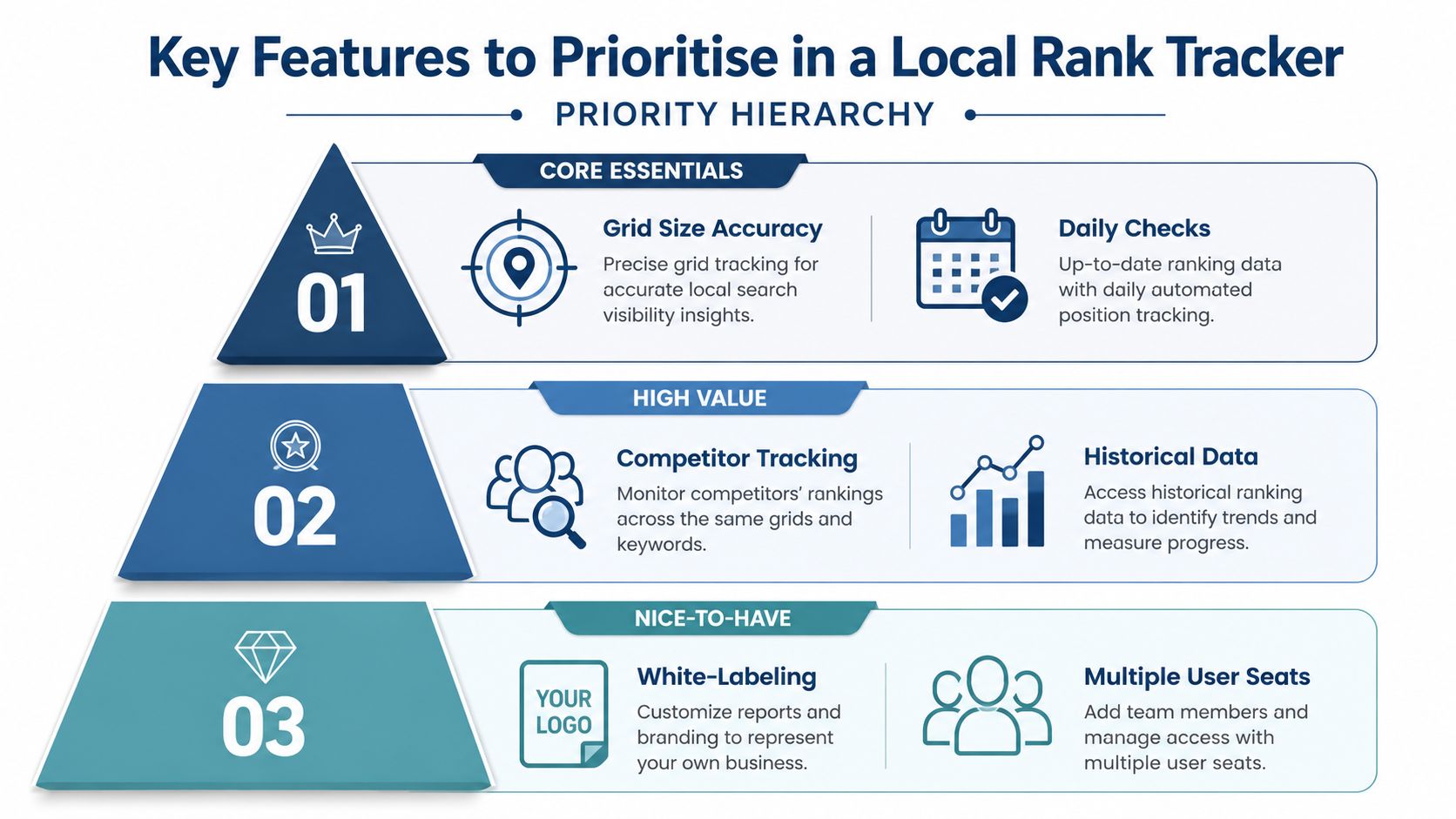
The first feature to prioritise is not an attractive dashboard. It's a geo-grid that lets you control the scan centre, grid size and radius. Without those controls, a tracker may tell you how visible a business is in a broad city area but hide the nearby town where the commercial opportunity sits.
For VisiLocali users, the Google Business Profile geo-grid supports 5×5, 7×7 and 9×9 scans, with a manually selected centre and a radius that can extend up to 100,000km, as described in the VisiLocali local rank tracker. The practical value isn't the maximum radius. It's the ability to test a service area deliberately instead of accepting one fixed city-level view.
Features that support decisions
A strong tracker should pair ranking data with profile information. Look for these capabilities in priority order:
- Interactive grid maps: You should be able to inspect individual points, change the scan centre and compare areas without exporting raw data.
- Side-by-side competitor comparisons: A competitor overlay is useful when it shows profile fields, categories, reviews, photos and posts next to your own data. A list of competitor names alone doesn't explain the gap.
- Profile auditing: An audit should identify missing or weak categories, descriptions, attributes, hours, photos and other Google Business Profile details.
- Prioritised AI recommendations: AI is useful when it explains the situation, names the change to make and gives a reason based on ranking and competitor data. Generic advice such as “optimise your profile” isn't actionable.
- Historical comparisons: You need to compare scans over time, while remembering that algorithm changes, competitor activity and scan-centre changes can all affect the pattern.
- Performance reporting: Google Business Profile data should sit alongside rankings, including calls, directions, website clicks and profile interactions where available. Google documents these performance measures in its Business Profile performance support page.
Features that close the loop
Review management and post scheduling become more valuable when the tracker identifies a reason to use them. If reviews are unanswered, an integrated response workflow reduces the delay between finding the problem and addressing it. If the profile lacks fresh, relevant updates, post scheduling can make implementation easier.
The same principle applies to photos. Photo count can be a useful comparison point, but the number alone doesn't explain quality, relevance or accuracy. Treat it as a prompt for inspection, not a target to inflate.
An expert estimate summarised in a UK local SEO guide places Google Business Profile signals at 32% of local pack ranking weight, compared with 20% for review signals and 15% for on-page signals. The source clearly presents these as practitioner estimates rather than measured Google weights. That limitation matters. No tracker should turn an estimated model into a promise, and no score should replace checking the actual profile and local results.
Local Rank Trackers Versus General SEO Rank Trackers
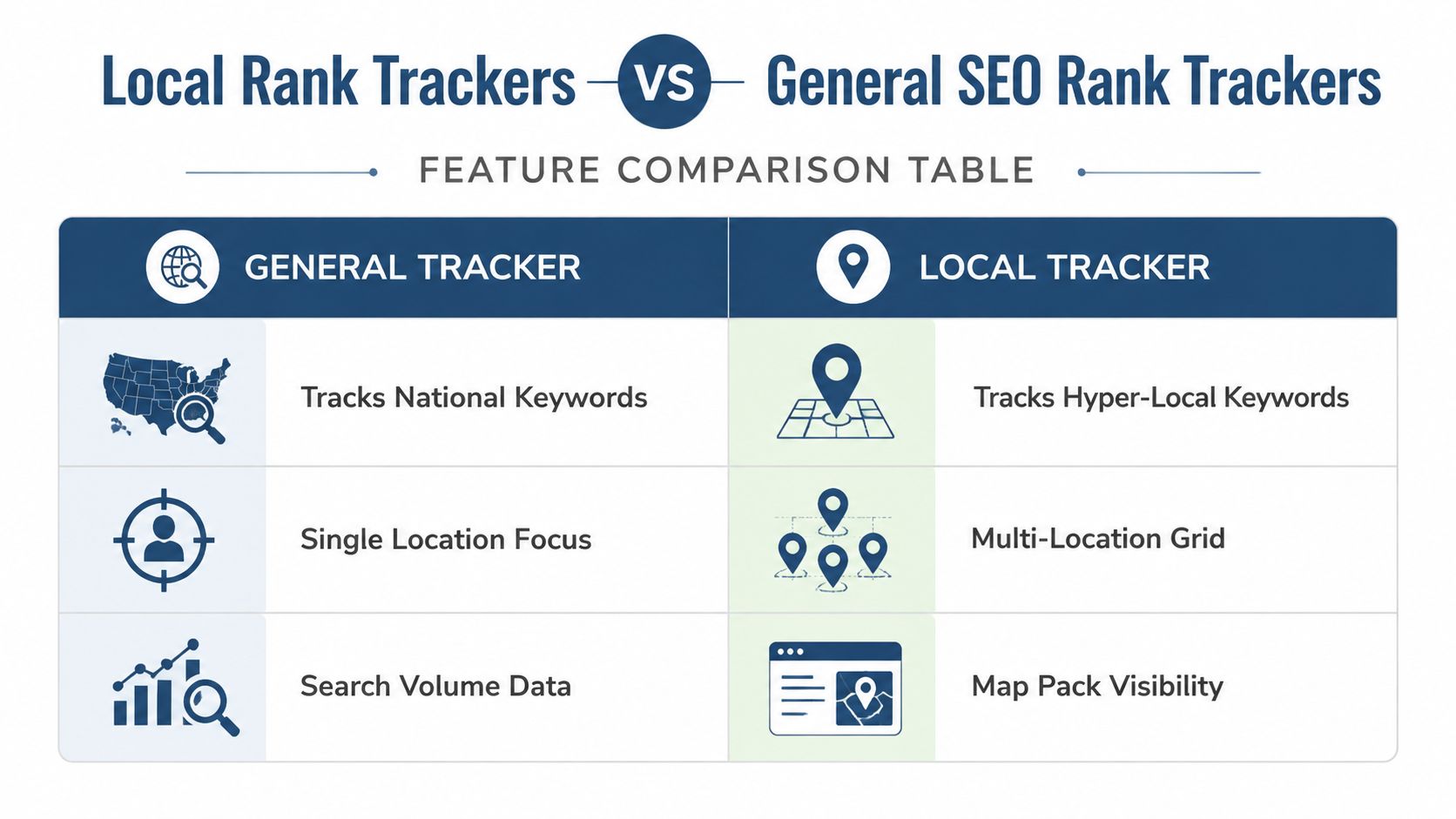
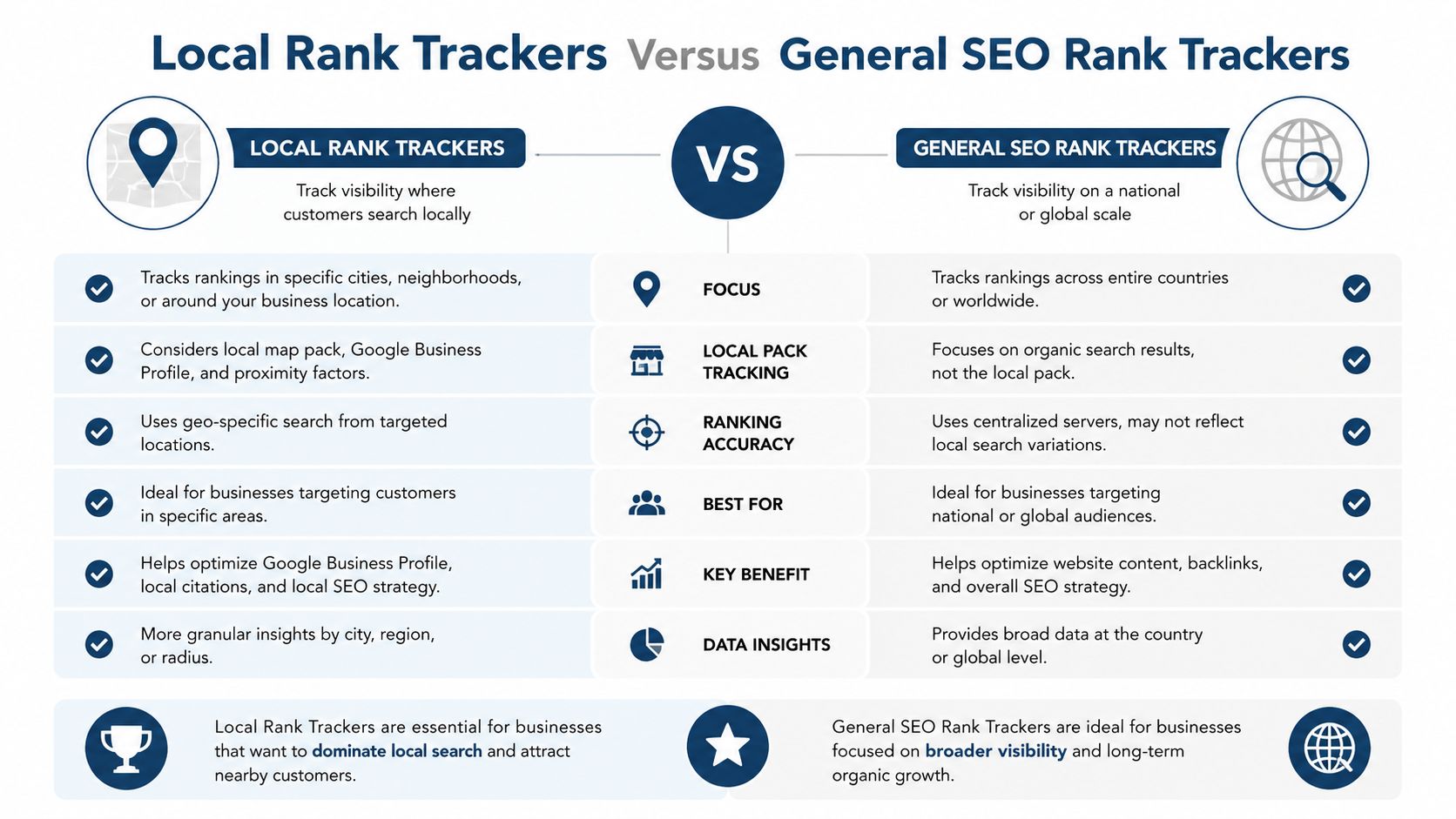
A general rank tracker answers a broad question: where does a website rank for a keyword from a specified market or location? That is valuable for organic SEO, especially when measuring service pages, guides and commercial terms across a wider audience.
A local rank tracker asks a different question: where does this Google Business Profile appear from different points around the service area? That distinction changes the unit of measurement from one position to a geographic pattern.
A business can rank first near its premises and be absent from the Map Pack several miles away. A single city-level check may report a reassuring result because it happens to use a favourable location. The business owner then assumes the whole market is covered, while customers in a nearby suburb see different competitors.
The surfaces are different
General trackers tend to focus on organic listings, featured results and website pages. Local trackers need to separate at least three local surfaces:
| Tracking need | General SEO tracker | Local SEO rank tracker |
|---|---|---|
| Search location | Broad market or single location | Multiple points across a defined area |
| Main result | Organic website position | Google Business Profile and Map Pack visibility |
| Competitors | Websites competing for the term | Nearby profiles competing at each point |
| Keyword intent | Broad informational and commercial terms | Service, town, neighbourhood and local-intent terms |
| Main output | Position and trend | Heatmap, local visibility and action priorities |
That difference also affects keyword selection. A dentist may track a broad service term for website SEO, but local tracking should include the service combined with relevant towns, suburbs and service areas. A plumber may need to understand both “emergency plumber” and the locations where that service is sought.
The right tracker reflects the way customers search, not the way an SEO dashboard is organised.
A general tracker is sufficient when the business only needs national organic visibility or has no meaningful local presence. A dedicated local tool becomes necessary when Map Pack exposure, Google Maps discovery, multiple towns or service-area coverage influence customer acquisition. The comparison between local rank tracking and manual checks also shows why occasional personal searches can't replace repeatable location-based measurement.
Interpreting Geo-Grid Volatility Across Nearby Locations
A changing heatmap doesn't automatically mean the tracker is unreliable. It often reflects how Google evaluates a business from different search locations. As the scan centre moves, the distance to the business changes, nearby competitors change, and the local market may become denser or less competitive.
The mistake is treating every point as an isolated verdict. A single red square could be normal geographic variation. A widening band of weak points across repeated scans is more useful evidence that the business lacks visibility in that area.
Separate movement from meaning
Use a consistent comparison method:
- Keep the keyword stable: Don't compare a service term in one scan with a town-modified term in another.
- Keep the grid comparable: Use the same centre, radius and density when measuring change over time.
- Look for repeated patterns: One unusual scan deserves investigation, not an immediate strategy change.
- Mark meaningful events: Record category edits, review activity, new photos, hours changes and competitor updates beside the ranking history.
A scan from a nearby town can still be valuable even if the average rank falls. It may reveal an expansion opportunity, a weak service area or a competitor cluster that doesn't appear in the home-town report. The question isn't “what is my average position?” but “where can customers find me, and where do competitors replace me?”
Link each pattern to the profile
If one town performs poorly, compare the profiles that appear there. Check whether they use a more relevant primary category, stronger secondary categories, fuller services, clearer hours or a more active review profile. Don't copy a competitor's wording or add categories that aren't accurate. Use the comparison to form a hypothesis, then make only legitimate changes.
Google's own local ranking framework makes distance especially important, while prominence includes reviews and links. That means a weak outer-grid result may need a profile relevance improvement, stronger local prominence signals, or a more realistic expectation about the business's geographic reach. The tracker provides the location pattern. It can't remove the physical distance constraint.
Read the shape, not the square. Repeated geographic patterns support decisions. Isolated fluctuations usually need context.
Turning Ranking Insights Into Profile Improvements
The most effective workflow starts with the weakest meaningful area, not with a random list of profile edits. Identify the keywords and locations where visibility is poor, compare the businesses appearing there, then inspect the profile signals that could explain the difference.
Start with completeness. Confirm the primary category accurately describes the business, then review secondary categories, services, the business description, attributes and opening hours. Special hours deserve attention because an incorrect availability signal can damage customer confidence even when it doesn't explain a ranking pattern.
A practical priority order
Use the profile audit to create a short task list:
- Correct foundational information: Check name, address, phone number, primary category, secondary categories and opening hours.
- Fill useful profile fields: Add an accurate description, services and relevant attributes. Don't add information to increase field coverage.
- Review customer feedback: Find unanswered reviews, improve response quality and build a consistent process for requesting genuine feedback.
- Improve visual evidence: Add accurate exterior, interior, team, product or service photos where they help customers understand the business.
- Maintain activity: Use posts when there is something useful to announce, explain or promote. Scheduling can help a busy team maintain consistency.
- Re-scan the same area: Compare the same grid after implementation instead of changing the scan centre and claiming a result.
A UK-focused report cited by SEO Caddy's UK SME SEO research says Google Business Profile optimisation was the highest-ROI local channel for 78% of surveyed businesses. That is a survey finding, not a guarantee for every business, but it supports prioritising profile work before adding complexity elsewhere.
Use competitor data as a diagnostic
Suppose your grid is weak in a neighbouring town. The next step isn't automatically creating a new location page or building citations. Compare the profiles visible at those points. If the strongest competitors have more complete categories, clearer service information and better maintained review activity, those gaps give you a practical starting hypothesis.
VisiLocali's Google Business Profile optimisation workflow follows this connection between ranking data, profile comparisons and implementation. Its Profile Analyser, Review Analyser and Post Analyser present profile information alongside selected competitors, while AI recommendations explain what to improve and why.
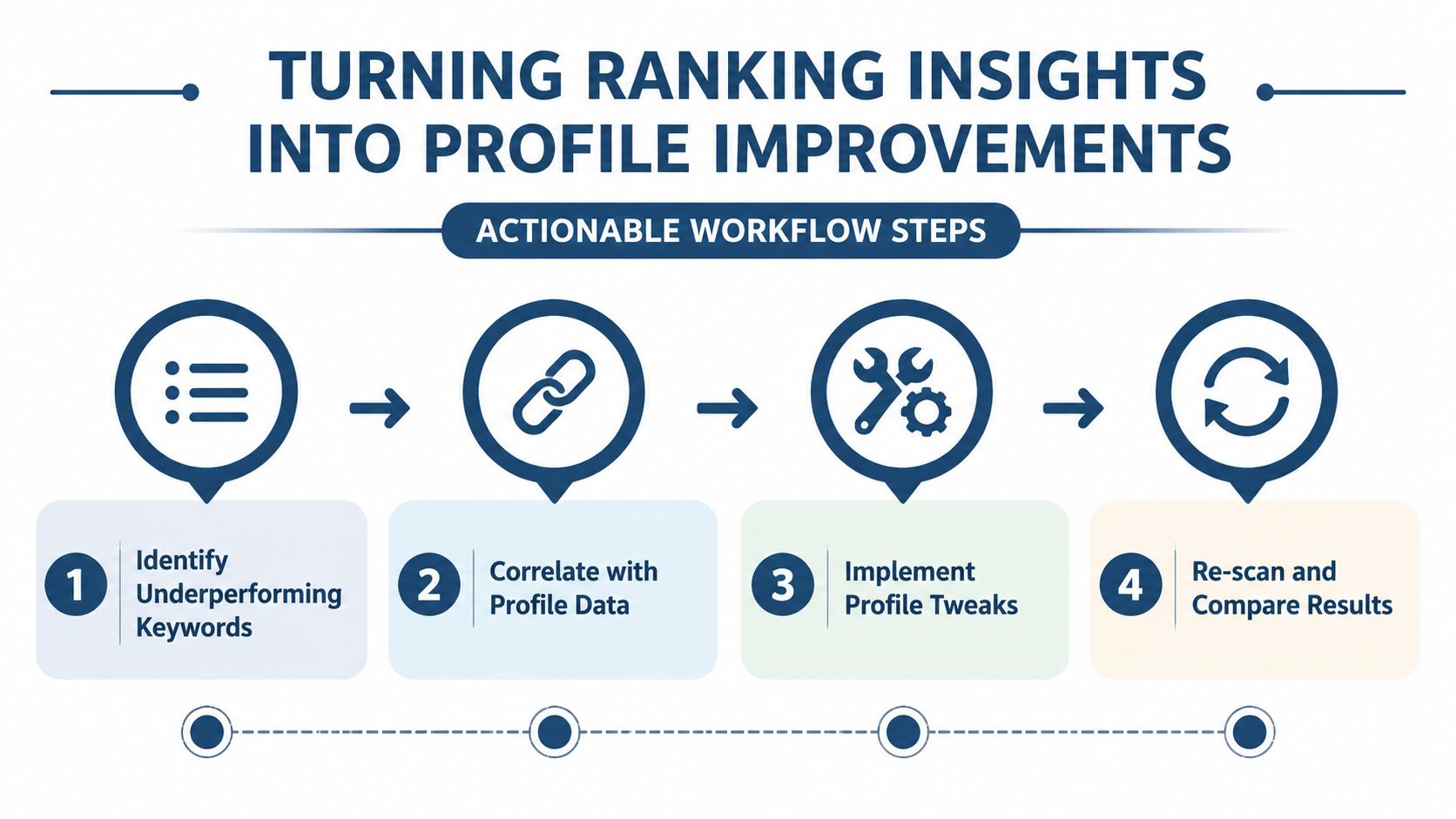
Don't treat AI output as an automatic strategy. Validate every recommendation against the business, make accurate changes, and then re-scan the same keywords and locations. The value comes from shortening the path between evidence and a defensible action.
Choosing and Implementing the Right Local Tracking Solution
Choose a local SEO rank tracker based on the decisions it helps you make, not the size of its feature list. A small business usually needs an easy setup, adjustable geo-grids, clear competitor comparisons and a prioritised task list. An agency may also need multi-location management, repeatable reporting and a workflow that makes recommendations easy to explain to clients.
Evaluate the operating workflow
Before committing, test whether the platform can handle these practical tasks:
- Set a meaningful scan: Can you choose the centre, radius and grid density that match the actual service area?
- Inspect local competition: Can you see which profiles appear where yours is weak, and compare their relevant profile data?
- Find the next task: Does the system identify a category, review, photo or hours issue, rather than displaying a score?
- Implement efficiently: Can your team manage profile fields, reviews and posts without moving every task into separate software?
- Prove change carefully: Can you compare the same keyword and grid after an update and report the result without overstating causation?
Avoid tracking every possible keyword at the start. Begin with the services that generate enquiries and the towns or neighbourhoods that matter commercially. Add more terms after the first set produces a stable baseline. Also avoid ignoring competitors. A ranking decline may reflect a competitor's stronger profile rather than a technical problem on your website.
Google's Business Profile reporting provides behaviour data such as calls, direction requests and website clicks, while a local tracker adds the geographic visibility layer. Combining those views gives a more useful assessment than either one alone. For a broader evaluation of software workflows, see this review of local rank tracking software.
VisiLocali is one option for businesses and agencies that want Google Business Profile geo-grid rankings, side-by-side competitor profile data, AI-powered recommendations and profile management in one workflow. The platform is designed to turn visibility gaps into prioritised actions across categories, reviews, photos, hours and posts, rather than leaving the user with a dashboard to interpret alone.
Try VisiLocali for 14 days free to track your Google Business Profile rankings, compare competitor profiles side by side, and receive AI insights and recommendations that help you choose the right actions to improve local visibility.
Start your 14-day free trial of VisiLocali to map Google Business Profile rankings across your service area, compare competitor profiles side by side, and turn geo-grid findings into practical AI-guided improvements. Use the trial to establish a baseline, fix the highest-priority profile gaps, and re-scan the same locations to measure progress.
