 Skip to content

You've updated your Google Business Profile, added photos, asked for reviews, and checked your opening hours twice. Then you search from your phone and your business appears. A customer two streets over does the same search and you're nowhere in sight.
That's the moment local search starts to feel irrational.
For many UK businesses, the problem isn't effort. It's visibility that changes from one road, postcode, or nearby town to the next. A bakery can look strong in its own neighbourhood and weak just outside it. A plumber can rank well for one place name and disappear for another, even when both jobs are well within the service area. That gap between what you've done and what customers see is where local SEO software becomes useful.
The stakes are commercial, not just technical. In the UK, 70% of consumers physically visit a store after performing a local search on a mobile device, according to Humans with AI's local SEO overview. If people can't find you locally, they often don't compare five alternatives. They instead choose the business they can see.
Good local SEO software exists to make that problem less mysterious. It helps you stop guessing why one area performs well while another doesn't. What's more, it should tell you what to fix next, in plain English, without burying you in charts you'll never use.
Table of Contents
- Introduction Why Local Visibility Feels So Unpredictable
- What Local SEO Software Actually Does for Your Business
- The Core Features Your Business Needs to Evaluate
- Choosing the Right Tool Small Business vs Agency Needs
- A Smarter Workflow From Data to Customers
- Common Pitfalls to Avoid When Using Local SEO Tools
- Why We Built VisiLocali for Action Not Just Analysis
Introduction Why Local Visibility Feels So Unpredictable
A lot of business owners come to local SEO with the same assumption. If your Google Business Profile looks complete and your website is decent, you should show up consistently across your area.
That isn't how local search behaves in practice.
Take a locksmith in Manchester. They search for their own service near their office and see themselves in the map results. Later, a customer in another part of town searches for the same service and gets a different set of businesses. Nothing dramatic changed in the business itself. The searcher's location changed, and local rankings shifted with it.
That's why local visibility feels slippery. You're not trying to win one universal ranking. You're trying to be visible across the places where people search.
Local search can make a good business look inconsistent when the real issue is that the owner is only seeing one tiny slice of how Google displays results.
Local SEO software is important. It doesn't replace the basics like accurate business details, useful pages, and solid reviews. It shows how those basics perform across a real map, in real places, for real search terms.
For UK businesses, that clarity matters because local search often leads directly to action. If someone searches on a mobile phone and then visits a shop, calls a service provider, or asks for directions, visibility has already started to turn into revenue. The software's job is to close the gap between effort and outcome.
Many tools make this harder than it needs to be. They dump data onto a dashboard and leave you to decode it. Better tools take a different approach. They help you answer a simpler question: what should I change next so more nearby customers can find me?
What Local SEO Software Actually Does for Your Business
The easiest way to think about local SEO software is as a digital compass. Its job is to point nearby customers towards your business, and point you towards the changes that improve your chances of being found.
That sounds simple, but the underlying problem is messy. Google weighs proximity, relevance, profile completeness, reviews, website signals, business categories, posts, and consistency across the web. Most owners don't need a lecture on every ranking factor. They need a clear next step.
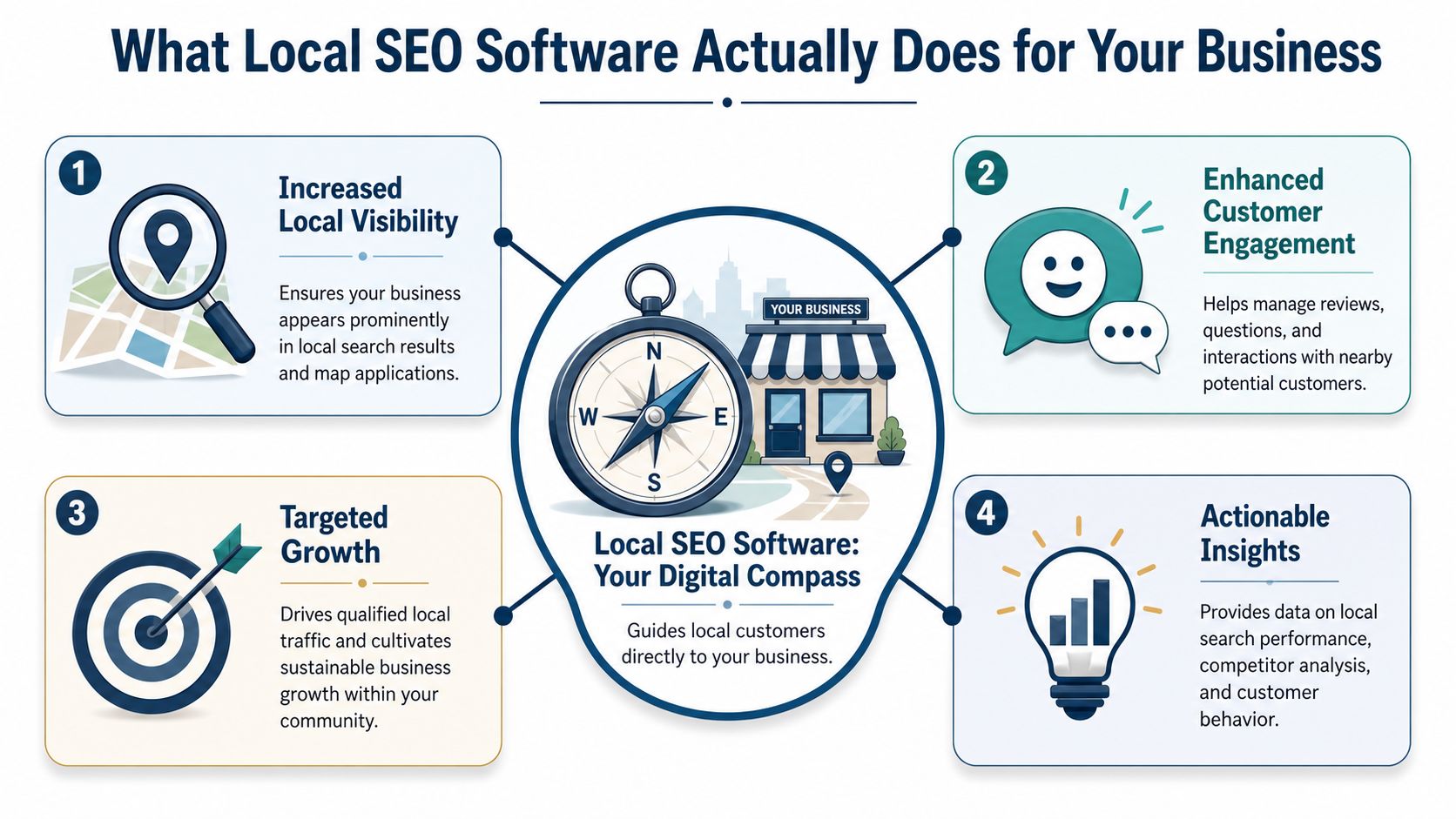
It turns scattered signals into a shortlist
Without software, local SEO often becomes a pile of disconnected tasks.
You update your profile. You post occasionally. You reply to reviews when you remember. You tweak a location page. None of that is wrong, but it's hard to know which action matters most. Good software connects those moving parts and helps prioritise them.
A strong platform usually helps you answer questions like these:
- Where are we visible now for our important services and locations?
- What's missing from our Google Business Profile compared with businesses that rank better?
- Which reviews or posts need attention this week?
- Which page or location term needs improvement first?
It connects SEO work to customer actions
Many business owners understandably get sceptical. They've seen software with endless metrics but no obvious business result.
The better way to judge local SEO software is by whether it helps drive actions that matter, such as profile views, calls, and direction requests. According to Dataintelo's local SEO platform market report, UK SMEs using dedicated local SEO platforms reported measurable return on investment within 90 to 180 days, along with an average 27% increase in Google Business Profile views and a 19% lift in phone calls and direction requests.
Those numbers matter because they describe outcomes a business owner can feel. More views mean more local exposure. More calls and direction requests usually mean more chances to win work.
Practical rule: If a tool gives you more charts than tasks, it's probably making local SEO feel harder than it needs to.
It helps non-specialists make better decisions
Most small businesses don't have an in-house SEO team. Agencies and freelancers might know the technical side, but owners often need software that speaks plainly.
That means a useful local SEO platform shouldn't just report that your visibility has dropped. It should explain why that likely happened and what to do next. For example, it might flag missing secondary categories, thin service-area coverage, weak review signals, or inconsistent opening hours. The point isn't to admire the dashboard. The point is to leave it with a short task list you can complete.
The Core Features Your Business Needs to Evaluate
A local bakery can look strong in one part of town and nearly invisible two streets away. Another business may collect reviews every week but still have an incomplete profile that holds it back. This is why feature lists can mislead. What matters is whether each feature helps you decide the next job to do.
That is the standard to use here. Good local SEO software should turn a messy set of signals into a short, sensible task list for a real business owner or busy team.
A useful platform helps you answer three plain questions. Where are we weak? Why is that happening? What should we fix first? If a tool cannot get you to those answers without extra spreadsheets and guesswork, the feature count does not matter much.
This kind of visibility is easier to grasp when rankings are shown on a map rather than buried in tables.
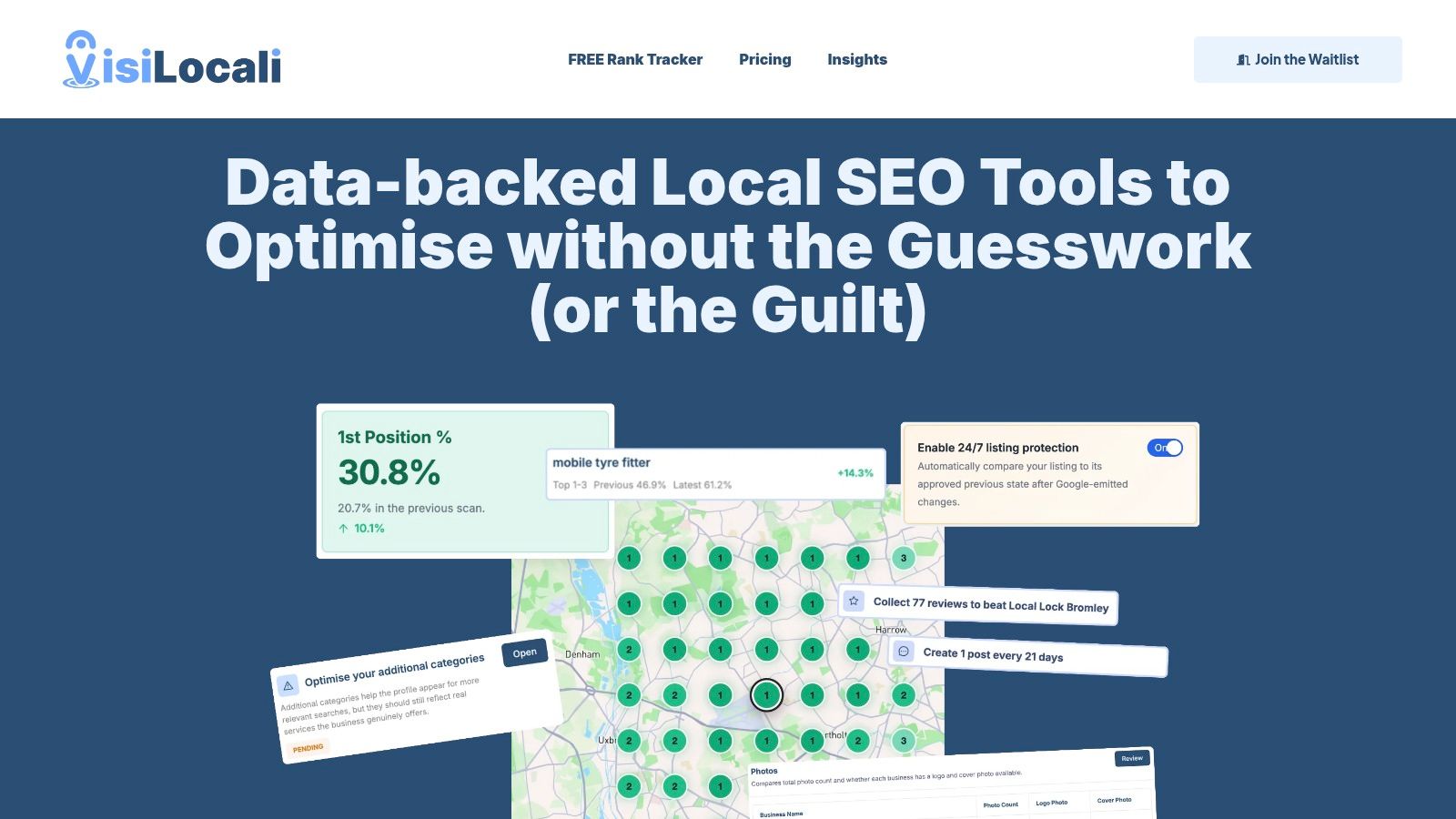
Geo-grid rank tracking
Start here.
Traditional rank tracking usually checks one point, often your business address or a city-centre location. Local search does not work that neatly. Visibility can change street by street, especially in busy towns and cities.
A geo-grid gives you a map of rankings across the area you serve. It works like a weather map for your local visibility. Instead of one temperature reading, you see warm spots, cold spots, and patterns across the full area.
That matters because a single ranking can hide the underlying problem. You might appear in the Map Pack near your office but drop out in the neighbourhood where many of your customers live. A geo-grid makes that gap visible.
For a solicitor, estate agent, dentist, or café, this changes the conversation from "Are we ranking?" to "Where are we losing business?" That is a far more useful question.
The best tools make the pattern easy to read. Strong areas stand out. Weak pockets stand out too. Once you can see those weak pockets, your next task becomes clearer. You may need better category alignment, stronger nearby landing pages, more reviews from a certain area, or improved profile completeness.
Google Business Profile audits
A Google Business Profile audit should feel less like a technical inspection and more like a pre-opening checklist.
Before opening the front door, you would check the sign, opening hours, lighting, and window display. Your profile needs the same kind of care. Categories, hours, attributes, services, photos, and business details all shape how complete and trustworthy you appear.
The useful part is not the audit itself. It is the action that follows.
A good tool should show what is missing, explain why it matters, and help you fix it in order of impact. If your secondary categories are weak, that should be obvious. If your special hours are missing before a bank holiday, that should be flagged. If competitors have fresher photos or fuller service information, you should be able to spot that quickly.
Small details can change what happens next. A missing attribute may stop you appearing for a relevant filter. Out-of-date hours can cost trust. Thin photo coverage can make a profile look neglected.
The right software turns those issues into a short list you can complete this week.
Review and post management
Reviews and Google Posts often end up as "we'll get to it later" jobs. That is a mistake, because both affect what customers see before they contact you.
Reviews shape trust, but they do more than that. They show the words customers use naturally. If reviews keep mentioning "quick turnaround", "friendly receptionist", or "emergency call-out", that language can help you understand what people value and how they describe your service. A tool that keeps review requests, monitoring, and replies in one place saves time and helps you stay consistent. If you want a clearer picture of that process, this guide to Google review management explains the basics well.
Posts serve a different purpose. They keep your profile active and give you a simple place to highlight offers, updates, events, or key services. The useful question is not whether a tool lets you publish a post. Many do. The useful question is whether it helps you keep posting without turning it into another admin chore.
Look for software that makes these tasks easy to keep up with:
- Reviews: quick alerts, simple replies, and a clear view of recent sentiment
- Posts: easy drafting, scheduling, and publishing
- Team use: organised activity so requests and replies do not get missed
Actionable reporting and user experience
This is often the feature that decides whether software gets used after the first month.
A polished dashboard means very little if you still have to interpret everything yourself. Small business owners rarely need more raw data. They need a clear sense of priority. Agencies need that too, but at greater scale.
Good reporting works like a competent receptionist. It does not hand you every message in a pile. It highlights what needs attention first, what can wait, and who should deal with it.
Look for software that handles reporting in a practical way:
| Need | What good reporting looks like |
|---|---|
| Daily monitoring | Clear changes you can understand at a glance |
| Prioritisation | A short list of actions with likely impact |
| Context | Comparisons against relevant local competitors |
| Usability | Plain language and an interface that is easy to learn |
The strongest local SEO tools do more than measure visibility. They help you leave the dashboard knowing the next sensible action.
Choosing the Right Tool Small Business vs Agency Needs
A sole trader and a local SEO agency can both need local SEO software, but they rarely need the same version of it.
A small business owner usually wants clarity. They don't want to click through six menus to understand whether their category is wrong or their profile needs more photos. They want software that helps them act without learning a new profession.
An agency or freelancer has a different problem. They need to manage several businesses, track separate locations, produce reports clients can understand, and avoid mix-ups between accounts. They may also need more flexible workflows because one client is a café, another is a law firm, and another serves multiple towns.
That difference changes what “best” looks like.
Local SEO Software Needs Small Business vs Agency
| Consideration | Small Business Priority | Agency/Freelancer Priority |
|---|---|---|
| Interface | Simple, guided, easy to learn | Efficient across many accounts |
| Recommendations | Clear next actions | Scalable across different client types |
| Reporting | Short, readable summaries | Client-friendly reporting and account segmentation |
| Location management | One business or a few branches | Multiple locations and multiple clients |
| Workflow | Quick wins and easy implementation | Repeatable process and team coordination |
| Complexity tolerance | Low | Higher, if it saves time at scale |
What a small business should look for
The safest choice is usually software that reduces decisions, not software that offers every possible feature.
A local trades business, clinic, restaurant, or shop often benefits most from a platform that highlights profile issues, shows local ranking coverage clearly, and turns those findings into a short action list. If the dashboard feels like accounting software for SEO, most owners won't keep using it.
What agencies and freelancers should look for
Scale changes everything.
If you manage several clients, you need cleaner account separation, easier comparisons, and ways to keep each location distinct. That matters even more for multi-location brands, where each branch needs its own profile, local content, and review strategy to avoid cannibalisation. The right software should support that structure rather than flatten everything into one generic view.
Agencies usually don't fail because they lack data. They fail because too much data makes client work slower and less consistent.
The right choice depends less on headline features and more on whether the software matches the way you work.
A Smarter Workflow From Data to Customers
The clearest way to understand local SEO software is to follow one realistic workflow.
Take a fictional plumbing business serving Greater Manchester. The owner knows they cover Stockport, but most of their visibility checks happen from their office location. On the surface, things look fine. Jobs are coming in, but not as many as they should from nearby towns.

Step one spot the hidden gap
The business runs a geo-grid scan for a town-specific term such as “emergency plumber in Stockport”. Many service-area businesses frequently encounter issues with this approach. A lot of tools are built around a city-wide view, but nearby town names often behave differently.
According to Red Eagle's article on local SEO for small businesses, no major UK tool currently offers manual scan-centre selection with radii up to 100,000km to isolate rankings for neighbouring town-name keywords, and that gap costs service-area businesses an estimated 28% of potential local leads.
That matters because a plumber doesn't only need to rank where the office sits. They need to know how they appear where the customer is searching. Once you understand how to analyse local competitors, those weak spots start to become much easier to diagnose.
Step two compare against real competitors
The scan shows weak visibility in Stockport. The next question is why.
Now the software shifts from tracking to analysis. It compares the plumber's profile with the businesses showing up more often in that town. Perhaps those competitors mention the town more clearly in service descriptions. Perhaps they have stronger reviews that mention emergency callouts. Perhaps their profile details are more complete.
Software earns its keep. It shouldn't leave the owner staring at a weak grid and guessing. It should identify practical gaps that connect directly to the ranking pattern.
Step three turn insight into a small task list
A good platform doesn't stop at “competitor has more reviews” or “profile needs improvement”.
It creates a manageable next move. For example:
- Update service wording so the emergency service is clearer.
- Refine profile details to reflect the areas served.
- Prompt fresh reviews that mention the emergency service naturally.
- Reply to recent feedback so the profile stays active and responsive.
That's a much better workflow than exporting reports and postponing action until next month.
Step four implement without leaving the platform
This part is easy to underestimate.
Many tools are good at diagnosis and poor at doing. They tell you what's wrong, but to fix it you jump between your profile, a notes document, and a spreadsheet. A smarter workflow keeps management close to the analysis so you can update profile details, review content, and publishing tasks in one place.
Good local SEO software should shorten the distance between finding a problem and fixing it.
Step five keep the loop going
Local SEO is rarely a one-off tidy-up. Search visibility changes as competitors improve, reviews accumulate, and location intent shifts.
The useful habit is simple: scan, analyse, act, repeat. That loop is what turns local SEO from a confusing project into a working business routine.
Common Pitfalls to Avoid When Using Local SEO Tools
Buying software doesn't automatically create clarity. In some cases, it creates more noise.
The most common mistake is chasing vanity metrics. A business owner sees a strong ranking at their exact address and assumes local SEO is healthy. That can present a distorted picture if nearby areas perform poorly. A map-based view is usually more honest than a single rank position.
Mistake one treating one location as the whole market
Local search is hyperlocal. Ranking well outside your premises doesn't mean you rank well across your service area.
The fix is straightforward. Check performance across the places that matter, especially neighbouring districts or towns if you're a service-area business. If your tool can't show that clearly, it's hiding an important part of the picture.
Mistake two choosing software that's too complex
Some platforms are built for enterprise marketing teams and sold to businesses that just want more calls.
The result is analysis paralysis. Owners log in, see dozens of charts, and leave without making a change. If software adds friction to basic tasks like replying to reviews, updating hours, or spotting profile gaps, it won't help for long.
Mistake three ignoring consistency and follow-through
Local SEO tools often surface simple problems that owners postpone because they look small.
Those small details still matter. Common examples include:
- Inconsistent business details across profiles and listings
- Unanswered negative reviews that shape trust for the next customer
- Unused Google Posts even when there are updates worth sharing
- Old opening hours that create confusion at the wrong time
If you want a cleaner operating routine, these local SEO best practices are a sensible starting point.
The biggest waste in local SEO isn't bad data. It's good data that never turns into a completed task.
The safest habit is to keep your workflow small. Review the data, choose one or two fixes with the clearest impact, implement them, and then check again.
Why We Built VisiLocali for Action Not Just Analysis
You log into a local SEO tool on Monday morning, hoping to find one clear next step. Instead, you get charts, filters, heatmaps, and a long list of issues that all seem urgent. By Tuesday, nothing has changed on your Google Business Profile, and no new customer has found you more easily than before.
That gap between insight and action is the problem we wanted to solve.
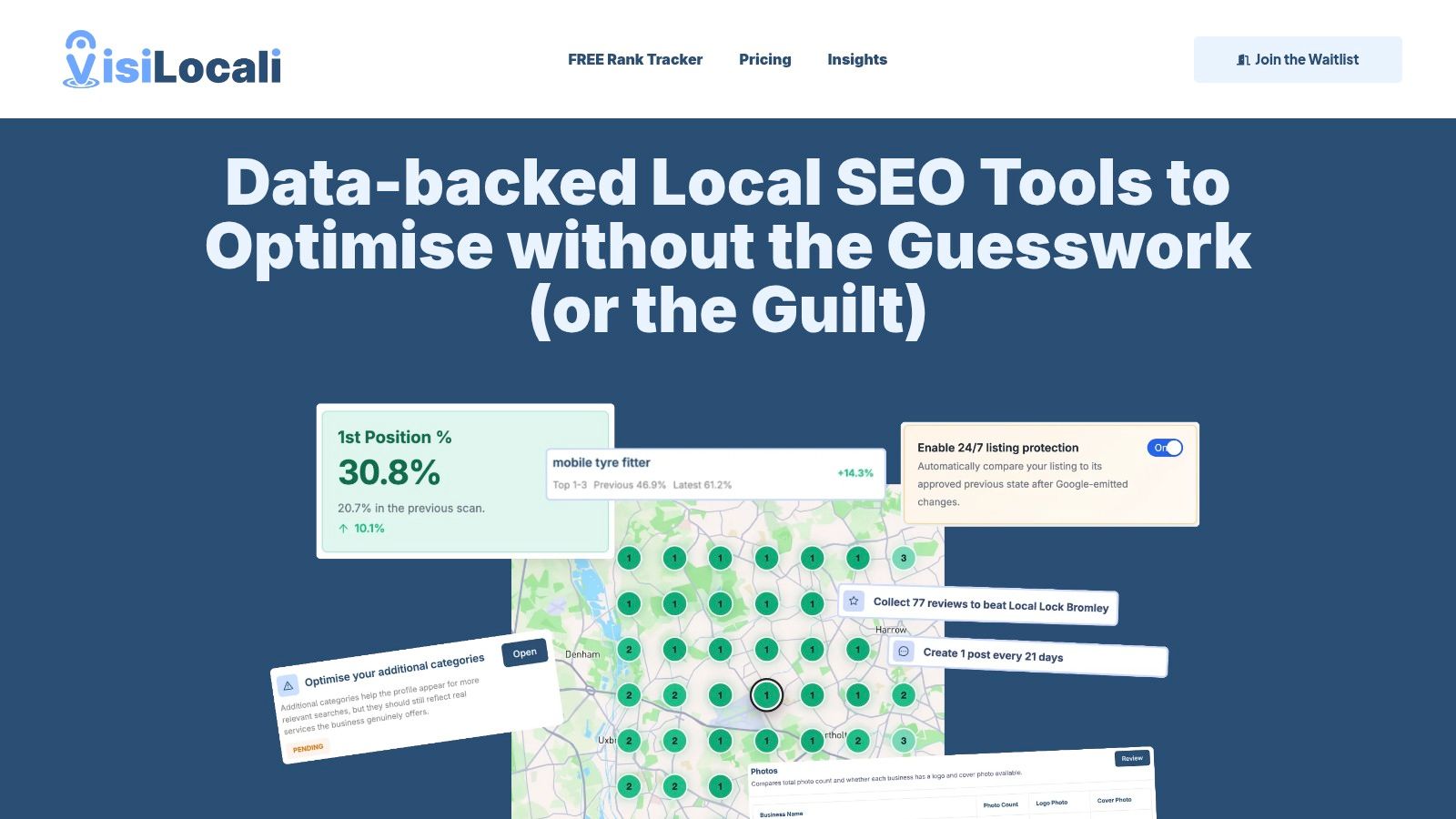
We built VisiLocali to work more like a good shop manager than a stack of reports. A good manager does not hand you ten clipboards and walk away. They point to the one job that needs doing first, explain why it matters, and help you sort it.
That is the idea behind the platform.
VisiLocali brings geo-grid tracking, competitor comparison, Google Business Profile analysis, and AI-supported recommendations into one workflow built around decisions. The aim is simple. Help you spot the next useful improvement, make the change, and see whether it moved the needle.
As noted earlier in the article, profile improvements such as choosing the right secondary categories and adding enough strong photos are closely linked to better local visibility. Value isn't found in merely seeing that insight in a dashboard. Instead, it lies in turning it into a small, prioritised task that someone can complete today.
We designed VisiLocali for small businesses, freelancers, and agencies that want local SEO software to feel clear and usable. If a tool leaves you with more questions than actions, it is adding noise rather than helping you win more local searches.
If you want a platform that turns ranking data into practical next steps, explore VisiLocali. It was built to help UK businesses make clearer decisions and take action faster.
