 Skip to content

You've just finished a busy morning at the salon. Three booking tabs are open, two customers are waiting for replies on social media, and a new Google review has appeared. It's positive, but the owner mentioned a staff member by name, so a generic “Thanks for your feedback” would look careless. By lunchtime, another review arrives, this one critical, and nobody's sure whether the manager, receptionist or area lead should respond.
That's the practical problem a review management tool solves. Reviews aren't a quarterly marketing chore anymore. They're a daily operating signal tied to customer trust, Google Business Profile activity, service quality and local visibility. The right system brings those signals together, helps your team respond safely, and shows which customer complaints deserve an operational fix.
Table of Contents
- Why Reviews Have Become a Daily Operations Problem
- What a Review Management Tool Actually Does
- Core Features That Move the Needle
- A Practical First Week Setup and Response Workflow
- How to Choose the Right Tool for a Small Team
- KPIs That Tie Reviews to Local Search Performance
- Common Pitfalls and How to Sidestep Them
- Bringing It All Together With VisiLocali
Why Reviews Have Become a Daily Operations Problem
A review sits in public long after the original customer interaction has ended. A prospective customer may see it in Google Maps, compare it with nearby businesses, and decide whether to call, book or keep searching. Your response becomes part of that decision, too.
For a local business, the workload spreads quickly. A restaurant manager checks Google between staff briefings. A plumber sees a review while travelling between jobs. A dental practice needs to handle feedback carefully because a public reply can expose sensitive details if someone responds without checking the context first.
The gap is operational, not cosmetic
The UK market still has a substantial response-maturity problem. A 2022 UK cross-category audit found that only 44% of businesses responded to online reviews, with automotive businesses at 84%, financial services at 37%, and supermarkets at 0% in the sample, as reported by MarketingTechNews. The audit covered more than 500 organisations, and the uneven behaviour showed that some sectors treated reviews as customer service while others barely engaged publicly.
That gap matters because silence looks different from business to business. For a service-area business, an unanswered complaint about missed appointments can make a prospect question reliability. For a salon, a reply that acknowledges a specific service issue can show that the owner pays attention. For a multi-location operator, inconsistent replies can make one branch look cared for and another look abandoned.
Practical rule: If reviews affect whether someone chooses your business, review work belongs in the operating rhythm, not on a marketing “when there's time” list.
Google visibility needs context
Google Business Profile activity sits inside a wider local search system. Review frequency, recency, response coverage, rating patterns and the language customers use can all help you understand how your profile compares with nearby businesses. They shouldn't be treated as isolated vanity figures.
Google also requires a business to be verified before it can reply to reviews. Replies are posted publicly under the review, and Google checks them for policy compliance. Google says replies usually appear within up to 10 minutes, although review processing can take up to 30 days in some cases, according to its Business Profile review guidance.
The owner with five browser tabs and scattered email alerts doesn't have a strategy problem. They have a workflow problem. A dedicated system creates one place to see what arrived, who owns it, what requires escalation and which themes keep returning.
What a Review Management Tool Actually Does
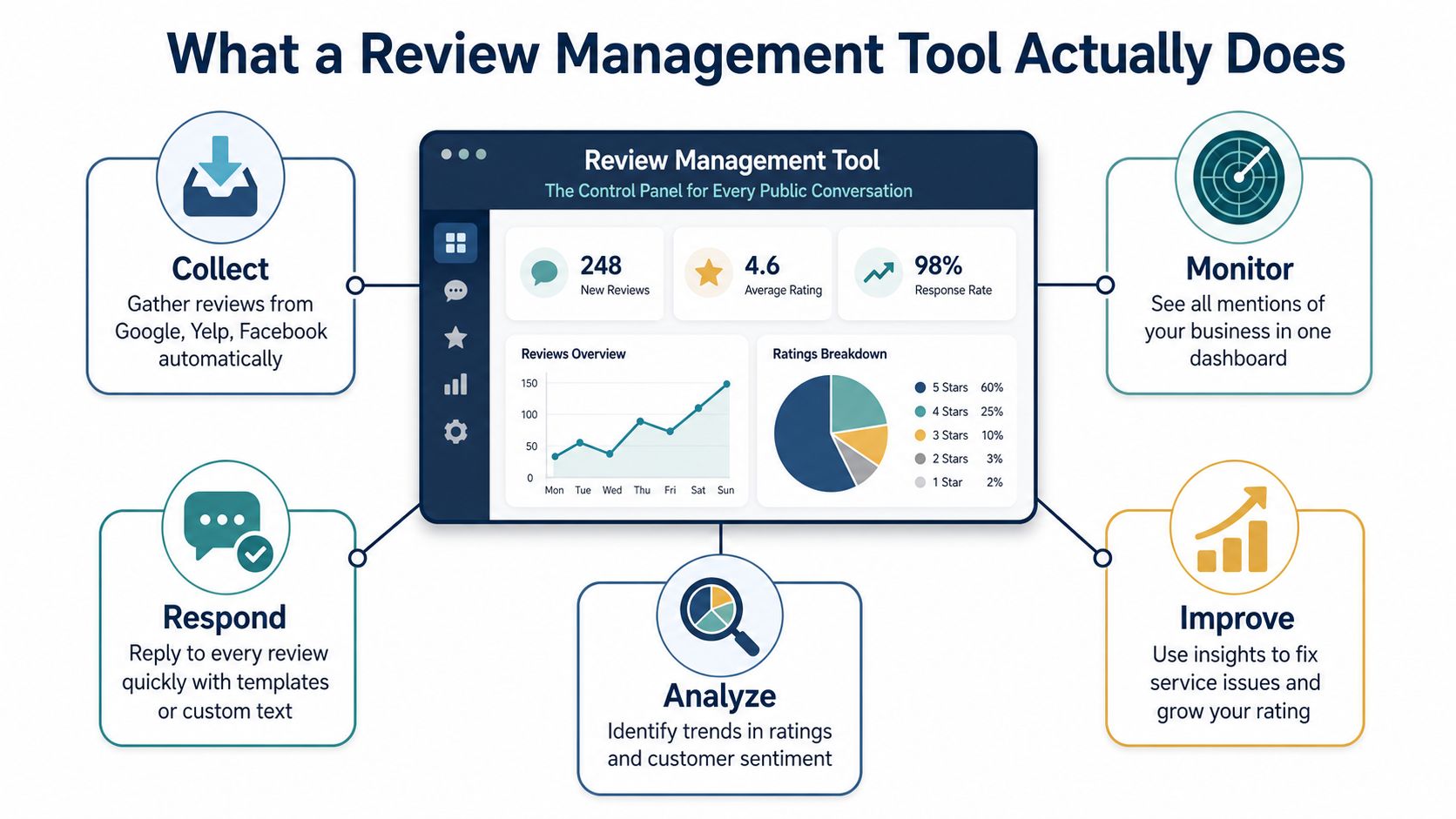
Think of a review management tool as the control panel for every public conversation about your business. A till system gives the team one place to handle sales, refunds and transaction records. A review platform does something similar for customer feedback.
It can bring reviews and feedback from Google Business Profile, Facebook, Yelp, industry directories and first-party surveys into a central workspace. Instead of asking staff to remember several passwords and check multiple inboxes, the team can monitor, assign, draft, publish and report from one interface.
The three jobs that matter
First, it aggregates and monitors. The tool collects feedback into a single inbox, filters it by location or source, and alerts the right person when something new arrives. This is especially useful when one owner manages several branches or when reviews appear on more than one directory.
Second, it creates a response workflow. A team member can be assigned a review, an AI assistant can suggest a draft, and a manager can approve it before publication. Templates help with common situations, but the response should still refer to the customer's actual experience. A complaint about a delayed delivery needs a different reply from praise for a particular employee.
Third, it turns feedback into decisions. Analytics can group reviews by sentiment, recurring topic, location and response status. If “waiting time” appears repeatedly, the answer isn't another polished reply. It's a staffing, scheduling or process discussion.
Why one view beats more notifications
The benefit isn't fewer logins. It's reduced context-switching. When a manager can see the review, its history, the location, the current response status and competitor context together, they can make a better decision without reconstructing the situation from messages and spreadsheets.
Start with one shared inbox, clear ownership and a small set of response rules. Advanced automation only helps once the basic workflow is visible and organised.
Core Features That Move the Needle
A review platform should earn its place by changing what your team does each day. A long feature list isn't useful if the owner still has to copy reviews into a spreadsheet before deciding what needs attention.
Features worth paying for
Unified monitoring should cover Google Business Profile, Facebook, Apple and relevant niche directories. Real-time alerts matter because a new complaint can require a same-day response, while location filters stop a multi-site manager from drowning in unrelated activity.
AI-assisted response drafting is useful when it supports judgement rather than replacing it. The system should learn the business's tone, suggest a suitable reply and flag policy-sensitive complaints for human review. It shouldn't auto-publish a legally risky or privacy-sensitive response just because the wording sounds fluent.
Sentiment and theme analysis gives reviews operational value. Sentiment means the emotional direction of the feedback, whether broadly positive, neutral or negative. Theme analysis goes further by grouping comments around topics such as pricing, staff, cleanliness, waiting time or communication. That lets an owner identify repeated causes instead of treating every review as a separate writing task.
Compliant review requests help create a steady stream of genuine feedback. Email and SMS requests, QR codes at checkout and controls that stop the team repeatedly asking the same customer can all support a sensible process. The aim is to make it easy for customers to share an honest experience, not to manufacture praise.
Google and governance belong together
A useful system should connect Google Business Profile activity with review work, including replies, photos, Q&A and posts where the integration supports it. Competitor benchmarking adds another layer by showing how your review volume, themes and response coverage compare with nearby profiles.
For agencies and managers, white-label reporting, role-based access and audit trails are practical requirements. An audit trail records who drafted, edited, approved or published a response. That record becomes important when a customer disputes what happened or a regulated business needs to explain its process.
The UK compliance position is clear. Businesses that publish or facilitate reviews need proactive, transparent and impartial processes for collecting, moderating, publishing, monitoring, investigating and sanctioning content. The CMA reviews guidance says the DMCC regime bans fake reviews and concealed incentivised reviews from 6 April 2025. A tool should therefore support reviewer verification, incentive disclosure, escalation queues and removal records, not just profanity detection.
| Feature | What It Does Day-to-Day | Impact for Small Teams |
|---|---|---|
| Unified inbox | Brings review sources into one queue | Must-have, removes missed reviews and tab switching |
| Response assignments | Gives each review an owner and approval path | Must-have, prevents duplicated or forgotten replies |
| AI drafting | Produces a first draft in the chosen brand voice | Must-have with human approval, speeds up routine work |
| Sentiment and theme analysis | Groups recurring complaints and praise | Must-have, connects reviews to service improvements |
| Review requests | Sends compliant prompts through email, SMS or QR codes | Must-have, supports consistent customer feedback |
| Competitor benchmarking | Compares profile and review activity | High-value, reveals gaps that local rank data alone may miss |
| White-label reporting | Presents results under an agency or business brand | Nice-to-have, useful for client and management reporting |
| Social listening | Tracks wider online mentions | Nice-to-have, less urgent for a small local operator |
| Complex survey builder | Creates extensive custom research journeys | Skip-for-now unless surveys are a core operating process |
A Practical First Week Setup and Response Workflow
Don't connect every channel, switch on every automation and ask the team to learn the whole platform in one afternoon. A disciplined first week creates a habit your staff can maintain after the initial enthusiasm fades.

Days one and two create visibility
Day one: Connect the verified Google Business Profile and bring the main review streams into one dashboard. Confirm that every location is labelled correctly. A wrong location tag can send a complaint to the wrong manager and distort your reporting.
Day two: Create tags for sentiment, source, location and priority. Mark urgent issues such as safety complaints, alleged discrimination, privacy concerns or threats of legal action for escalation. Routine praise can follow a lighter approval path.
Days three and four create consistency
Day three: Write response frameworks for common situations. Include a greeting, a specific reference to the review, an appropriate next step and a clear sign-off. Leave placeholders for the service, location or employee name so staff don't accidentally publish the wrong detail.
Day four: Practise with real scenarios. Review a positive comment, a vague one-star rating, a service complaint and a potentially fake review. Your team should know when to reply publicly, when to move the conversation offline and when to request removal.
For guidance on wording and structure, use this Google review response guide as a reference, then adapt the approach to your sector and brand voice.
Days five to seven turn setup into routine
Day five: Connect review requests to suitable point-of-sale or CRM events. Don't ask every customer indiscriminately if the process could create duplicate requests or expose sensitive information.
Day six: Set a weekly review meeting. Check response coverage, unresolved negative feedback, recurring themes and any service changes that need an owner. Keep the meeting focused on decisions, not reading every comment aloud.
Day seven: Add competitor-review alerts and inspect the first week's data. Look for missed assignments, incorrect tags and templates that sound robotic. The objective isn't a perfect dashboard. It's a reliable daily review check that nobody has to rediscover each morning.
How to Choose the Right Tool for a Small Team
Small businesses don't need enterprise theatre. They need a tool that connects to Google properly, makes ownership obvious and turns review activity into an action someone can complete.
Compare the essentials before the extras
Start with direct Google Business Profile access. Confirm whether the platform can read and manage the review information you need, whether the connection supports every location and how permissions are handled. Ask for a live demonstration using your actual profile structure rather than a polished sample account.
Then test the workflow. Can a receptionist draft a reply while a manager approves it? Can an agency restrict access by client or location? Can the owner see unassigned reviews immediately? A platform that produces attractive charts but makes daily response work awkward is the wrong purchase.
| Criterion | Why It Matters | Small-Team Priority |
|---|---|---|
| Google Business Profile connection | Keeps reviews and local profile work close together | Essential |
| Multi-location support | Separates branches and assigns responsibility | Essential for more than one site |
| AI-assisted drafting | Reduces writing time while preserving review context | High |
| Sentiment scoring | Highlights patterns hidden behind star ratings | High |
| Competitor comparisons | Shows where nearby profiles have stronger review signals | High |
| White-label reports | Helps agencies and managers communicate outcomes | Medium |
| Social listening | Extends monitoring beyond review platforms | Medium to low |
| Survey builder | Supports detailed first-party feedback programmes | Low unless required |
| Data ownership and export | Prevents painful migration later | Essential |
| Clear pricing | Protects a small budget from unexpected seat or location costs | Essential |
Red flags that deserve a hard no
Reject opaque review sourcing. You should know where the data comes from and how often it updates. Be cautious with annual contracts that hide cancellation terms, especially if the onboarding process is untested.
Regulated businesses need another check. Ask how the platform handles sensitive content, incentive disclosures, reviewer disputes and records of moderation decisions. Google explicitly prohibits offering free or discounted goods or services in exchange for posting, changing or removing a review, as explained in its fake engagement policy.
Use a simple scorecard. Give each criterion a pass, concern or fail, test the top two tools with one real location, and choose the system your team can operate every day. If you're comparing broader local-search capabilities as well, review local SEO software options alongside the review workflow rather than buying separate dashboards by default.
KPIs That Tie Reviews to Local Search Performance
Star count alone won't tell you whether your review process is healthy. A local operator needs metrics that show activity, responsiveness, freshness and the themes customers associate with the business.
Four core measures
Review velocity is the pace at which new reviews arrive. Track it by location and by period, then look for consistency rather than occasional bursts. A steady flow gives you a better view of current service quality than a large historic review total.
Average rating shows broad customer sentiment, but it needs to sit beside the review content. A profile with a strong average can still contain a recurring complaint about parking, late appointments or unclear pricing.
Response rate measures the share of reviews that receive a public reply. Track it separately for positive and negative feedback, then inspect the unanswered queue rather than celebrating a blended average.
Review recency shows whether the profile reflects current customer experiences. Old praise can't explain what customers are experiencing this month, and recent criticism deserves context and action.
The connection to local search needs careful handling. Google's own guidance confirms that review replies are public and subject to policy review, but it doesn't promise that replying to every review will produce a specific ranking increase. Treat these measures as operational indicators that help you improve profile activity, customer confidence and service consistency, not as guaranteed ranking levers.

Add the measures that explain movement
Review language can reveal whether customers mention the services and attributes you want to be known for. Track recurring keywords alongside location, sentiment and competitor comparisons. If competitors receive repeated praise for communication while your reviews mention missed updates, the action is operational before it's promotional.
A useful dashboard should also show unresolved negative-review rate, median response time, photo activity, post activity and share of voice against nearby Map Pack competitors. Share of voice means how often your profile appears in the visible local results for the target searches you monitor. It doesn't prove that reviews caused a ranking change, but it helps you examine review activity beside actual Google Business Profile visibility.
Review analytics for local businesses should lead to a decision. Assign an owner to each recurring theme, record the change made and watch whether later feedback shifts. If a metric doesn't change what someone does, it probably doesn't belong on the owner's weekly dashboard.
Common Pitfalls and How to Sidestep Them
Most review problems don't start with malicious intent. They start with an owner chasing the wrong target, copying an old reply or postponing an awkward conversation until the queue becomes unmanageable.

Mistake one, chasing volume instead of a reliable process
A sudden burst of review requests followed by silence doesn't give you a dependable view of current service. Build a regular request workflow, ask for honest feedback and monitor whether the timing makes sense for the customer journey.
Mistake two, publishing robotic replies
Copy-paste replies make a real complaint look automated. Rotate approved response structures, mention a detail from the review and remove any sentence that could apply unchanged to every customer.
Mistake three, ignoring negative feedback
Silence leaves the reviewer and every future reader with one version of events. Reply calmly, avoid discussing private details and offer an offline route for resolution. Don't argue about intent in public.
Mistake four, treating every review as genuine
Google allows businesses to report reviews that violate its policies, but removal is limited to policy violations. Its review removal process also includes a status check and an appeal route, with up to 10 reviews selectable in one appeal submission. Keep evidence, record the reason for the report and never use removal as a way to hide legitimate criticism.
The operator's compliance check
- Check incentives: Never offer free or discounted goods or services for a review, a changed rating or a removed review.
- Check privacy: Don't confirm private customer details in a public reply.
- Check escalation: Send legal, medical, safety and discrimination complaints to the appropriate senior owner.
- Check records: Keep an audit trail of drafts, approvals, reports and offline follow-up.
- Check patterns: Review sentiment and themes weekly so repeated service failures receive an operational owner.
A policy-safe workflow protects more than the profile. It protects the credibility that makes reviews useful in the first place.
Bringing It All Together With VisiLocali
The practical answer isn't another inbox. It's a workflow that connects review activity with the wider Google Business Profile work your team already needs to manage.
On a Monday morning, the owner should be able to see new reviews, response status, rating movement and location context without opening a collection of separate tools. AI-assisted drafts can provide a starting point, while sentiment and keyword tags identify whether customers are praising a service, reporting a delay or repeating a problem that needs management attention.
Competitor comparison adds the missing context. A review count means little on its own if a nearby profile is receiving fresher feedback, responding more consistently or being mentioned for services your profile barely features. Side-by-side profile data helps the team decide whether the next action is a response, a review request, a profile update, a new photo, a post or an operational change.
VisiLocali brings Google Business Profile review management, AI-supported replies, review analysis, profile comparison and local ranking data into one platform. Its Review Analyser compares ratings, review quantity, review frequency, review content and reviewer profiles, then uses AI to support practical recommendations. The same operating view can connect review performance with Google Business Profile rankings, so a manager can examine review velocity, response coverage and star trends beside visibility for target searches.
That connection is the important part. Reviews shouldn't sit in a reputation folder while ranking data sits somewhere else. The team needs to know what changed, which profile gap matters and what action should happen next.
Start by mapping each location, confirming the correct Google Business Profile access and choosing the review and ranking signals you'll inspect each week. Keep the process simple enough for a small team to follow, then add automation only where it improves control rather than removing judgement.
Start your 14-day free trial of VisiLocali to track Google Business Profile rankings, compare competitor profiles side by side, and receive AI insights and recommendations on the actions most likely to improve local visibility. Bring review monitoring and local SEO decisions into one practical workflow, then use the data to decide what your team should fix next.
