 Skip to content

84% of UK consumers trust customer reviews, compared with 41% who trust companies directly, according to UK consumer research summarised by OpenPR. That difference changes the answer to “how do I reply to a Google review?” A reply isn't a polite extra added after the marketing work. It sits on a public page that prospective customers may read before they call, book, or visit.
Online reviews influence approximately £23 billion in annual UK consumer spending, while 68% of consumers said positive reviews would lead them towards a purchase and 69% said negative reviews could change their mind. The same UK review research shows why your response deserves more care than a quick “Thanks”. A useful reply adds context, demonstrates attention, and helps a reader judge whether your business is genuine.
Table of Contents
- Why Replying to Google Reviews Matters More Than You Think
- How to Post a Reply on Your Google Business Profile
- Crafting Replies for Positive, Neutral, and Negative Reviews
- Handling Fake, Defamatory, or Policy-Violating Reviews
- Tone, Privacy, and Legal Best Practices for UK Businesses
- Scaling Your Review Strategy with VisiLocali
Why Replying to Google Reviews Matters More Than You Think
Many UK business owners treat review replies as routine housekeeping. Customers leave feedback, someone sends a brief thank-you, and the team moves on. That approach misses the fact that a Google review page functions like a public conversion page, especially for local services where a customer is comparing several businesses in a short search session.
The trust gap is important. UK consumers trust reviews more readily than direct company messaging, yet they also know that reviews can be manipulated. The UK Competition and Markets Authority estimated that fake reviews account for about 11% to 15% of reviews on popular UK e-commerce platforms in common product categories in its review and endorsement guidance. That context makes an authentic owner response valuable. It shows that a real person has noticed the feedback and is prepared to discuss the experience openly.
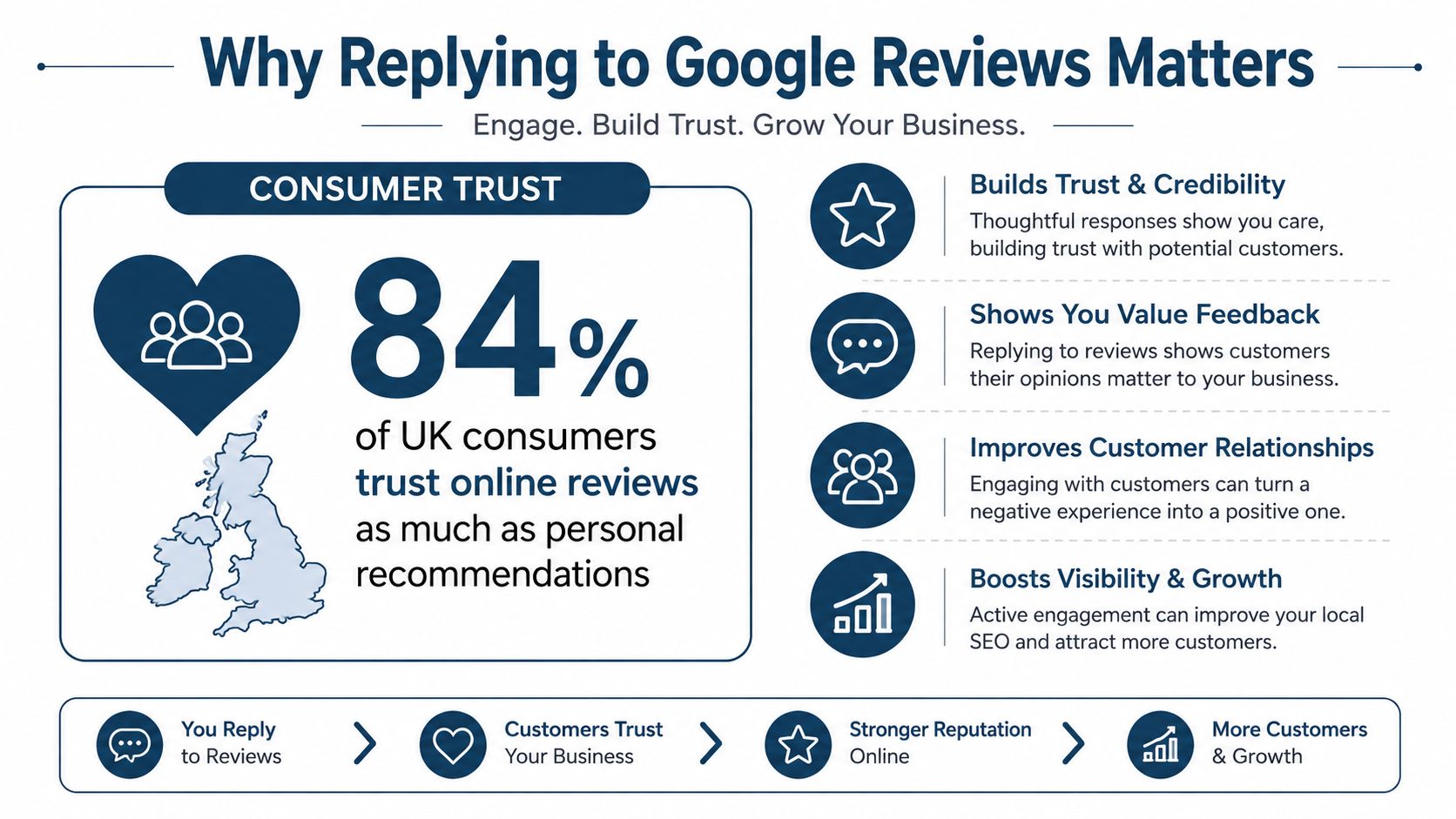
The response gap creates an opening
Only 44% of UK businesses respond to online reviews, according to a cross-category benchmark reported by Marketing Tech News. The sector differences are wide. Automotive businesses responded at 84%, financial services at 37%, and supermarkets at 0% in that audit.
You don't need an elaborate reputation department to stand out. Consistently responding to every review, with extra care for complaints and detailed feedback, already puts your business in a stronger position than much of the market. The response rate matters because silence can look like indifference, even when the underlying service is good.
A reply can also support your broader local search work, although it shouldn't be treated as a magic ranking shortcut. Google review activity is one visible part of a Business Profile, so use this guide to whether reviews help local rankings alongside a wider profile and customer experience strategy.
Practical rule: Write every reply for the next customer reading it, not only for the person who posted the review.
How to Post a Reply on Your Google Business Profile
Before worrying about wording, make sure you can access the profile. Google requires a verified Business Profile before a business can respond to reviews. Anyone with access to the listing can reply, and Google allows replies to be edited or deleted after posting, as explained in Google's Business Profile community guidance.
On a computer, sign in to the Google account connected to the profile. Search for your business on Google, open the Business Profile management view, and select the option to read your reviews. Find the review you want to address, choose Reply, write the response, and submit it.
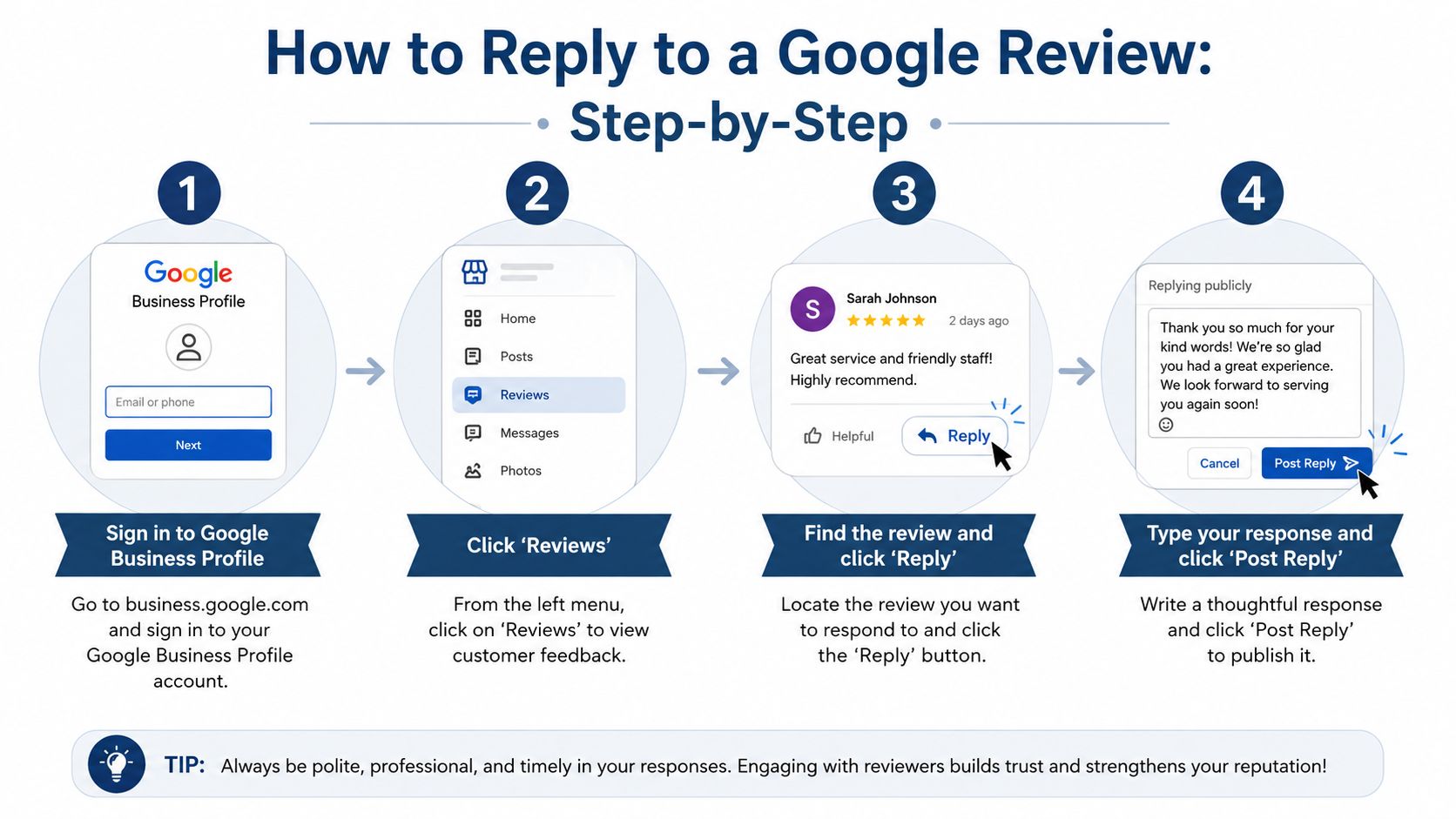
The exact Google path is open your profile, select “Read reviews”, choose the review, enter your reply, and click Reply, according to Google's review reply instructions. Google checks replies against its content policies before publication. If a reply isn't approved, Google will ask you to edit it, so avoid personal information, insults, unsupported accusations, and promotional wording that doesn't address the review.
Mobile access and editing
On mobile, open the Google Maps app while signed in to the account managing the profile. Tap your profile picture, select Your Business Profiles, choose the relevant business, and open the reviews area. Select the customer review, tap the reply option, and publish your text.
The interface can change, but the principle remains the same. Use the account with profile permissions, select the correct location, and check the review carefully before posting. If you make a mistake, return to the response and edit or delete it rather than leaving an inaccurate statement visible.
You can also use Google Business Profile management guidance to keep review responses connected to the wider information customers see on your listing. A polished reply can't compensate for incorrect opening hours, an outdated phone number, or a misleading business description.
Crafting Replies for Positive, Neutral, and Negative Reviews
A five-star compliment and a one-star complaint shouldn't receive the same template. The customer has given you a different communication problem in each case, and the next reader needs a different signal from your response.
Positive reviews need specific gratitude
Suppose a customer writes, “Brilliant service. The engineer arrived on time and explained the repair clearly.” A weak response says, “Thanks for your review.” It confirms nothing and could have been posted beneath any review.
A stronger reply might read:
“Thank you for taking the time to share this, Sarah. I'm pleased the engineer arrived when expected and explained the repair clearly. We appreciate your recommendation and hope to help again.”
Mentioning the detail the customer praised makes the response feel written for them. It also gives prospective customers useful evidence about punctuality and communication without turning the reply into an advert. Don't stuff it with keywords or repeat the business name unnaturally. Customers recognise promotional copy quickly.
Neutral reviews are improvement opportunities
A three-star review often contains more practical information than enthusiastic praise. If a customer says the service was good but the appointment started late, acknowledge both parts:
“Thank you for the balanced feedback, James. I'm glad you were happy with the service, although I'm sorry the appointment started later than planned. We'll review how we manage delays, and we'd welcome the opportunity to provide a smoother experience next time.”
Don't argue with the rating or demand an explanation in public. A measured response accepts the customer's perspective while showing that the team has heard the criticism.
Negative reviews need a resolution sequence
For a genuine complaint, use four moves:
- Acknowledge the experience. “I'm sorry the visit didn't meet the standard you expected.”
- Address the specific issue. Refer to the delay, missed appointment, damaged item, or communication problem.
- Offer a private route. Invite the customer to contact a named person through an official channel.
- Sign the reply. Use a real name or initials so the response has accountability.
Don't publish the customer's booking details, phone number, address, or other personal data. Don't accuse them of lying because the account doesn't immediately appear in your records. Investigate privately, then correct the facts only when you can do so without revealing confidential information.
Handling Fake, Defamatory, or Policy-Violating Reviews
“Apologise and take it offline” suits a genuine service complaint. A fabricated review, defamatory accusation, or policy breach needs a different process. Public arguments increase the post's visibility and can make the business appear defensive, even where the complaint has no factual basis.
The CMA's online reviews and endorsements material estimates that fake reviews make up about 11% to 15% of reviews on popular UK e-commerce platforms in common product categories. That figure does not measure every Google Business Profile, but it helps explain the UK trust gap. A calm, specific reply gives sceptical readers evidence of how your business handles scrutiny, which matters when online reviews influence substantial consumer spending.
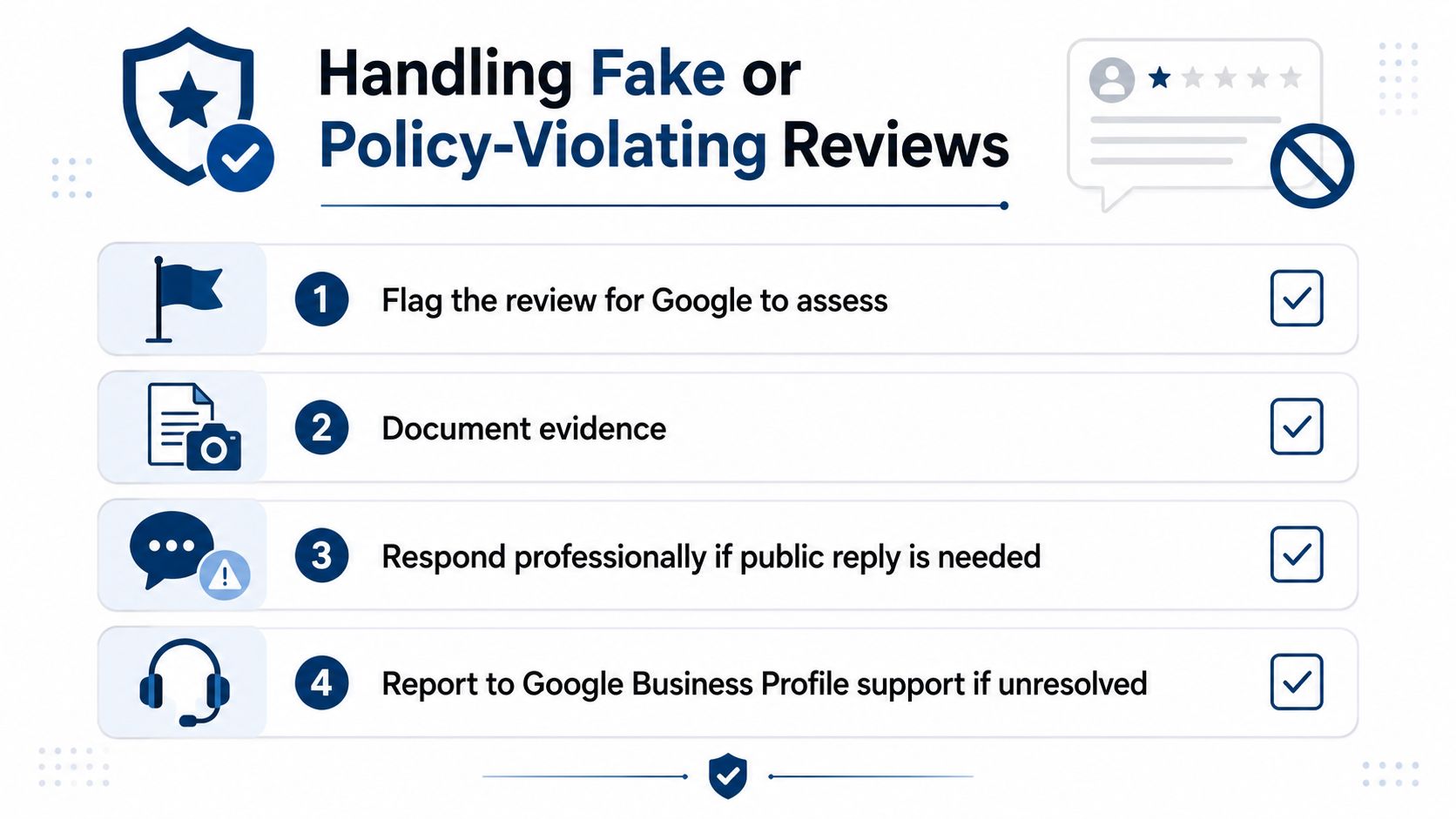
Use a decision process, not an emotional reaction
Save evidence before replying. Record the review URL, reviewer name, date, wording, and relevant internal records. Then classify the issue:
- A genuine complaint: Acknowledge the problem, reply courteously, and offer a private route to resolution.
- An uncertain review: Write, “We can't identify this experience from the information provided. Please contact us directly so we can investigate.”
- A policy concern: Flag the review through your Business Profile and identify the relevant policy issue without attacking the reviewer.
- A defamatory or threatening post: Preserve the evidence and seek appropriate professional advice before making detailed public claims.
Google's UK guidance recommends investigating the reviewer's account and visit history, staying polite and non-personal, acknowledging mistakes, and signing with a real name or initials. It also says businesses should not disclose private information or attack reviewers. If reporting does not resolve the issue, contact Google Business Profile support instead of continuing the dispute in the review thread.
Tone, Privacy, and Legal Best Practices for UK Businesses
A review reply is public business communication. Treat it with the same care as website copy, an email to a customer, or a statement made at your premises. The safest response is calm, specific, human, and limited to facts you can support.
Google's UK guidance for responding to reviews emphasises investigation, politeness, privacy, honest acknowledgement, and a named sign-off. Those points work together. Investigate before replying, avoid personal attacks, don't expose customer information, accept genuine mistakes, and let a real person take responsibility for the message.
A practical quality check
Before publishing, ask:
- Would I say this in front of a prospective customer? Remove sarcasm, irritation, and arguments about motives.
- Does it answer the actual review? Mention the relevant service detail rather than pasting a generic thank-you.
- Have I protected privacy? Don't include appointment dates, addresses, staff details, health information, or account history that identifies the customer.
- Can I support every factual statement? Avoid claiming that an issue was resolved if it hasn't been investigated.
- Does the sign-off identify accountability? Use a staff member's name or initials where appropriate.
The CMA's guidance for businesses and brands focuses on honest and transparent online reviews and endorsements. Your reply shouldn't pressure a customer to remove criticism, imply that a favourable review is required for a refund, or make claims designed to mislead readers.
Time matters, but speed shouldn't produce careless wording. UK review survey reporting says 61% of consumers expect a business response within a week, while 44% are less likely to choose a business that never replies, according to UK-focused review response guidance. If your time is limited, triage urgent harm complaints first, then service complaints, then routine praise. A thoughtful response within a sensible timeframe beats an instant template that sounds automated.
Scaling Your Review Strategy with VisiLocali
Manual replies are manageable when review activity is light. As the profile collects more feedback, the difficult part becomes deciding what deserves attention, maintaining a consistent standard, and understanding whether your work is improving the wider local search picture.
VisiLocali's Google review management platform lets businesses read and respond to reviews with AI support. The practical value isn't replacing judgement. It helps you handle the queue faster while keeping the final response aligned with the specific customer experience, privacy requirements, and tone your business expects.
Turn replies into an organised local SEO workflow
VisiLocali's Review Analyser presents your profile side by side with statistically competitive and selected competitor profiles. That comparison helps expose gaps such as unanswered feedback, inconsistent response patterns, or areas where other local businesses provide more visible engagement.
The platform also connects review analysis with Google Business Profile data and geo-grid rank tracking. A geo-grid is a map-based scan that shows how your profile performs across different nearby locations for selected keywords. This gives you a practical way to review customer engagement alongside Map Pack visibility, rather than treating replies as an isolated administrative task.
AI-powered recommendations explain what to improve and why, using profile, competitor, and ranking information. You can then prioritise the next action, whether that's responding to a complaint, improving profile information, or investigating a visibility gap.
Start your 14-day free trial of VisiLocali to track Google Business Profile rankings, compare competitor profiles side by side, and receive AI insights and recommendations. Use the data to decide which review, profile, or local SEO action to take next, then improve your visibility where UK customers are searching.
