 Skip to content

A Leeds plumber with three vans doesn't need another marketing theory lesson. They need someone to publish a useful Google Business Profile post while they're under a sink. The agency managing fourteen café profiles has the same problem at a larger scale, while a single-location solicitor often remembers posting only when a promotion is already nearly over.
That's why a Google Business Profile post scheduler belongs inside a repeatable local SEO workflow. Scheduling turns posting from an occasional chore into a planned activity that supports profile freshness, customer actions and wider Map Pack visibility. Google officially supports scheduled and recurring posts, so this isn't a social media workaround bolted onto your listing. Google's UK Business Profile guidance confirms that owners can create Update, Offer and Event posts, choose a later publication time, set repeat schedules and publish across multiple profiles in one action.
Consistent posting won't rescue an incomplete profile or poor service, but dormant profiles give you fewer opportunities to show what the business does now. The workflow below covers the scheduling process, the right cadence, useful post formats and the reporting loop that makes publishing worth the effort.
Table of Contents
- Why GBP Post Scheduling Matters for Local Visibility
- How to Schedule a Google Business Profile Post
- Built-In Scheduler vs Third-Party Schedulers
- Choosing the Right Cadence and Timing
- Post Types, Copy, and Images That Actually Work
- Why an Integrated Local SEO Platform Beats a Standalone Scheduler
- Your Weekly GBP Posting Routine and Next Step
Why GBP Post Scheduling Matters for Local Visibility
The problem isn't usually a lack of ideas. It's that ideas arrive at the wrong time. A plumber thinks about a boiler-service offer after a long day on the road, an agency drafts café content between client calls, and a solicitor postpones a legal update because there's no obvious slot in the diary. By the time someone opens Google Business Profile, the post has become another task competing with urgent work.
Scheduling fixes the operational gap. Update posts can reinforce what a business does and where it serves. Offer posts put a clear promotion in front of people already viewing the profile. Event posts give Google and potential customers timely information about something happening locally. These formats don't replace accurate categories, services, reviews or business details, but they give an active profile more useful material to present.
UK practitioner guidance recommends a weekly rhythm for most small businesses, with more frequent publishing during seasonal peaks. Google's official post guidance also supports posting at least once a week. That creates a straightforward operating benchmark, 52 posts per year at one post each week, or approximately 104 posts at two posts each week, before any seasonal additions, as outlined in UK-focused GBP posting guidance.
Cadence is a management decision
A post scheduler makes that benchmark realistic. The owner can approve a month of content in one sitting. An agency can see every location's queue without opening profiles one by one. A team member can prepare a post before going on holiday and let the system publish it at the intended time.
Practical rule: If posting depends on someone remembering, it isn't a workflow. It's a hope.
The useful connection is between activity and measurement. You can schedule posts, monitor profile actions and compare local ranking positions rather than treating GBP content as a standalone social task. VisiLocali's Google Map Pack tracking provides the ranking context needed to see whether your wider optimisation work is moving in the areas that matter.
How to Schedule a Google Business Profile Post
Start in the Posts dashboard with a draft already prepared. You can write it manually, or use an AI writer from a short prompt such as “seasonal boiler servicing for households in Leeds”. The draft still needs a human check for accuracy, location relevance and the offer details. AI can speed up production, but it shouldn't invent availability, prices or services.
Choose the post format next. Update suits announcements, service reminders and useful business news. Offer is for a promotion with clear conditions and dates. Event works for an appointment-based session, workshop, open day or other scheduled activity. The selected format controls the information Google expects and the CTA options available to the reader.
Set the schedule around customer behaviour
Open the scheduling panel and choose the publication date. Pick a time window that fits the business's audience, using the location's GBP performance data rather than copying a generic recommendation. A café may want content ready before the lunch decision, while a solicitor may prioritise the hours when prospective clients are researching services.
If the content is part of a regular rhythm, switch on the weekly repeat option so the slot fills for the next 12 weeks. Review each repeated draft rather than allowing identical copy to run indefinitely. A recurring slot should provide structure, not permission to stop producing relevant content.
Add the image, descriptive alt text and the destination link. The editor supports up to 1,500 characters for an Update, while the CTA button allows up to 100 characters, as documented in the GBP post scheduler workflow. Keep the visible opening direct, because customers may decide whether to continue reading before they reach the button.
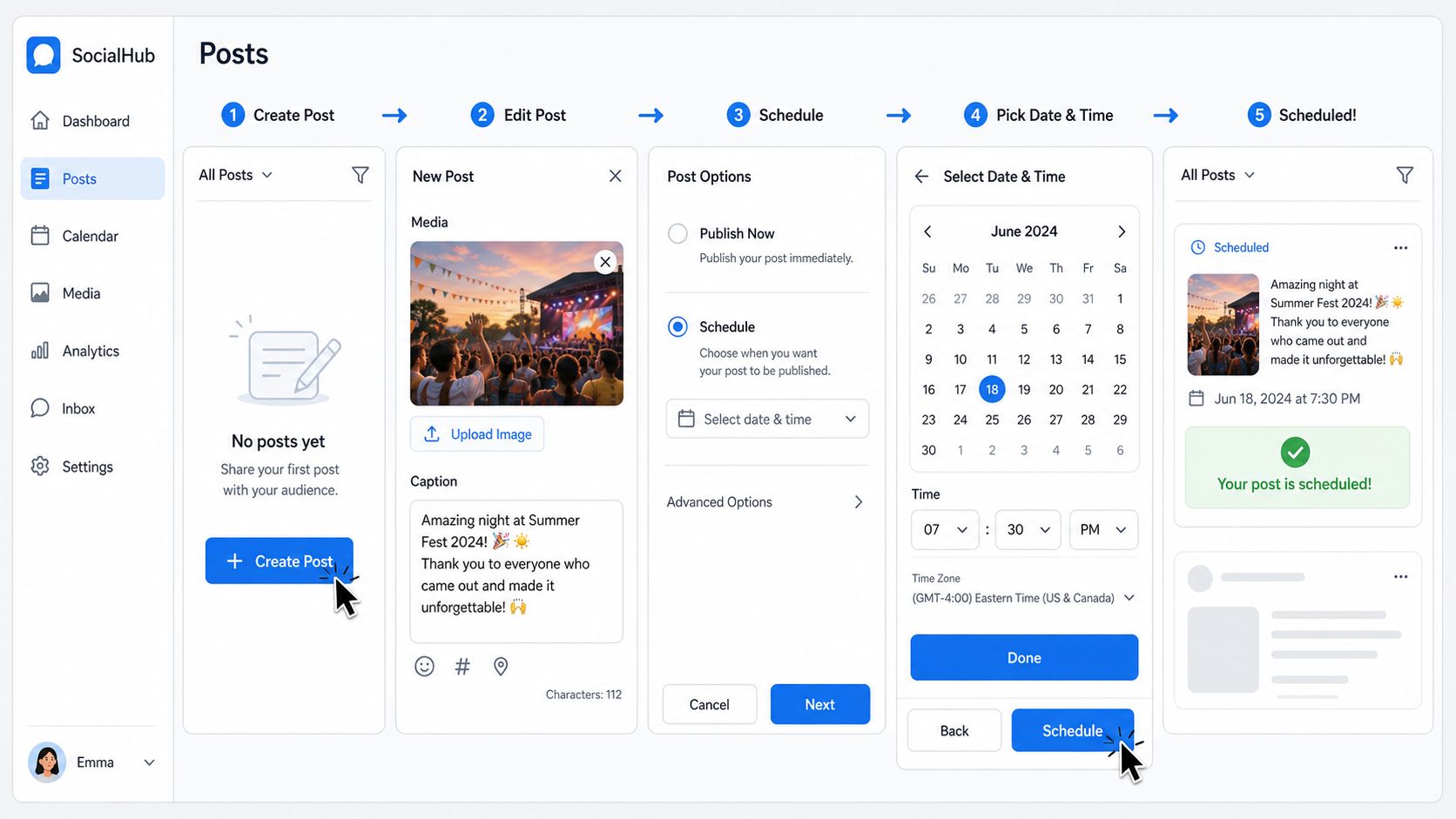
Use the preview pane to check the image crop, opening copy, dates, button and link. Then inspect the queue view, which should show the next 30 days at a glance. Look for duplicate topics, gaps around important promotions and posts assigned to the wrong location. Once confirmed, the scheduler sends the post to Google Business Profile through the API at the selected time.
That final review matters. A technically successful schedule can still publish the wrong branch, an expired offer or an image that doesn't represent the business. Approval before scheduling is quicker than correcting a public mistake after publication.
Built-In Scheduler vs Third-Party Schedulers
Google's native scheduling option is perfectly adequate for a single-location business that publishes occasionally and doesn't need a content queue or reporting layer. It lives inside the Business Profile workflow, requires no additional platform and keeps basic publishing close to the listing itself. For a business posting monthly, moving to another tool may add more administration than it removes.
The friction appears when the cadence becomes weekly or the account includes several locations. A third-party scheduler can centralise drafts, recurring slots, approvals and publication history. It also gives an agency a way to review what's planned without relying on memory or separate spreadsheets.
| Feature | Built-In GBP Scheduler | Third-Party Scheduler |
|---|---|---|
| Single-location publishing | Suitable for occasional posts | Suitable, with additional workflow features |
| Recurring content | Available through Google's supported scheduling workflow | Usually managed through a central queue and repeat rules |
| Multiple profiles | Google supports posting across profiles in one action | Designed for cross-location planning and review |
| AI drafting | Not the focus of the native workflow | May include AI-assisted writing, depending on the platform |
| Approval workflow | Limited | Useful for agencies and client sign-off |
| Queue visibility | Basic scheduling view | Calendar or queue view across planned content |
| Reporting context | Profile-level information | May connect posting with rankings, audits and performance data |
The choice is simple. One profile and occasional posts means stay native. Multiple profiles or a weekly cadence means use a scheduler. Don't buy software to solve a problem you don't have, but don't force an agency team to manage recurring work through disconnected screens.
The strongest option is a platform that bundles posting with ranking tracking and audits. That removes the gap between publishing content and checking whether the profile is improving in the places where customers search.
Choosing the Right Cadence and Timing
A post scheduler only helps if the publishing rhythm matches the content's useful life. UK local SEO guidance commonly treats GBP posts as prominent for roughly seven days, so a weekly baseline prevents the feed from becoming visibly stale. UK guidance on GBP profile activity recommends refreshing posts regularly and using explicit end dates for time-sensitive promotions.
Google's current best-practice direction is at least weekly posting, which fits the practical UK benchmark. One post each week gives a small business a dependable minimum. Two or three can make sense for a competitive restaurant, dentist or solicitor when each post has a distinct purpose and fresh asset. More volume isn't automatically better. Repeated, weak promotions can make the profile look careless rather than active.
Use timing data, not folklore
Don't copy “Tuesday at 9am” from a generic blog post. Review the performance information for each location and consider when customers make decisions. A service-area business may receive calls at different times from a high-street retailer, and two branches in the same business can attract different audiences.
A practical weekly pattern might look like this:
- Monday: Publish an Offer if customers need to plan or book early.
- Midweek: Publish an Update that answers a common question or highlights a service.
- Friday: Publish an Event or weekend-focused update when the business has something timely to promote.
The point isn't to fill every available slot. Consistency and freshness matter more than raw volume. Use repeat rules for the dependable Update slot, then add Offers and Events when the business has something genuine to say. The queue should make the next publication obvious, not hide a collection of recycled copy.

For owners who check GBP once a month, scheduling removes the guesswork. For agencies, it creates a shared operating standard across locations. Every post still needs a relevance check, but the business no longer starts from an empty calendar.
Post Types, Copy, and Images That Actually Work
Most small businesses should build around three formats: Update, Offer and Event. Product posts can support retailers and businesses with clearly defined products, while “What's New” content is effectively handled through the Update format in the current workflow. Choose the format based on the customer action you want, not the novelty of the label.
| Post Type | Best For | CTA Buttons | Expiry |
|---|---|---|---|
| Update | News, services, seasonal information and useful advice | Learn more, Call, Book | Usually short-lived |
| Offer | Time-bound promotions with clear conditions | Buy, Order, Book, Call | Use explicit start and end dates |
| Event | Workshops, appointments, launches and local activities | Learn more, Book, Call | Tied to the event period |
| Product | Specific products and retail-led information | Buy, Order, Learn more | Review when availability changes |
| What's New | General updates, now treated as Update content | Learn more, Call, Book | Usually short-lived |
A Leeds plumber could publish an Offer about a boiler-service discount, include a clear call to action and show the start and end dates. A café might use an Update to introduce a seasonal menu, paired with a 1,200 by 900 photograph of the actual dishes. An independent retailer could promote an in-store workshop through an Event post, with the date, location and booking route visible immediately.
Write for the first glance
Keep the main copy within the 1,500-character maximum and make the opening do the work. The first 100 characters should tell readers what's happening, where it applies and what they can do next. Use one clear CTA button, such as Book, Order, Buy, Learn more or Call, rather than giving the reader several competing directions.
Use real images wherever possible. Shopfronts, team members, completed work and current products establish local relevance more effectively than generic stock photography. Check the file dimensions and size before uploading, then add useful alt text that describes the image naturally.
Avoid content that commonly causes problems:
- Misleading pricing: Don't advertise a discount without explaining its conditions.
- Off-topic material: Keep the post connected to the business and its customers.
- Missing local context: Mention the service area or branch where it helps the reader understand relevance.
- Expired promotions: Remove or update content when the offer is no longer available.
For a practical way to manage Google Business Profile posts, treat each draft as part of the profile's customer journey, not as filler for a calendar.
Why an Integrated Local SEO Platform Beats a Standalone Scheduler
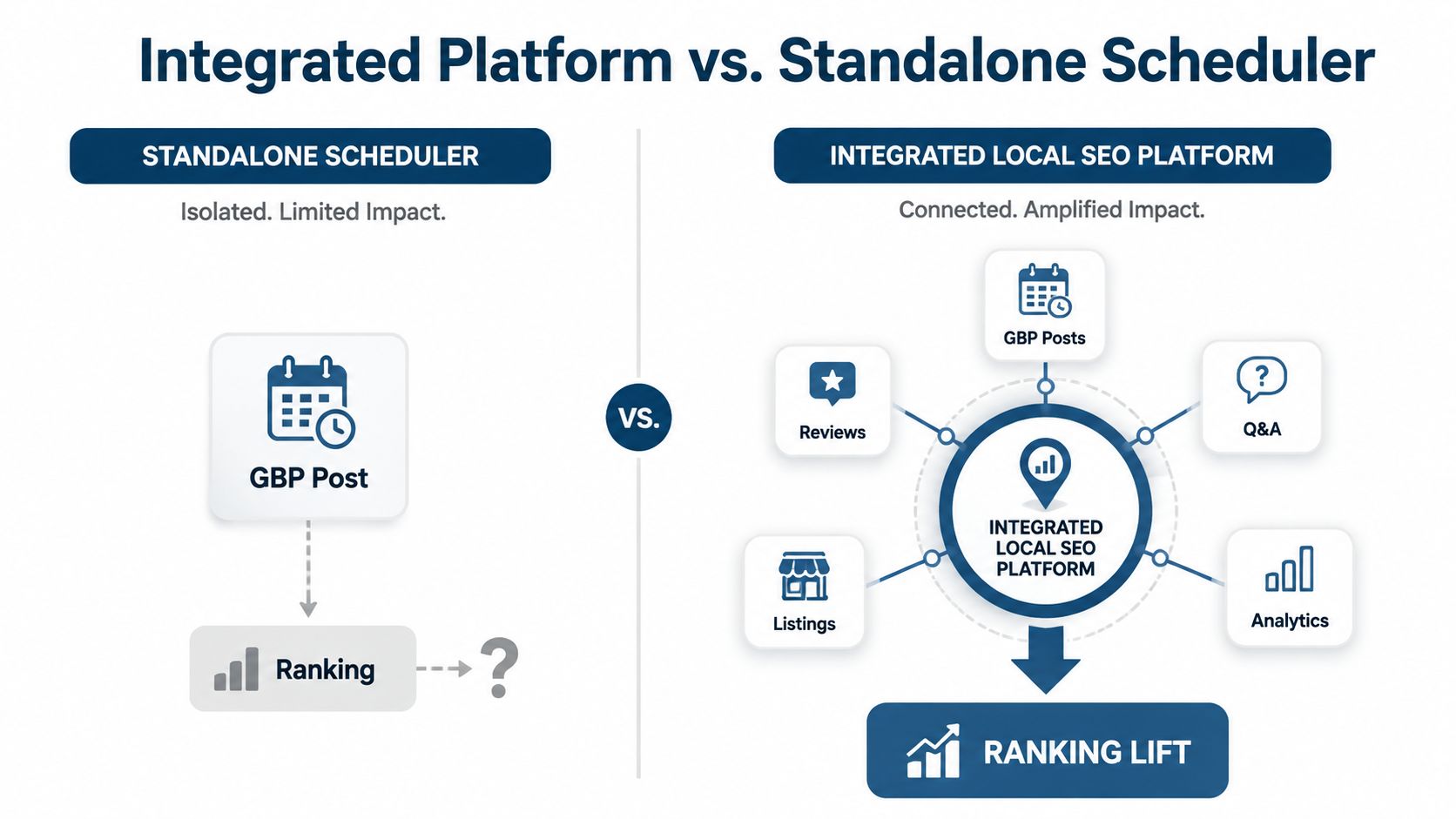
A standalone scheduler solves publication. It doesn't tell you whether the post addresses the gap that's holding a profile back. That distinction matters because local SEO includes profile accuracy, reviews, listings, rankings and customer actions, not just a stream of scheduled updates.
The useful workflow starts with an audit. If the audit finds a missing service, inconsistent category or weak competitor coverage, that finding can shape the next post. The post can point to a service page that has just been improved, while ranking tracking checks whether the business is becoming more visible in the relevant Map Pack locations.
Close the audit-to-action loop
The sequence is straightforward:
- Audit: Identify a profile or competitor gap.
- Create: Turn the finding into a location-relevant Update, Offer or Event.
- Publish: Schedule the post alongside the wider content queue.
- Measure: Compare ranking positions and profile actions after the work is live.
- Refine: Keep, improve or replace the content based on what the data shows.
That loop prevents the common mistake of publishing attractive but strategically disconnected posts. A review analyser may reveal recurring customer language, a profile audit may expose incomplete information, and rank tracking may show that a service performs well in one part of town but poorly in another. Each finding can produce a more useful next action.
VisiLocali's local SEO software for UK businesses brings GBP post management, AI-assisted recommendations, review management, profile analysis and geo-grid rank tracking into one workspace. Agencies benefit from one queue and one reporting view instead of switching between native GBP, a scheduler, a rank tracker and a spreadsheet.
A scheduled post is an output. The audit and ranking data decide whether it was the right output.
Use a standalone scheduler if publishing is your only requirement. Use an integrated platform when you need to connect the post with the reason it exists and the evidence that shows whether it helped.
Your Weekly GBP Posting Routine and Next Step
A reliable routine doesn't need to consume the whole week. It needs an owner, a fixed review point and enough flexibility to respond to what customers and competitors are doing.
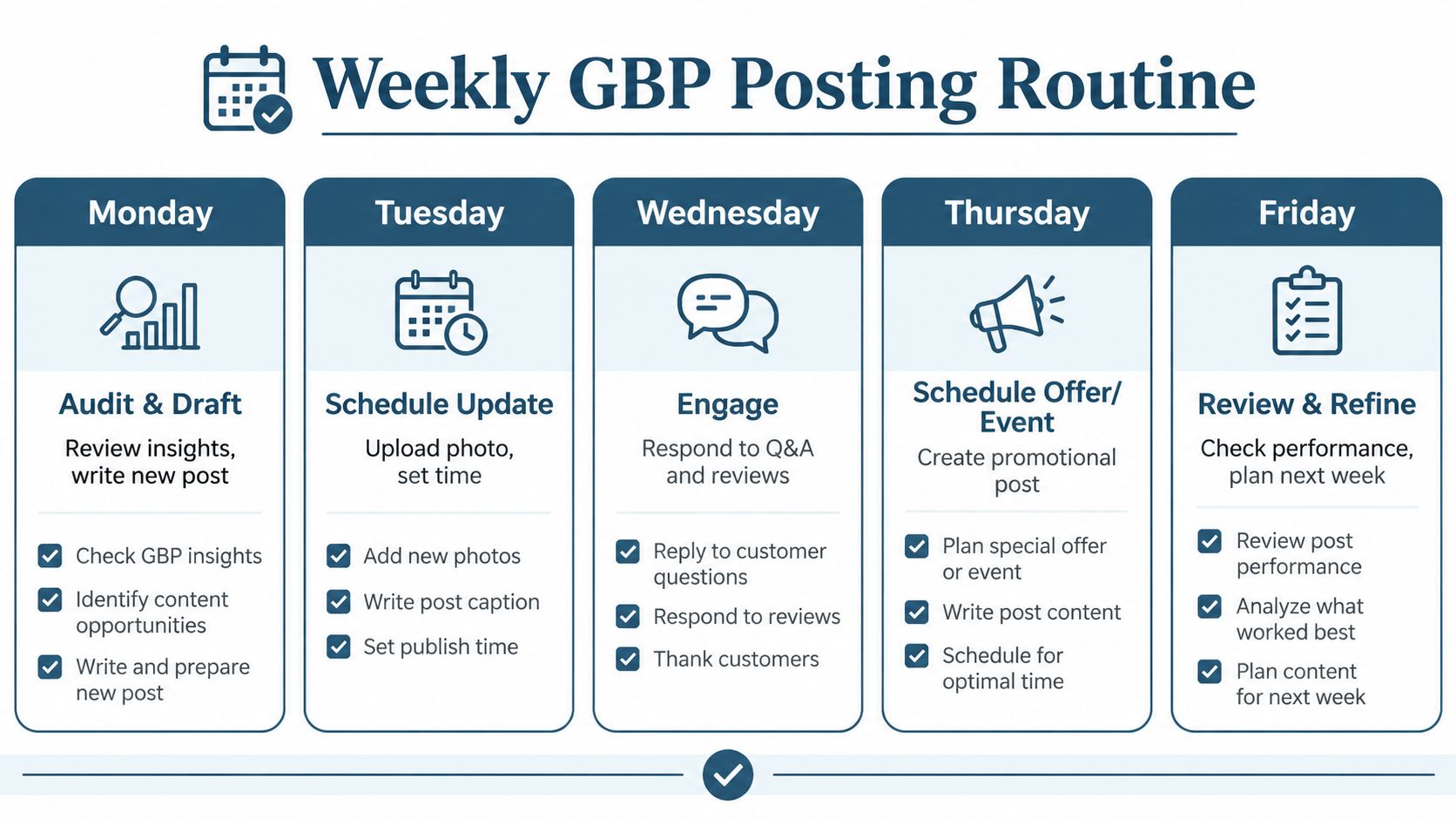
Monday
Review the latest profile information, competitor activity and ranking positions. Draft the week's Update, using an audit finding or a real customer question as the subject.
Tuesday
Schedule the Update with a current image, a precise location reference and a single useful CTA. Check the preview before it enters the queue.
Wednesday
Respond to new reviews and review any customer questions or profile changes that need attention. These actions support trust and profile accuracy while the scheduled content handles the publishing cadence.
Thursday
Schedule an Offer or Event if the business has a genuine promotion or activity to announce. Add start and end dates, then confirm that the landing page matches the post.
Friday
Check profile actions and ranking direction for the tracked locations. Note which topics deserve another post and which should be retired, then prepare the next queue slot before the week ends.
This routine connects content with measurement. Updates keep current services visible, Offers support direct action, Events add timely context, and review responses show that the business is active with customers. Rankings and profile actions tell you where to focus next.
Start a 14-day free VisiLocali trial, connect your Google Business Profile location, draft the first week of posts with the AI assistant and monitor ranking and action metrics during the trial. You'll also get side-by-side competitor profile comparisons plus AI insights and recommendations that identify the right actions to improve rankings, rather than leaving you with a queue of posts and no direction.
Start your VisiLocali trial to schedule Google Business Profile posts alongside ranking tracking, audits and competitor profile comparisons. Use the 14-day free trial to publish your first week, see the AI recommendations and act on the changes most likely to improve your local visibility.
