 Skip to content

You've checked your Google Business Profile from the office postcode and everything looks healthy. Your plumbing company appears in the local pack, the phone number is correct, and the profile has a respectable set of reviews. Then a customer in the next town searches for the same service and your business has vanished. For service area businesses, that isn't a reporting glitch. It's the central local SEO problem.
Google's local results respond to the searcher's location, not just the address associated with your profile. A useful strategy therefore starts with evidence from across the places you serve, then prioritises the changes most likely to close the visible gaps. That's the approach below: measure first, fix the foundation, strengthen proof, and build pages only where the data justifies them.
Table of Contents
- Why Most Service Area Businesses Stay Invisible on Google Maps
- What Google Actually Means by a Service Area Business
- Setting Up Your Google Business Profile the Right Way
- The Four Levers That Move a Service Area Business Up the Map Pack
- Building Service and Area Pages That Earn Rankings
- Tracking Rankings with Geo-Grid Tools
- Your First 30 Days of Local SEO Actions
Why Most Service Area Businesses Stay Invisible on Google Maps
A plumber in Guildford can appear near the top of Google Maps when searching from their own postcode. Move the search to Woking, roughly ten miles away, and the same business may disappear completely. The owner sees a strong ranking report and assumes the whole service area is performing. Customers see something else.
That difference is the visibility gap. It happens because Google evaluates local results using relevance, distance and prominence, as described in Google's local ranking guidance. Distance means the position of the person searching matters. A profile can be highly relevant and well regarded, yet remain less visible to a searcher who is further from its verified base.
Storefront businesses have an obvious public location. A service area business, often called an SAB, serves customers at their properties instead of welcoming them at a public premises. Its address is hidden from customers, but Google still uses location signals when deciding which businesses are plausible matches.
Practical rule: A rank check from your office postcode tells you how visible you are there. It doesn't tell you how visible you are across Woking, Farnham, Aldershot or any other town you claim to serve.
Google remains the dominant search gateway for local discovery in the UK. One UK industry summary cites Google's desktop-and-mobile search share at about 93.5% in July 2025, while Google Maps reach among UK online adults rose from 69% in May 2023 to 73% in 2024. The same summary says 76% of people who search for something nearby visit a business within 24 hours. See the UK local SEO overview for that context.
That makes local visibility a commercial issue, not a vanity metric. Someone searching for an emergency plumber, mobile dog groomer or domestic cleaner is often choosing who to call now. Start with a geo-grid scan across your priority towns. Once you know where the red zones are, you can decide whether the answer is a better category, stronger reviews, cleaner citations or a useful area page. Without that evidence, most SAB owners spend money polishing the part of the map that already works.
What Google Actually Means by a Service Area Business
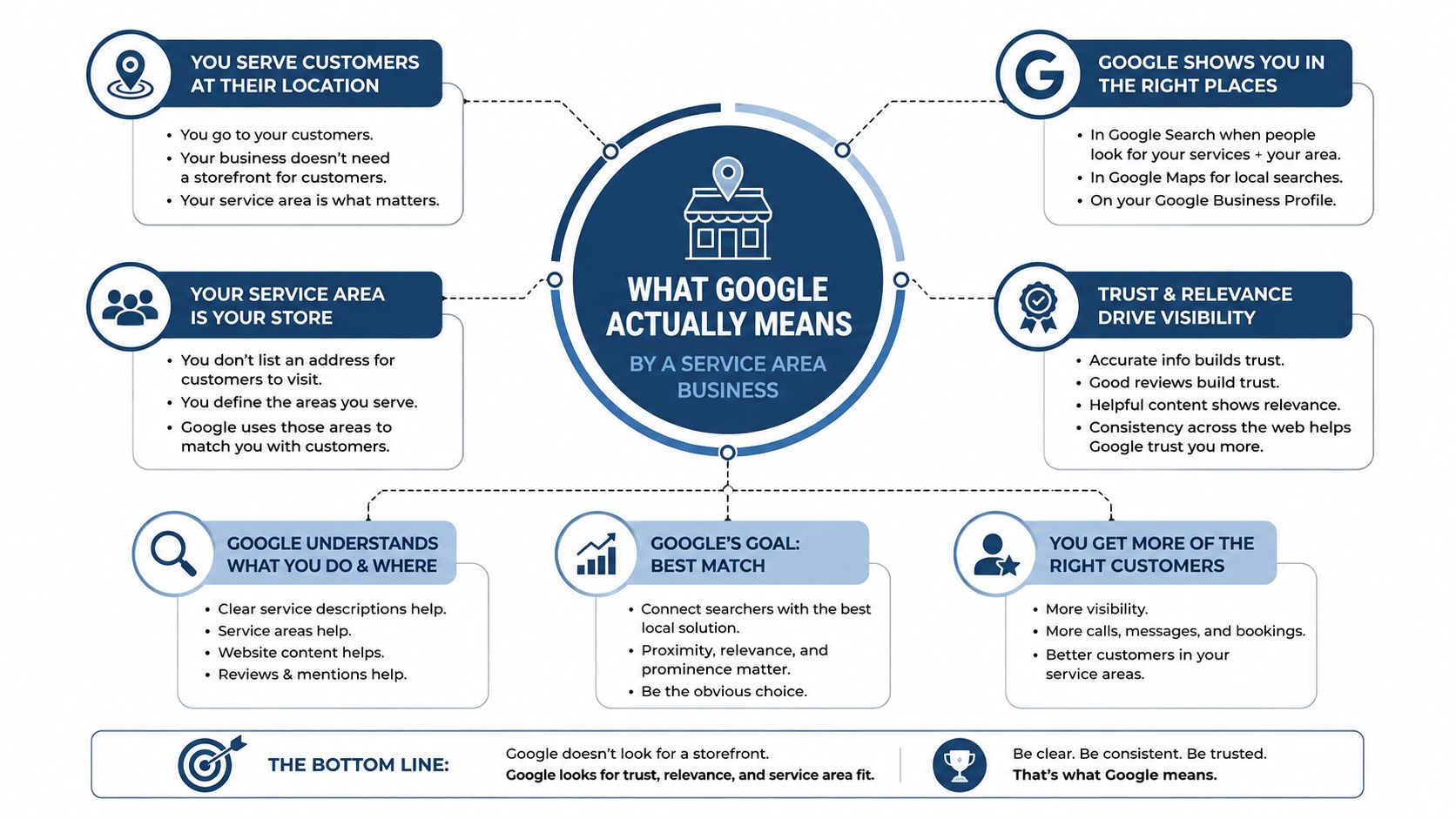
A service area is a delivery boundary. You can promise to travel within a practical operating zone, but claiming every place on the map creates a profile your business may struggle to support. Google defines an SAB as a business that visits or delivers to customers directly instead of serving them at its business address.
Plumbers, roofers, mobile groomers, cleaners and travelling accountants fit this model. A salon that accepts walk-in customers at its premises does not. Businesses that both receive customers and travel to them may use a hybrid setup, provided the profile represents that operation accurately.
The configuration rules UK businesses must follow
Google allows an SAB one Business Profile for the whole area it serves, rather than a separate profile for every town. You can define up to 20 service areas, and the total area should cover no more than about two hours of driving time from the business base, according to Google's official service-area guidance.
Service areas are not set as a simple radius. Choose towns, cities, postcodes or other permitted areas in the profile settings. Hide the public address if customers do not visit it. Google still uses the verified base behind the scenes, so a virtual office, inaccurate location or private address presented as a customer-facing shopfront can cause verification and suspension problems.
Choose a defensible boundary
Leave unused service-area fields blank. Select places where you regularly complete work, travel time makes commercial sense and your profile and website can support the claim. A focused boundary is more credible than a county-wide promise your team rarely fulfils.
Use geo-grid evidence to decide where the profile needs attention first. If priority towns show weak coverage, investigate the category, reviews, citations or area-page content before widening the boundary. The question is where you want profitable enquiries and whether you can demonstrate service there. This service area SEO guide offers broader context, while this guide to optimising service areas on Google Business Profile helps you review the settings.
Setting Up Your Google Business Profile the Right Way
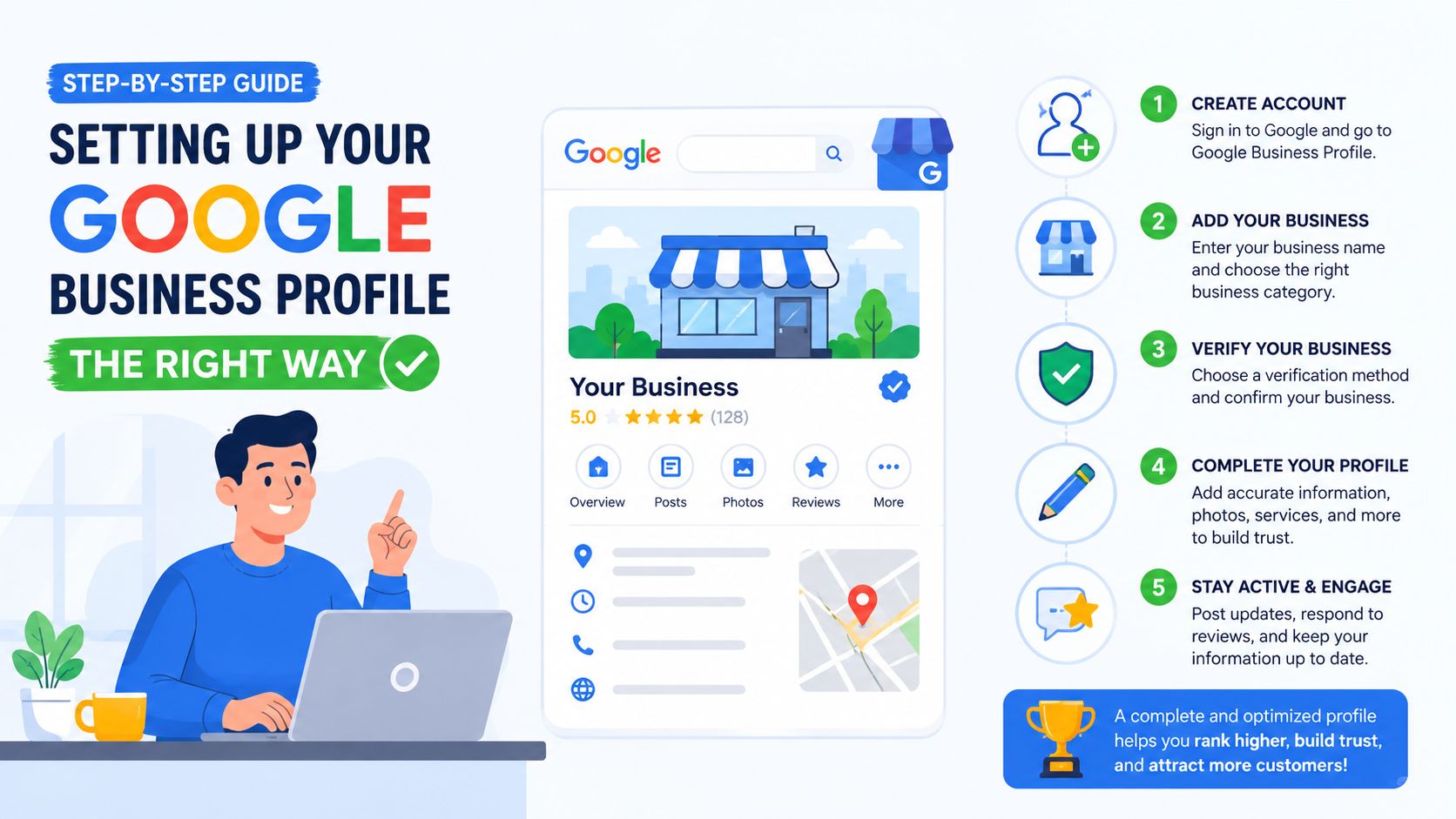
A strong profile starts with a sound foundation. Set it up in the order that reflects how your business operates, then check every field before publishing content or requesting reviews. A weak foundation undermines everything built on top of it.
Start with verification and privacy
Use a dedicated business email account rather than a personal login that could become inaccessible when staff or agencies change. Add the UK base address Google can use for verification, then complete the available process, such as postcard or video verification. Use a genuine business location, and do not present a customer-facing premises that customers never visit.
Once verification is complete, hide the address before publishing the profile publicly. Google supports a hidden-address setup for service-area businesses, with service areas defined through the profile edit flow. Customers should see where you work without being directed to an address that is closed to the public.
Make category selection specific
Choose the most accurate primary category available. An emergency plumber should assess whether Emergency Plumber describes the main commercial offer more precisely than the broader Plumber category. Add secondary categories only when they represent services you provide. Keep the list tightly focused, with no more than nine relevant choices, rather than adding every remotely connected category.
Categories help Google interpret relevance and determine which searches your profile can match. Category stuffing adds noise and weakens that signal.
Complete the fields owners often ignore
Set opening hours accurately, even if nobody visits your base. Customers need to know when calls are answered and when emergency work is available. Add the correct phone number, business description, services, booking details and service areas.
Keep keywords out of the business name unless they form part of the real-world name. Do not list an entire county just because it contains more towns. Do not publish a visible address for a property that is not customer-facing.
After launch, inspect the dashboard instead of assuming the listing is finished. Check your name, address and phone details, service list, hours, special hours, description, attributes and photos. Clear filenames help organise your own assets, but photo metadata alone will not repair weak rankings. Use geo-grid results to decide which parts of the profile deserve attention first, especially when priority towns show poor visibility.
For the core setup process, follow this Google Business Profile creation guide. A complete, accurate profile gives later review and content work a stronger base.
The Four Levers That Move a Service Area Business Up the Map Pack
A trades owner with weak visibility can spend a week building directory listings and still miss calls from nearby towns. Start with the levers that affect your profile, reviews and local relevance, then use geo-grid evidence to decide where further work belongs.
A citation is a mention of your business details on another website, such as a directory or trade listing. NAP means name, address and phone number. Consistent NAP supports trust, but a large pile of low-quality listings will not compensate for a neglected profile or thin customer feedback.
A 2026 local ranking-factor summary reports Google Business Profile signals at 32%, review signals at 20% and on-page signals at 15% of local pack and Maps weighting. Those figures are summarised in local ranking-factor research. Use the weights to set priorities, not to predict a guaranteed ranking change.
SAB local pack levers ranked by practical impact
| Lever | Approx. Weight | Time-to-Effect | Priority Advice |
|---|---|---|---|
| Google Business Profile category and completeness | 32% | Often relatively quick after Google processes changes | Fix first. Make the profile accurate, specific and complete. |
| Reviews, volume and relevance | 20% | Builds steadily through normal customer follow-up | Create a repeatable request and response process. |
| On-page signals | 15% | Usually requires content and indexing time | Build useful service and area pages where demand is proven. |
| NAP citations | Not specified in the supplied evidence | Variable | Correct important listings, then stop chasing directory volume. |
Review work needs a specific process. A separate review-signals study summarised in the same ranking discussion found that, among top local results, review count represented 26% and review keyword relevance 22%, while proximity's influence was 36%. Once you are geographically competitive, the quantity and detail of customer feedback can separate similar businesses.
Ask for an honest review after each completed job. Do not script praise or offer an incentive for a particular rating. Reply to the service mentioned, adding relevant wording only when it sounds natural.
Use geo-grid results to check whether these priorities improve coverage in your target towns. If the grid shows weak visibility despite a complete profile, investigate reviews and useful page opportunities before spending time on low-value directory work.
Skip this: Don't spend weeks submitting to obscure directories while your primary category remains vague, your service list empty, and recent customers haven't been asked for feedback.
Building Service and Area Pages That Earn Rankings
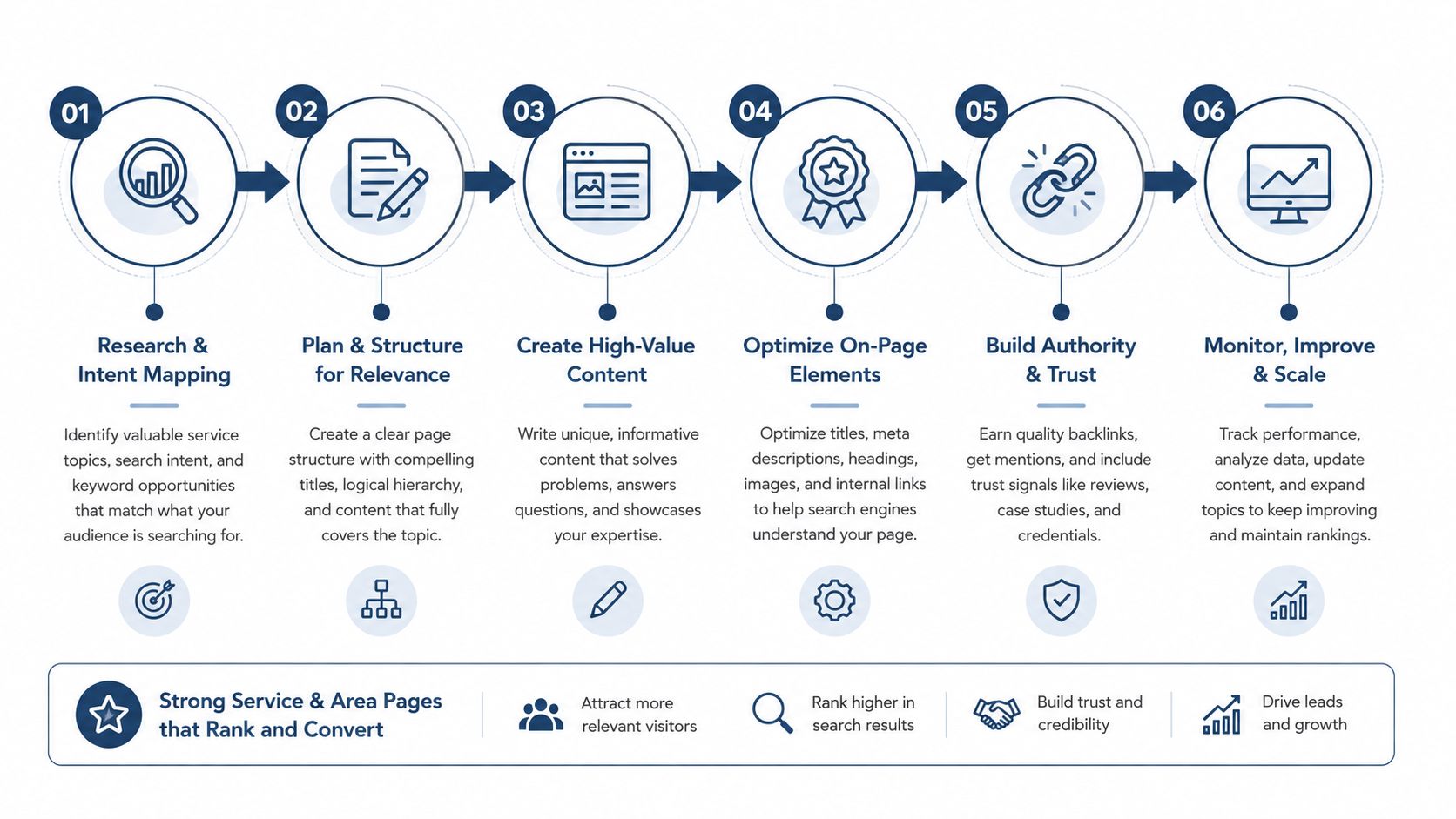
A service-and-area page should answer a customer's local question with evidence, not repeat a town name around generic copy. The strongest pages make it easy to understand what you do, where you do it and why someone in that area should trust you.
Choose the combinations you can support
Start with a shortlist of service × town combinations based on live demand and geo-grid visibility. If “boiler repair Woking” shows a meaningful gap and you regularly complete boiler jobs there, that combination may justify a dedicated page. If two nearby place names return the same businesses, same intent and no unique proof, one well-built hub page may be better.
Google's service-area guidance limits a profile to 20 service areas, but that doesn't mean you should create a page for every possible location. The page count should follow your ability to provide distinct, useful information.
A worthwhile page can include:
- Local job proof: Describe a real type of work completed in the town, without exposing private customer details.
- Relevant imagery: Use an authentic project image where you have permission.
- Customer language: Include a genuine review or testimonial only with consent and accurate attribution.
- Practical coverage: Explain travel expectations, appointment availability and the types of properties served.
- Clear next step: Give visitors a direct way to request a quote or ask a service question.
Avoid doorway duplication
A doorway page is a low-value page created mainly to capture a location keyword and funnel visitors elsewhere. Replacing “Guildford” with “Woking” in the same template doesn't create local relevance. It creates a collection of pages with little reason to exist independently.
Give each page a distinct purpose. Mention the routes or neighbourhoods you cover, common local property types where relevant, and the work your team has carried out. A driving-distance line can help set expectations, but it isn't proof by itself.
Link service pages to relevant area pages and area pages back to the core service. Keep the structure logical, so users and search engines can see the relationship between boiler repair, emergency plumbing and the towns served.
The decision is simple. Create a dedicated page when you have distinct demand, a meaningful visibility gap and real proof. Use a hub when the locations share intent and you can't make each page materially different.
Tracking Rankings with Geo-Grid Tools
A geo-grid tracker checks your Google Business Profile from multiple points around a selected centre. Instead of asking, “Where do we rank?” you ask, “Where do we rank for this service, from each part of the area we care about?”
The tool places a grid over the target geography, runs the same keyword search from each point and records the local result position. The output is usually colour-coded. Stronger areas appear green, weaker areas appear red, and the pattern shows how visibility changes as the searcher moves away from your base.

Read the grid as a decision map
A 5×5 grid gives a useful quick view of the central service area. It's suitable for an initial baseline or a focused town scan. A 9×9 grid samples more points and reveals finer changes between neighbourhoods, especially where towns overlap or major roads separate catchments.
The scan centre matters. If you're assessing Woking, don't centre the grid on your Guildford office just because that's where the profile is based. Manually centre the scan on the town and include the keyword a customer would use, such as “emergency plumber Woking”.
Look for patterns rather than isolated squares:
- Green near the base, red outward: Your proximity advantage is strong, but prominence or relevance may not carry far enough.
- A strong pocket beside a weak pocket: Investigate local competition, review strength and whether your website supports that service-area intent.
- Weak everywhere: Check verification, category fit, service settings and profile completeness before building pages.
- One service performs, another doesn't: The issue may be category or service relevance rather than overall brand visibility.
A snapshot is a starting point, not a result. Repeat scans consistently and compare the map after a meaningful set of changes. For sector-specific ideas, this guide to SEO for cleaning services offers useful context on matching local content to a service business.
Use the weak quadrants to choose the next action. A profile adjustment may address a relevance problem. Review requests may strengthen prominence. A citation correction can remove conflicting business information. A proof-led area page may support organic visibility where the map profile alone isn't enough.
Your First 30 Days of Local SEO Actions
A Midlands plumber found that a single postcode report hid a wider pattern. The business ranked on page one in two towns but was inconsistent across the rest of its target area. After using grid data to identify the weak locations and following a focused plan informed by profile comparisons and AI recommendations, the team moved towards a consistent top-three presence across nine towns.
That result came from sequencing, not from changing everything at once. Your first month should remove avoidable profile problems, establish a review habit, correct important business mentions and create only the pages your evidence supports.
Week one, fix the profile foundation
Set the address to hidden if customers don't visit the base. Tighten the primary category, remove irrelevant secondary categories and rewrite the service list so each item reflects a real offer. Add a focused batch of high-quality job photos, using descriptive filenames for your own organisation.
Run a baseline grid scan before making changes. Record the keyword, scan centre, radius and date so later comparisons mean something. If the profile has incorrect hours, an inconsistent phone number or an overextended service area, correct those before investing in content.
Week two, build a review routine
Write a short, polite request that goes out after a completed job. Add a QR card to the van, but direct customers to leave honest feedback rather than asking for a specific rating. Respond to reviews within a day where possible, addressing the work completed and using service language naturally rather than forcing keywords.
Review velocity means the regular pace at which new reviews arrive. It's an operational habit, not a one-off campaign. Make the request part of the job completion process so it doesn't depend on remembering later.
Week three, clean the citations
Lock the exact business name, address format and phone number before updating listings. Start with important UK directories, then move to trade-specific and county-level sites that your customers or industry use.
Remove duplicates and correct outdated information. Don't measure success by how many directories contain your details. Measure whether the important references agree.
Week four, publish proof-led area content
Create one service-and-area page for each priority town that has a real visibility gap and enough proof to make the page useful. Include a genuine job image, an accurate customer quote with permission, the service details and a clear explanation of travel coverage. Track the page from launch and connect it to the relevant service page through internal links.
After the first month, keep a simple loop running: weekly geo-grid scans for priority searches, review velocity checks and one piece of proof-led content. Use the pattern of the results to decide what happens next. Don't build pages for red squares automatically, and don't keep polishing green areas because they're easier to report.
Start a 14-day free trial of VisiLocali to track Google Business Profile rankings across geo-grids, compare your profile side by side with competitor profiles and receive AI insights and recommendations. Use the evidence to choose the right next action, whether that's improving categories, strengthening reviews, correcting profile gaps or building a priority area page.
