 Skip to content
Most local service businesses have a single “Services” page that tries to do everything at once.
It lists every offering in a wall of text, targets a dozen keywords, and ranks well for none of them.
If you’ve ever wondered why your plumbing, landscaping, or legal services site struggles to appear in local search results despite having solid reviews and a decent Google Business Profile, the answer often sits in your site architecture.
Structuring parent and child service pages for local SEO is one of the most effective ways to tell both Google and potential customers exactly what you do and where you do it.
The approach isn’t complicated, but getting the details right matters more than most people realise.
Here’s how to build a service page hierarchy that actually works.
The Fundamentals of Silo Structure for Local Search
A silo structure groups related content into logical clusters on your website. Think of it like organising a filing cabinet: you wouldn’t throw invoices, contracts, and receipts into one drawer. You’d create labelled folders, each containing related documents. Your website should work the same way.
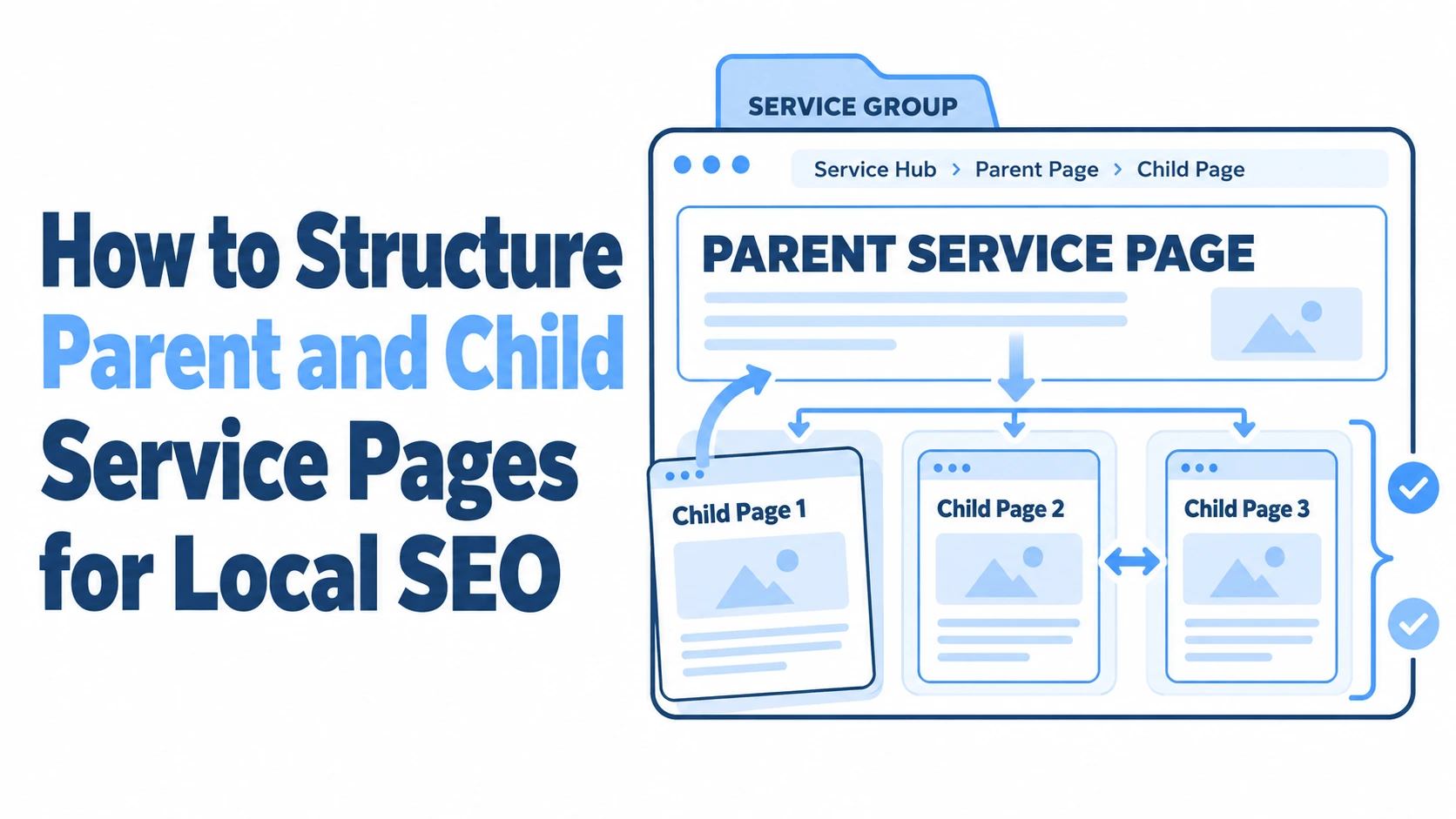
For a local service business, this means creating broad service category pages (parent pages) that link down to specific service pages (child pages). A locksmith in Manchester, for example, might have a parent page for “Residential Locksmith Services” with child pages for “Lock Replacement,” “Home Lockout Service,” and “Security Lock Installation.” Each page targets a distinct search intent while reinforcing the topical authority of the parent.
Defining Parent and Child Page Relationships
A parent page acts as a hub. It provides a broad overview of a service category, introduces the specific services within it, and links to each child page. It answers the question: “What types of X do you offer?”
A child page goes deep on one specific service. It answers the question: “Tell me everything about this particular service you provide.” The child page should contain enough detail that someone searching for that exact service finds everything they need: what’s involved, how long it takes, what it costs (even a rough range helps), and why your business is the right choice in their area.
The relationship between the two is hierarchical but bidirectional. The parent links down to each child, and each child links back up to the parent. This creates a clean loop that search engines can follow easily.
How Hierarchy Improves Crawlability and Indexing
Google’s crawlers follow links to discover and understand pages. A flat site structure where every page sits at the same level gives crawlers no context about how your services relate to each other. A hierarchical structure does the opposite: it creates clear pathways that signal which pages are most important and how topics connect.
When Googlebot hits your parent page for “Commercial Cleaning Services” and finds organised links to child pages like “Office Deep Cleaning in Bristol” and “Warehouse Floor Cleaning in Bristol,” it understands the topical cluster immediately. Each page gets indexed with proper context, and the internal linking passes authority from the parent down to the children and back again.
This also reduces the risk of orphan pages: those lonely service pages that exist on your site but have no meaningful links pointing to them. Orphan pages often go unindexed or rank poorly because Google simply doesn’t find them important enough to prioritise.
Organising Service Categories for Maximum Relevance
The biggest mistake businesses make is choosing the wrong level of granularity. Too broad, and your parent pages compete with your child pages. Too narrow, and you end up with dozens of thin pages that add no real value.
A good rule of thumb: if a service has enough distinct search volume and enough unique information to fill 400+ words of genuinely useful content, it deserves its own child page. If it doesn’t, it belongs as a section on the parent page instead.
Identifying Broad Parent Services vs Specific Child Niches
Start by listing every service you offer. Then group them into natural categories. An estate agency might group services into “Sales,” “Lettings,” “Property Management,” and “Valuations.” Each of those becomes a parent page.
Under “Lettings,” the child pages might include “Tenant Finding Service,” “Fully Managed Lettings,” and “HMO Management.” Each targets a different customer with a different need. The tenant-find customer wants minimal involvement. The HMO landlord needs specialist compliance knowledge. These are fundamentally different search intents, and they deserve separate pages.
Look at what your competitors rank for using a tool like VisiLocali’s Local Rank Tracker, which shows you exactly where competitors are stronger across your target area using visual ranking grids. If a competitor has dedicated pages for services you’ve lumped together, that’s a strong signal you need to split them out.
URL Path Optimisation for Localised Silos
Your URL structure should mirror your page hierarchy. Clean, descriptive URLs help both users and search engines understand where they are on your site.
- Parent: yoursite.co.uk/plumbing-services/
- Child: yoursite.co.uk/plumbing-services/boiler-installation-leeds/
- Child: yoursite.co.uk/plumbing-services/emergency-plumber-leeds/
Avoid stuffing locations into every URL segment. “yoursite.co.uk/leeds-plumbing-services/leeds-boiler-installation-leeds/” looks spammy and offers no ranking benefit. One location reference per URL is plenty.
If you serve multiple areas, you have two options. You can create location-specific child pages (best if the content genuinely differs between areas) or use a single service page that references your service area naturally in the content. Don’t create 15 near-identical pages with only the city name swapped out: Google has been penalising that approach since the helpful content updates.
Internal Linking Strategies to Distribute Authority
Internal links are the plumbing of your site architecture (pun intended if you’re a plumber). They determine how authority flows between pages and how easily users move through your content. A well-linked silo structure does more for local rankings than most people give it credit for.
The goal is straightforward: make sure every child page is reachable within two to three clicks from your homepage, and ensure that related pages link to each other with descriptive anchor text.
Using Breadcrumbs for Enhanced User Navigation
Breadcrumbs are the small navigational trail that typically appears near the top of a page, showing the path from the homepage to the current page. Something like: Home > Electrical Services > Rewiring in Glasgow.
They serve two purposes. First, they help users orient themselves and move back up the hierarchy without hitting the back button. Second, Google uses breadcrumb markup to understand your site structure and often displays them in search results, which improves click-through rates.
Implement breadcrumbs using BreadcrumbList structured data. Most modern CMS platforms and SEO plugins support this natively. Make sure the breadcrumb trail matches your actual URL structure: inconsistencies confuse both users and crawlers.
Contextual Linking Between Related Child Services
Beyond the parent-child links, look for opportunities to link between sibling child pages where it makes sense contextually. On your “Boiler Installation” page, you might mention annual servicing and link to your “Boiler Servicing” child page. On your “Bathroom Fitting” page, you could reference tiling work and link to “Tiling Services.”
These contextual links should appear naturally within the body content, not in a generic “Related Services” sidebar that gets repeated on every page. A link embedded in a relevant sentence carries more weight than a templated link block. Use descriptive anchor text that tells the reader (and Google) what they’ll find on the linked page: “our annual boiler servicing plans” is far better than “click here.”
Optimising On-Page Elements for Local Intent
Each page in your hierarchy needs on-page elements tailored to its specific purpose. A parent page and its child pages should never target the same primary keyword. The parent targets the broader category term, and each child targets its specific service variation, ideally with a local modifier.
Tailoring Meta Tags for Specific Service Areas
Your title tags and meta descriptions are your first impression in search results. They need to be unique for every single page: no exceptions.
For a parent page, the title tag might read: “Roofing Services in Leeds | [Business Name].” A child page under it could be: “Flat Roof Repair in Leeds | [Business Name].” The meta description for each should summarise what that specific page covers and include a compelling reason to click through.
Common mistakes to avoid:
- Using the same meta description template across all child pages with only the service name changed
- Stuffing multiple locations into a single title tag (“Roofing in Leeds, Bradford, Wakefield, Harrogate”)
- Writing meta descriptions longer than 155 characters (they get truncated)
- Forgetting to include your primary service term and location in the title tag
If you’re unsure which elements on your site need attention, VisiLocali’s GBP Audit Tool can help identify gaps in your overall local search presence, including how your website signals connect to your Google Business Profile. It analyses what’s working, what’s missing, and tells you what to prioritise next: no guesswork required.
Implementing Local Business Schema Across the Hierarchy
Schema markup helps search engines understand the context of your pages. For local service businesses, LocalBusiness schema (or a more specific subtype like Plumber, Electrician, or LegalService) should appear on every service page.
On your parent pages, use the schema to define your business type, service area, and contact details. On child pages, add Service schema that specifies the individual service, its description, and optionally its price range. This layered approach gives Google granular information about what you offer without duplicating your entire business schema unnecessarily.
Don’t forget to include areaServed properties. If your “Emergency Plumber” child page serves Leeds and surrounding areas, specify those areas in the schema. This reinforces the local relevance signals that your on-page content already provides.
Avoiding Content Cannibalisation and Keyword Overlap
Content cannibalisation happens when two or more pages on your site compete for the same keyword. Google doesn’t know which one to rank, so it often ranks neither well. This is the single most common problem with poorly planned service page hierarchies.
The fix starts with keyword mapping. Before you create any page, assign one primary keyword to it. Write that keyword down in a spreadsheet alongside the page URL. If you find two pages targeting the same term, you have a conflict to resolve.
A parent page for “Pest Control Services in Edinburgh” and a child page for “Pest Control Edinburgh” are going to cannibalise each other. The parent should target the broader category (“Pest Control Services Edinburgh”), while child pages target specific services: “Rat Removal Edinburgh,” “Wasp Nest Removal Edinburgh,” “Commercial Pest Control Edinburgh.”
Differentiating General Overviews from Technical Details
The content on parent and child pages should feel distinctly different. A parent page reads like a brochure: it introduces the category, briefly describes each service within it, highlights your credentials, and directs users to the specific page they need.
A child page reads like a consultation. It answers specific questions: How does the process work? How long does it take? What should the customer prepare? What does it cost? Are there any regulations or certifications involved? This level of detail is what separates a page that ranks from one that doesn’t.
Here’s a practical test: if you removed the heading from a child page, could someone still tell it apart from the parent page? If not, the content is too similar. Each child page needs its own angle, its own set of questions answered, and its own unique value proposition. A “Loft Conversion” child page should discuss building regulations, party wall agreements, and typical timelines for a loft conversion specifically: not just repeat the general “Home Extensions” parent page content with a different H1.
Analysing Performance and Scaling the Structure
Building the hierarchy is only half the job. You need to track whether it’s actually working and know when to expand it.
Monitor each page’s performance individually. Look at organic impressions and clicks in Google Search Console, broken down by page. A well-structured child page should start picking up impressions for its target keyword within four to eight weeks of being indexed. If it doesn’t, the page likely has a content quality issue, a cannibalisation problem, or insufficient internal links pointing to it.
For local visibility specifically, VisiLocali’s Local Rank Tracker is particularly useful here. Its visual ranking grids show you exactly where each service page ranks across different locations in your target area. You might discover that your “Boiler Installation” child page ranks well in central Leeds but drops off in the suburbs: that’s a signal to strengthen your local content for those areas or consider location-specific variations.
Scale your structure gradually. Don’t launch 30 child pages at once. Start with your highest-value services: the ones that generate the most enquiries or revenue. Build those child pages first, optimise them, track their performance for a few months, and then expand to secondary services. This approach lets you refine your template and content strategy before committing to the full build-out.
When adding new child pages, always update the parent page to include a link and brief description of the new service. Orphaned child pages that aren’t linked from their parent will underperform consistently.
Pay attention to user behaviour signals too. If a child page has a high bounce rate, the content might not match the search intent. If users land on a parent page and don’t click through to any child pages, your parent page isn’t doing its job as a hub. These signals tell you where to focus your improvement efforts.
Getting Started with Your Service Page Hierarchy
The businesses that rank well locally in 2026 almost always have one thing in common: a clean, logical site structure where every page has a clear purpose and a defined keyword target. Building parent and child service pages for local search isn’t a one-weekend project, but it doesn’t need to be overwhelming either. Start with your core services, map your keywords carefully, create genuinely useful content for each page, and link everything together with intention.
If you’re not sure where your current site structure stands or which areas need the most attention, running an audit of your Google Business Profile and local rankings is a sensible first step. VisiLocali offers a 14-day free trial across all plans, giving you access to GBP auditing, rank tracking, and profile management tools that show you exactly what to fix and in what order. Card details are required at sign-up to prevent trial abuse, but it’s a low-risk way to see where the real opportunities are before you start restructuring anything.
