 Skip to content

Google Business Profile is Google's free tool for controlling how your business appears on Search and Maps, and it directly influences local Map Pack visibility. In the UK, 70% of Google Business Profile views come from Google Maps, while complete profiles can receive 5x more views than incomplete profiles according to UK Google Business Profile statistics.
A customer searches “plumber near me” while standing in a cold kitchen, or types “cafe open now” into Google Maps before meeting a friend. They see a shortlist of nearby businesses, opening hours, photos, reviews, directions and a call button. If your information is missing or outdated, another business may win the enquiry before the customer ever visits your website.
Table of Contents
- Introduction to Google Business Profile for Local Businesses
- How Google Business Profile Powers Search and Maps Visibility
- The Essential Elements Inside Your Google Business Profile
- Why Google Business Profile Matters for Winning Local Customers
- Common Misconceptions About Google Business Profile Explained
- Next Steps to Optimise and Track Your Profile With Confidence
Introduction to Google Business Profile for Local Businesses
Google Business Profile, often shortened to GBP, is the free Google-owned tool that lets you manage how your business appears in Google Search and Google Maps. It controls the public details customers see, including your business name, category, phone number, website, address or service area, opening hours, photos, reviews, posts and customer questions.
That makes GBP more than a digital directory entry. It's a live visibility asset. Google reads the information in your profile to understand what you do, where you operate and which searches might match your services. Customers then use the profile to decide whether to call, visit your premises, request directions or explore your website.
The UK data makes the Maps connection especially important. 70% of profile views come from Google Maps rather than classic Search, and 84% of discovery searches are based on a category, product or service rather than a business name according to the same UK-focused GBP research. A person may search for “emergency electrician”, not know your company yet, and still find you through a well-managed profile.
GBP suits shops, restaurants, clinics, tradespeople, professional practices and service-area businesses, such as plumbers who visit customers rather than welcoming them at a public address. It also gives owners measurable feedback. Google's official Business Profile performance guidance explains that owners can track views, searches, calls, website clicks and direction requests.
The practical question isn't “Do I have a profile?” It's, “Can Google and potential customers clearly understand and trust it?”
How Google Business Profile Powers Search and Maps Visibility
Think of your profile as a digital shopfront that Google can read. Your business name is the sign above the door, your category explains what kind of shop it is, your service area shows where it delivers, and your photos and reviews help people decide whether to walk in.
Google's local ranking framework uses three core factors: relevance, distance and prominence, as described in this guide to local pack and organic visibility.
Relevance means matching the customer's need
Relevance asks whether your business fits the search. A “boiler repair service” is more relevant to a boiler breakdown than a general home improvement company. Your primary category, secondary categories, services, description and website all help clarify that match.
Categories need care. Google advises choosing the fewest categories needed to describe the core business, rather than adding every vaguely related option. A roofing contractor shouldn't select categories that describe services it doesn't provide to appear for more searches.
Distance sets the local context
Distance reflects how close the business is to the searcher or the location included in the search. A customer looking for “dentist in Leeds” creates a different local context from someone searching without a place name while standing nearby.
Distance doesn't mean the closest business automatically wins. Google still considers whether the profile is relevant and whether the business has enough prominence to deserve attention.
Prominence reflects recognition and authority
Prominence relates to how established or well-known a business appears across Google's local systems. Reviews, profile activity, website information and other signals can help Google understand that a business is real and significant in its market.
The result is often called the Map Pack, the group of local business results shown prominently in Search. You can see how this surface works in practice through VisiLocali's Google Map Pack visibility resource.

A profile also supports both branded searches and discovery searches. A branded search includes your company name. A discovery search describes the need, such as “gardener near me”. The latter matters because it introduces your business to people who may not know you exist.
For teams that want to connect search behaviour with broader planning, these actionable search insights for growth teams can provide useful context. The key lesson is simple: GBP gives Google structured information about your business, and Google uses that information to decide when your shopfront belongs in front of a nearby searcher.
The Essential Elements Inside Your Google Business Profile
A complete profile gives customers fewer reasons to leave and gives Google clearer information to interpret. Each field has a job, so optimisation isn't about filling boxes with keywords. It's about representing the business accurately and consistently.
Identity and location fields
Start with the business name. Use the name customers see on signage, invoices and your website. Adding extra search terms to the name can create display or policy problems.
Your primary category describes the main business activity. Secondary categories can add genuine context, but they shouldn't turn the profile into a catalogue of unrelated services.
For a physical premises, enter the correct address and make sure the map pin sits in the right place. A service-area business operates differently. A mobile locksmith, for example, may visit customers but not receive them at its home address. Google says service areas should be defined using cities, postcodes or other geographic areas, not a radius, and a profile can include up to 20 service areas. Google also advises keeping the overall coverage within about two hours' driving time from the base location in its Business Profile guidelines for representing your business.
Hours, services and customer-facing details
Enter regular opening hours, then add special hours for holidays or temporary changes. Google also supports related hours, such as pickup or online service hours, through the profile editor, as set out in its official GBP best-practice playbook.
Add services and products in plain language. “Boiler servicing” is more useful than a vague label such as “home solutions”. Attributes can explain practical details, such as accessibility or available facilities, where those attributes apply.
Photos should show the premises, team, vehicles, products or completed work. A kitchen fitter can display finished installations, while a mobile dog groomer might show the vehicle and grooming setup.
Reviews and Q&A complete the trust layer. Respond professionally to positive and negative feedback, and answer recurring questions clearly. If you need a structured process for boosting client reviews with ViralRef, use it to support genuine customer feedback rather than asking for misleading or manufactured praise.
Posts and updates can highlight announcements, services, events or temporary changes. They're useful when the business has something timely to communicate, but they shouldn't replace accurate core information.
For a detailed writing process, use VisiLocali's guide to optimising your business description on Google Business Profile.
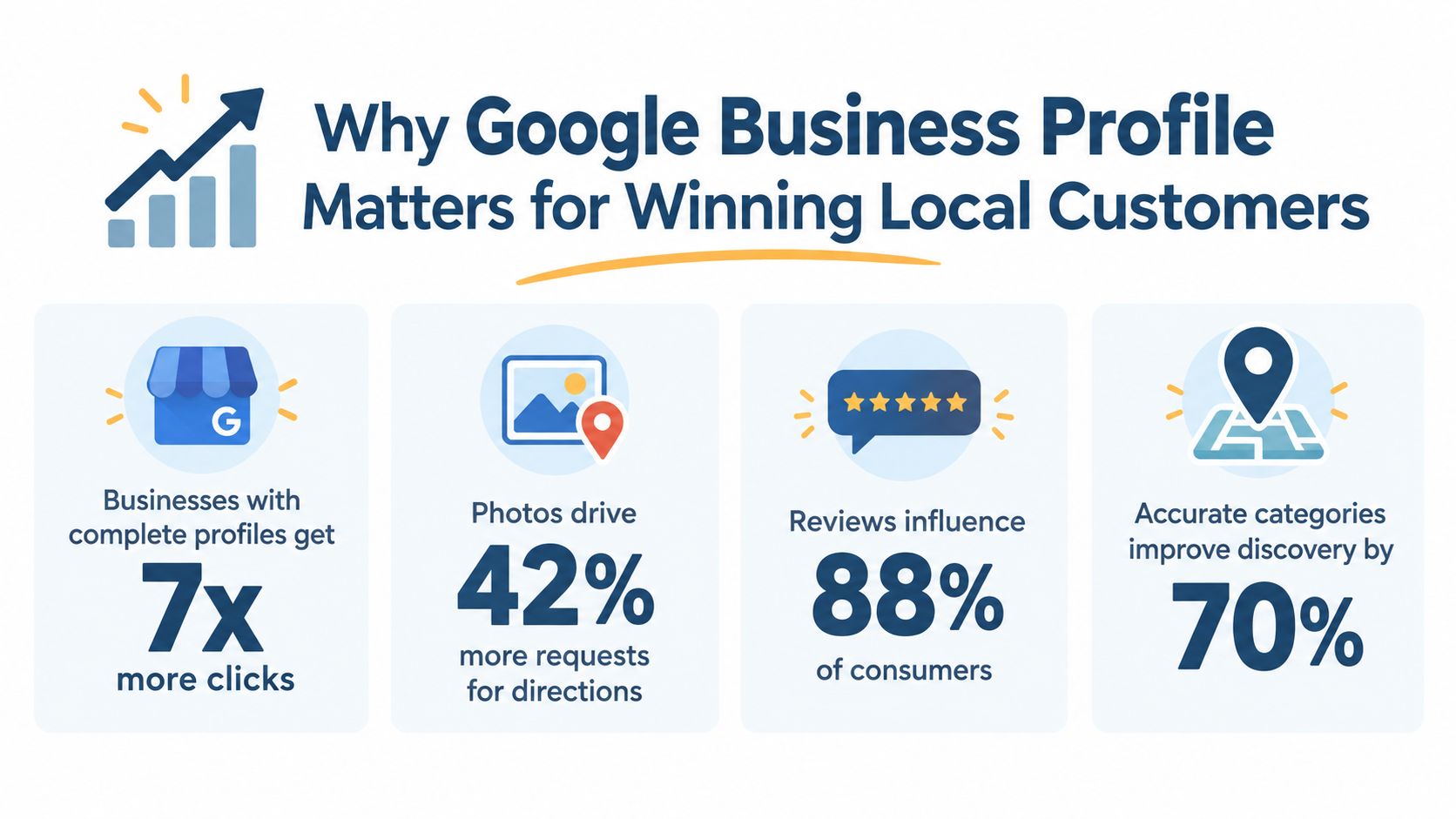
Why Google Business Profile Matters for Winning Local Customers
A customer can find a roofer in Maps, see an attractive website, then choose a competitor because the profile does not define its service area. The roofer may serve the searcher's town, but Google has less evidence connecting the business to that local query. The profile is therefore a live visibility asset, not a static directory entry. Its ownership and accuracy affect whether customers can discover, assess and contact the business.
Local customers often make decisions before visiting a website. They compare the information shown in Maps, check service coverage, review photos and feedback, then choose the option that appears suitable and accessible. A wrong category can place a business beside irrelevant competitors, while incomplete opening hours can make an available business look closed.
Completeness reduces uncertainty. A well-managed profile gives customers the practical information they need in one place, including the problem you solve, the areas you cover, when you are available and how to contact you. It also gives Google clearer signals for matching the business with service-led, non-branded searches.
That distinction matters for a company that is still building recognition. Someone searching for “roof repair” may not know your name, so brand familiarity cannot do the work. Your category, services, coverage and customer evidence must show relevance before the searcher has a reason to look for you specifically.
Measurement turns guesswork into management
GBP performance reporting covers profile views, searches, calls, website clicks and direction requests. Owners can review these figures in their Business Profile and in the Google Maps app, as explained in official performance documentation.
These figures do not explain every ranking change, but they reveal what happens after discovery. Searches without calls may indicate unclear service information or contact details that are hard to use. Direction requests suggest interest in visiting the premises, while website clicks show that people want more detail before making contact. VisiLocali can help turn those observations into a practical review process, linking profile completeness and ownership checks with the actions that follow.

Visibility only creates an opportunity. If a customer calls after finding you in Maps and nobody answers, that opportunity can disappear. This guide to how SkipCalls prevents missed leads offers practical ideas for reducing the gap between discovery and response.
Common Misconceptions About Google Business Profile Explained
Many businesses delay GBP work because they start with the wrong assumption. The profile may already exist, the verification method may differ from what they expect, or the business model may not fit a standard shop address.
“I need to create a brand-new profile”
Not necessarily. Google may have created a profile from public business information, or a former employee, agency or other person may manage an existing one. Search for the business on Google and Maps first. If the profile exists, look for the option to claim it or request access rather than creating a duplicate.
Google's UK business guidance describes GBP as a free tool for controlling how a business appears on Search and Maps, while its UK Business Profile FAQ highlights the importance of access and ownership in real-world setup.
“Verification always means receiving a postcard”
Google chooses the available method based on the business and account. Options can include video, phone or text, email, live video call, postcard and bulk verification. A verification review can take up to five business days, according to Google's verification guidance.
Video verification may require evidence of the location, signage, equipment or your authority to manage the business. Prepare genuine business evidence rather than treating verification as a routine form submission.
“A service-area business should target a radius”
Google doesn't allow radius-based service areas. You need to choose cities, postcodes or other defined areas. Google allows up to 20 service areas, and recommends keeping the total operating area within about two hours' driving time from the base location, as covered in the earlier Google guidance.
“More profiles and more categories are always better”
Google's guidance is one profile per business, with a consistent real-world name and only the fewest necessary categories. Duplicate profiles or inaccurate names can cause display problems in Search and Maps. Accuracy gives customers a cleaner experience and reduces avoidable ownership and eligibility issues.
Next Steps to Optimise and Track Your Profile With Confidence
Treat setup as an ownership and accuracy task before treating it as an optimisation task.
-
Find the existing profile: Search your business name in Google Search and Maps. If someone else controls it, request access or ownership rather than creating a duplicate.
-
Complete verification: Use the method Google offers. Verification can involve video, phone, text, email, live video call, postcard or bulk verification. Google says bulk verification is available for businesses with 10 or more locations, according to its verification community guidance.
-
Check the operating model: Choose the correct address, hide or display it as appropriate, and define service areas by cities, postcodes or other permitted geographic units. Don't use a radius for a service-area business.
-
Fill the important fields: Confirm the business name, primary and secondary categories, phone number, website, description, services, attributes, photos and opening hours. Add special and holiday hours whenever they apply.
-
Maintain customer signals: Respond to reviews, answer useful questions, add relevant updates and keep photos representative of the current business.
-
Measure the next change: Review profile searches, views, calls, website clicks and direction requests. For a structured Google Business Profile audit, compare your current information with the gaps that may affect local visibility.
VisiLocali can help by tracking Google Business Profile rankings across geo-grids, comparing your profile side by side with competitor profiles and turning ranking and profile data into AI insights and prioritised recommendations. It also supports practical GBP management, including profile updates, review responses, posts and performance reporting.
Start a 14-day free trial of VisiLocali to track your Google Business Profile rankings, compare competitor profiles side by side and receive AI insights that explain what to improve next. Use the recommendations to take focused action on your profile instead of guessing which change might help local customers find you.
